


Google Ads rolled out WhatsApp support case notifications in November 2025, letting advertisers receive real-time updates about support tickets through WhatsApp instead of email. This is huge for Latin America and Spain, where over 92% of internet users already use WhatsApp daily. You can now track ad disapprovals, billing issues, and account suspensions through the app you actually check, potentially cutting response awareness from 2-3 days down to minutes.
What Changed in November 2025
For years, Google Ads support meant one thing: email. Submit a ticket, wait for a response, hope it doesn't land in spam. Now you can get case updates via WhatsApp.
Here's what's different:
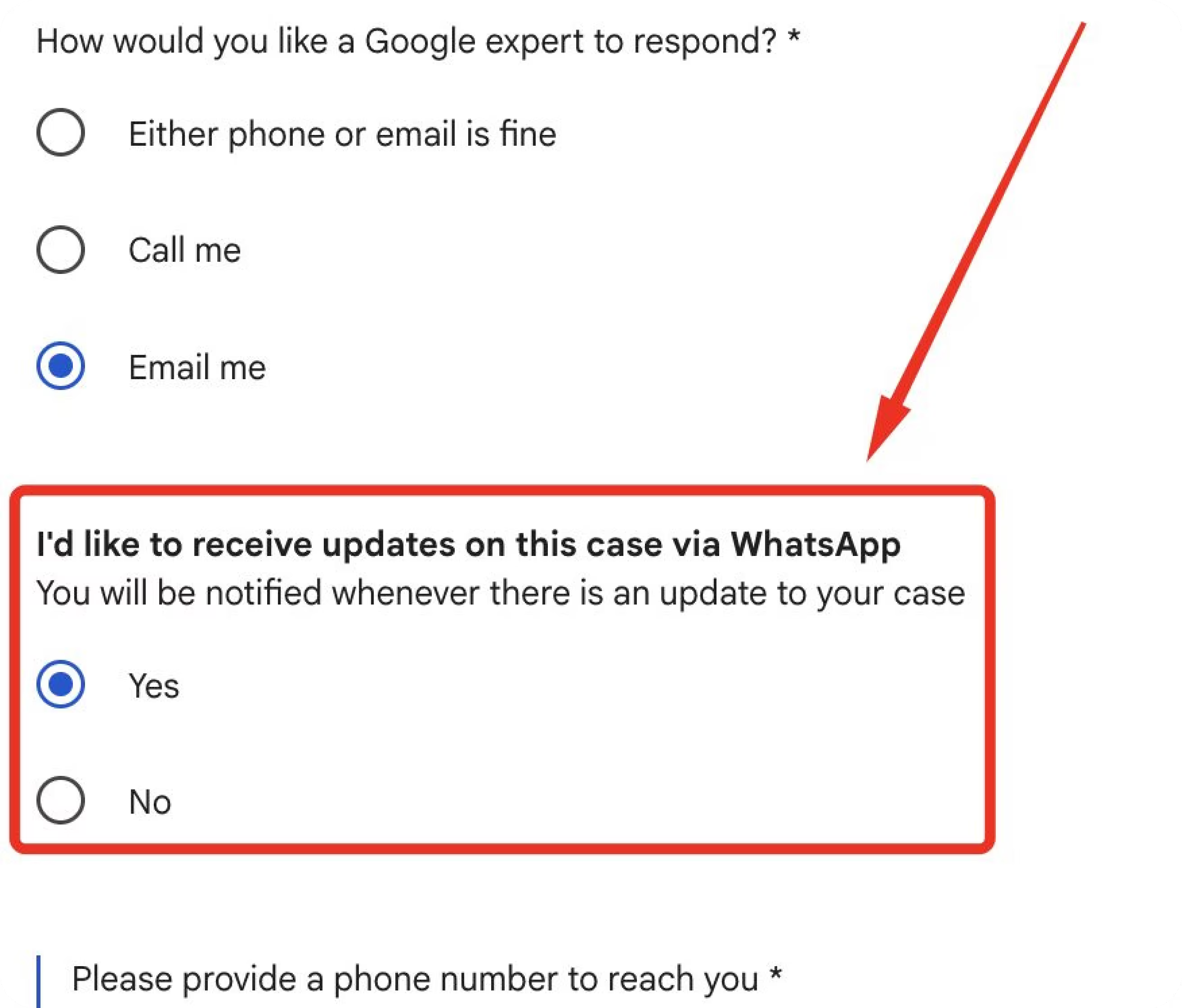
You still can't initiate cases through WhatsApp, you need to start them through Google Ads Help Center as usual. But once you opt in, every update hits your WhatsApp instead of (or in addition to) your inbox.
How to Enable It
Access the feature:
- Log into Google Ads → Click the Help icon (?)
- Scroll to "Contact Us" and describe your issue
- Look for the WhatsApp notification opt-in (if available)
- Verify your WhatsApp Business number
Requirements:
- Active WhatsApp account (Business version recommended)
- Verified advertiser status in Google Ads
- Account in good standing (no major policy violations)
The feature is rolling out gradually. Not all accounts see it yet, Google prioritizes advertisers with regular spend and positive compliance history, similar to how phone support access works.
Why Latin America Actually Cares
In the US or UK, WhatsApp is just another messaging app. In Latin America and Spain, it's infrastructure.
WhatsApp penetration rates:
- Chile: 93.8% of internet users
- Brazil: 93.4%
- Argentina: 93%
- Colombia: 92%
- Spain: 88% (33 million users)
According to Statista's 2023 data, more than 92% of internet users in Latin America access WhatsApp regularly, far higher than email usage in the same demographics.
Why email support fails these markets:
- Mobile-first workflows – Latin America has over 90% mobile internet usage. Checking email on mobile is clunky; WhatsApp is native.
- Notification reliability – Gmail's spam filters are aggressive. WhatsApp messages have a 99% open rate and get read within 5 minutes on average.
- Generation gap – Marketers under 35 check WhatsApp 20+ times daily but email only 2-3 times. They literally might not see your suspension notice for 12 hours via email.
A Mexican PPC manager posted on Reddit: "I missed a policy appeal deadline because Google's email went to spam. If it had been WhatsApp, I would've seen it in 5 minutes."
Three Real Scenarios
Colombian e-commerce store:
Gets "Circumventing Systems" suspension at 10 PM. With email, they'd discover it the next morning and wait 2-3 days for appeal response, losing $2,000-$3,000 in daily revenue. With WhatsApp, instant notification means immediate appeal submission. One case reported on Search Engine Roundtable got a response in 18 hours instead of 72.
Spanish agency managing 25 accounts:
Payment failure happens at 6 AM. Email support means the billing specialist sees it at 9 AM, contacts Google, and client campaigns pause for 24-48 hours. WhatsApp notification? Resolved before getting to the office.
Brazilian agency with 50+ accounts:
Receives 5-10 support cases weekly. Email puts all updates in one inbox, impossible to track which case belongs to which client. WhatsApp notifications have clear case numbers and can be forwarded directly to clients through the same app they use for everything else.
What Support Cases Actually Are (And How to Open Them)
A Google Ads support case is your official ticket when something breaks in Google Ads. Understanding when to open a support case versus when to troubleshoot yourself saves time. Here's how to contact Google Ads support and what cases they actually handle.
The most common reasons advertisers need support cases:
- Policy violations (30-40% of cases) – Ad disapprovals, account suspensions, that dreaded "Circumventing Systems" flag with zero explanation. Timeline: 5-10 business days for suspensions, 1-2 days for simple disapprovals.
- Billing issues (25-30%) – Credit cards declined, wrong charges, payment methods that won't save. Usually resolved in 1-3 business days.
- Technical problems (20-25%) – Conversion tracking stopped working, campaigns won't deliver, Manager Account access disappeared. Resolution varies wildly. (If you're seeing data discrepancies between Google Ads and GA4, that's often a tracking setup issue, not a support case.)
- Account verification (10-15%) – Google wants proof your business exists. Can take weeks if you don't have the exact documents they want.
- Performance questions (5-10%) – These rarely get resolved because support is technical help only, not strategic consulting. They can't tell you which keywords to target.
The Support System Hasn't Changed (Yet)
WhatsApp notifications are just notifications. The underlying Google Ads support system and how to contact Google Ads support remains identical:
- Still need to initiate cases through Google Ads Help
- Phone support (1-866-246-6453 in US) still depends on account spend
- Live chat availability still varies by region and time
- Email remains an option for non-urgent issues
- Response times for complex cases (suspensions, policy violations) still take 5-10 business days
What changed is awareness. You won't miss critical updates anymore because they're buried in email. The average email response time doesn't improve, but your reaction time does, you see the update within minutes instead of hours or days.
FAQ
Can I start a case through WhatsApp?
No. You only receive updates via WhatsApp. Start cases through Google Ads Help Center as usual.
Why don't I see the option?
Gradual rollout. Your account needs verified status, positive compliance history, and probably some ad spend history. Check your "Contact Us" flow to see if it's available.
Does this work in the US?
Maybe eventually. The initial rollout focuses on markets with high WhatsApp adoption: Latin America, Spain, India, Southeast Asia. US/UK/Canada might get it later since WhatsApp usage is lower there.
What if I miss the notification?
WhatsApp messages stay forever in your chat history. But support cases auto-close if you don't respond within 48-72 hours, so you still need to check regularly.
Can support help me optimize campaigns?
No. They're tech support, not consultants. They can fix broken tracking or explain policy violations, but they won't tell you which keywords to bid on. The "Google Account Strategists" who call offering "optimization advice" are actually salespeople trying to increase your budget.
How to Write Better Support Requests
Since WhatsApp only speeds up notifications (not resolution time), you still need to write clear support cases.
Start with specifics:
- Google Ads Customer ID (10 digits, top right of your account)
- Campaign name and ID
- Exact error message or screenshot
- What you've already tried
Example that gets fast responses:
"Customer ID 123-456-7890. Campaign 'Summer Sale 2025' (ID: 98765) won't deliver. Error: 'Limited by budget' but daily budget is $500 and spending is $0. Already tried pausing/restarting and checking billing. Can you investigate?"
What doesn't work:
"My ads stopped working. Please fix ASAP." (Too vague, support will ask 3 follow-up questions before helping.)
Response time matters: Cases that sit without a reply for 48+ hours get auto-closed. With WhatsApp notifications, you'll know immediately when Google responds, use that advantage by replying quickly.
What to Do Now
Next time you open a Google Ads support case, check if the WhatsApp opt-in appears in your account.
- Test the feature: Look for WhatsApp notifications when contacting Google Ads support
- Use WhatsApp Business if you manage client accounts professionally
- Keep email as backup – don't rely on a single notification channel
- Document everything – save case numbers regardless of how notifications arrive
- Set up WhatsApp Web on your desktop for faster support case responses during work hours
This is part of Google's push to match where advertisers actually communicate. In markets where WhatsApp has 3+ billion global users and messaging-first culture dominates, email support was always a mismatch.
For Latin America especially, WhatsApp support case notifications aren't a minor feature update, they're Google finally meeting advertisers where they already are. When 93%+ of your users are on one platform, Google Ads support notifications should be there too.



