


Moving Facebook Ads data to BigQuery lets you analyze campaign performance at scale, combine advertising data with other sources, and build custom reports that Meta's native tools can't handle. Google's native connector has serious limitations: 24-hour minimum refresh intervals, no custom reports, and access tokens that expire every 60 days. This guide shows you exactly how to connect Facebook Ads to BigQuery using four different methods—including the simplest option that works for most teams.
Why Send Facebook Ads Data to BigQuery?
Facebook Ads Manager works fine for checking yesterday's spend, but it breaks down when you need to:
- Combine Facebook data with Google Ads, TikTok, or LinkedIn in one report
- Keep more than 3 years of historical data
- Build dashboards that refresh automatically
- Run custom SQL queries to answer specific questions
BigQuery lets you query millions of rows instantly using SQL. Want to know which age group delivers the highest ROAS during Q4? Or how Facebook conversions compare to Google Ads for the same product category? These questions are impossible to answer in Ads Manager alone.
The problem is getting your data there.
Four Ways to Connect Facebook Ads to BigQuery
Method 1: Google BigQuery Data Transfer Service (Native Connector)
Google's built-in connector sounds convenient, but know the limitations before you start.
What It Can't Do
24-hour minimum refresh: You can't update data more than once per day. Need hourly updates for active campaigns? This won't work.
Three tables only: The connector supports exactly three predefined tables (AdAccounts, AdInsights, AdInsightsActions). You cannot choose custom combinations of metrics and dimensions—you get what Google defines, period.
No incremental updates: AdInsights and AdInsightsActions tables pull the full dataset every time. Even if you already have yesterday's data, it downloads everything again.
60-day token expiration: You must manually regenerate the access token through Google Cloud Console every two months. Miss it, and your pipeline stops.
6-hour maximum duration: Transfers that take longer than six hours fail automatically.
If you need flexibility, skip this method entirely and use Method 4.
Method 2: Manual CSV Export and Upload
This works for one-time analysis but doesn't scale.
Export your data from Facebook Ads Manager, download as CSV, then upload to BigQuery through the BigQuery Console. Simple enough.
The problem: Every time you need updated data, you repeat these steps. Attribution windows shift between exports. Column names change. Date formats vary. Within a few weeks, you're spending hours on work that could run automatically.
Method 3: Build a Custom API Script
If you have developers and specific requirements, you can write a script that pulls data from Facebook's Marketing API and loads it into BigQuery.
You'll need a Facebook App with Marketing API access, an access token with ads_read permission, Python or Node.js with BigQuery libraries, and a server to run the script on schedule.
The basic process: Use the Graph API to fetch campaign insights, transform the data into BigQuery-compatible format, then insert rows using the BigQuery API.
Real cost: 8-20 hours initial development, then ongoing maintenance every time Facebook updates their API (quarterly). Rate limits need retry logic. Schema changes require manual updates. Token management becomes your responsibility.
Most marketing teams don't have resources to support this long-term. If you need this level of control, consider using Dataslayer's API Query Manager instead—it handles the API complexity while letting you customize queries.
Method 4: Use Dataslayer (Recommended for Most Teams)
Dataslayer connects Facebook Ads to BigQuery without code and handles token management automatically. It supports 50+ marketing platforms, so you can add Google Ads, LinkedIn, or TikTok data later without switching tools.
Why This Works Better
Flexible refresh schedules: Update hourly, daily, or on custom intervals—no 24-hour restriction.
Custom metric selection: Choose exactly which metrics and dimensions you need instead of accepting predefined table structures. Want campaign performance by age and device? Select those dimensions. Need only specific metrics like ROAS and CPA? Pull just those.
Consistent attribution: Configure attribution windows once and Dataslayer applies them across all exports, eliminating discrepancies with Ads Manager.
Automatic token handling: No manual renewals every 60 days.
Multi-platform support: When you need to combine Facebook Ads with Google Analytics or other sources, everything flows through one interface.
How to Set It Up
Step 1: Create Your BigQuery Project
Go to BigQuery Console, create a new project, then create a dataset inside it. Name your dataset something clear like "facebook_ads_raw".
Important: Pick your region carefully. BigQuery can't join tables across different regions, so choose once and stick with it. See BigQuery's location documentation if you're unsure.
Step 2: Connect Dataslayer
Sign up at Dataslayer.ai (15-day free trial, no card required). Authorize it to access your BigQuery project.
Step 3: Configure Your Transfer
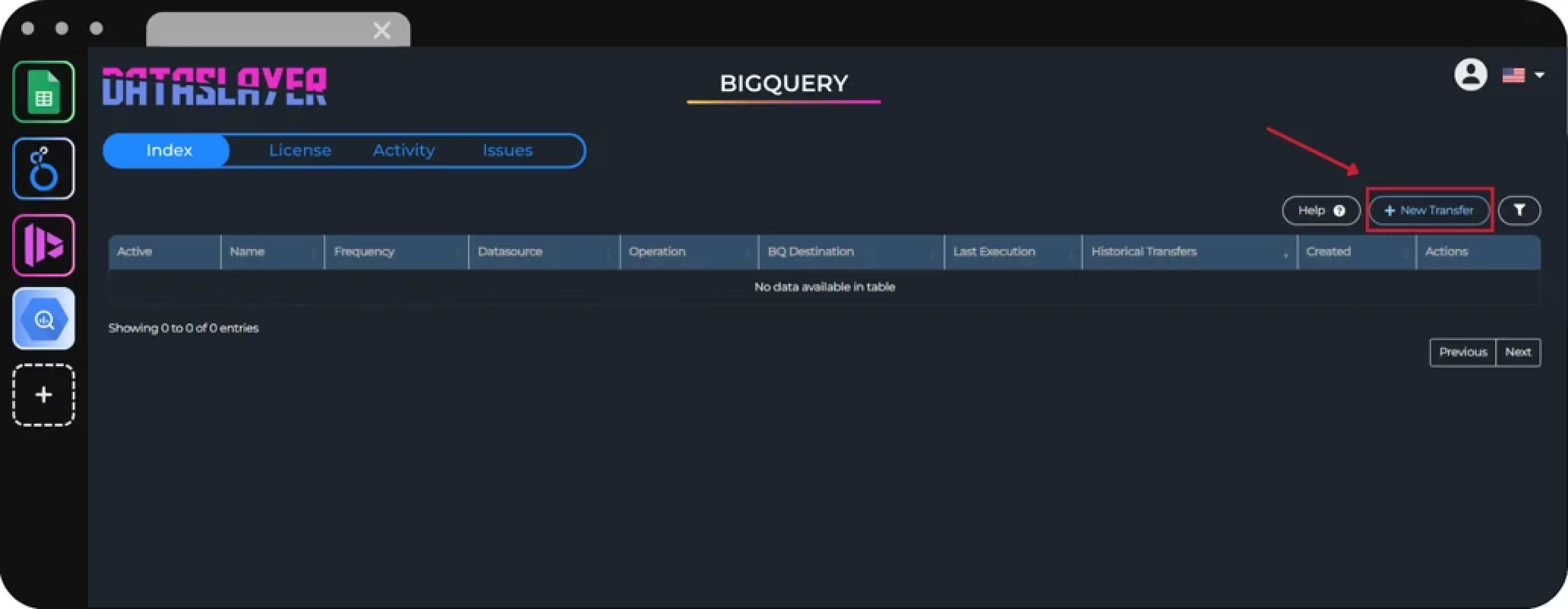
Click New Transfer → select Facebook Ads → authorize access to your ad account → choose BigQuery as destination.
Now select the metrics and dimensions you need:
Common metrics: impressions, clicks, spend, conversions, reach, frequency, CPC, CPM, CTR, ROAS
Common dimensions: campaign name, ad set name, ad name, date, placement (Feed/Stories/Reels), device (mobile/desktop), age, gender, country
For example, if you want campaign performance by placement, select:
- Dimensions: campaign_name, date_start, publisher_platform
- Metrics: impressions, clicks, spend, conversions
Dataslayer creates tables in BigQuery based on your metric and dimension combinations. You can create multiple queries with different breakdowns instead of being limited to predefined table structures.
Set attribution window: Match this to what you use in Ads Manager. The default is 7-day click, 1-day view. Mismatched attribution windows cause data discrepancies—this is fixable but annoying to troubleshoot.
Choose date range: Last 7 days for testing, last 30 days for ongoing reports. After the initial load, Dataslayer only pulls new data.
Step 4: Configure BigQuery destination:
- Transfer Name: Give it a descriptive name like "Facebook Ads - Campaign Performance"
- BigQuery Project: Select the project you created in Step 1
- BigQuery Dataset: Select your dataset (e.g., "facebook_ads_raw")
- Table Name: Name your table (e.g., "campaign_performance" or "ad_performance_by_placement")
- Write Mode: Choose Append to add new data without deleting old rows (recommended for most cases), or Replace to overwrite the table completely each time
Schedule refreshes: Daily at 6am works for most teams. Hourly updates make sense if you're actively optimizing campaigns throughout the day.
Click Save and Run.
Step 5: Verify Your Data
After 2-5 minutes, go to BigQuery Console and check your dataset. You'll see new tables created by Dataslayer.
Run this query to verify total spend matches Ads Manager:
Numbers should match within 1-2%. Slight differences are normal due to time zones and attribution processing.
Step 56: Connect to Reporting Tools
Now that your data is in BigQuery, you can:
- Build Looker Studio dashboards that update automatically
- Run custom SQL queries for cohort analysis or LTV calculations
- Join Facebook Ads data with CRM data or product databases
- Export to Google Sheets for quick analysis
Common Issues and Solutions
Data Doesn't Match Ads Manager
Check attribution settings first. If Dataslayer uses 7-day click attribution but you're comparing to Facebook's 1-day numbers, they won't align. Verify you're using the same date range and time zone.
Facebook updates conversion data retroactively. If you pull data for yesterday, some conversions might not appear until tomorrow. Use a 2-3 day refresh window to capture late attributions.
BigQuery Costs Are High
BigQuery charges for storage and queries. Facebook Ads data is tiny (most accounts use <1GB per year), but poorly written queries scan gigabytes unnecessarily.
Partition tables by date (Dataslayer does this automatically). Use WHERE clauses to filter by date. Instead of SELECT *, only query columns you actually need.
Example of expensive query:
Better query:
Transfer Failed with API Rate Limit
Facebook limits API calls per hour. This happens when pulling data for 50+ ad accounts simultaneously, or when another tool is already hitting the API, or when you selected too many action collections (conversion types).
Stagger your transfers by 15-30 minutes, or reduce the number of action collections in your query.
Best Practices
Test with one ad account first. Validate data accuracy before scaling to multiple accounts.
Use clear naming: Call your datasets facebook_ads_raw, facebook_ads_processed, facebook_ads_reporting. Future you will appreciate this.
Document attribution settings: Write down "We use 7-day click, 1-day view attribution across all platforms" somewhere. This prevents confusion when numbers don't match.
Build a staging layer: Don't report directly from raw data. Create cleaned views in BigQuery that handle nulls, standardize dates, and calculate custom metrics.
Set up monitoring: Configure alerts so you know immediately when a transfer fails.
FAQ
How often can I refresh Facebook Ads data in BigQuery?
Depends on your method. Google's native connector is limited to once per 24 hours. Manual exports are as frequent as you're willing to repeat the process. Dataslayer lets you schedule hourly, daily, or custom refreshes. Most teams use daily updates scheduled for early morning—hourly makes sense for active campaigns where you're optimizing throughout the day.
Does BigQuery support both Facebook and Instagram Ads?
Yes. Facebook and Instagram share the same data source in Meta's API. When you connect Facebook Ads, Instagram data comes automatically. All tables include a "publisher_platform" dimension showing whether impressions came from Facebook, Instagram, Messenger, or Audience Network. Filter by this dimension to isolate platform-specific performance.
What's the difference between AdInsights and AdInsightsActions tables?
AdInsights contains traffic metrics: impressions, clicks, spend, reach, frequency, and demographic breakdowns. AdInsightsActions stores conversion data—purchases, leads, add-to-cart events, and custom conversions. You need both to see complete performance.
Can I pull custom conversion events into BigQuery?
Yes, but implementation varies. Google's native connector only supports predefined action collections. Third-party tools like Dataslayer let you select custom events by name. If you track "Webinar Registration" or "Free Trial Signup" as custom conversions, verify your chosen method supports pulling those specific events.
How much does BigQuery storage cost for Facebook Ads data?
BigQuery charges $0.02 per GB per month for storage (as of 2025). Most Facebook Ads accounts generate <100MB monthly, which costs <$0.002. A mid-sized account with 2 years of history might use 2GB total—$0.04 monthly. Storage costs are negligible.
Do I need SQL to use BigQuery?
Not required, but it helps. Use BigQuery's visual query builder or connect BI tools like Looker Studio and Power BI that generate SQL automatically. However, learning basic SQL (SELECT, WHERE, GROUP BY, JOIN) lets you answer questions much faster than waiting for dashboards.
Can I combine Facebook Ads with other platforms in BigQuery?
Absolutely. This is BigQuery's biggest advantage. Send data from Google Ads, LinkedIn, TikTok, Google Analytics, and your CRM into BigQuery, then join tables to see unified performance. Calculate which platform drives the lowest cost per acquisition, or see how Facebook clicks correlate with Google Analytics conversions. Tools like Dataslayer support 50+ data sources, making cross-platform reporting straightforward.
Next Steps
You now understand the four main ways to connect Facebook Ads to BigQuery and their trade-offs.
For testing: Use Google's native connector or export a manual CSV to see how the data looks in BigQuery.
For ongoing reporting: Dataslayer automates the pipeline without requiring SQL or engineering resources. The 15-day free trial gives you time to test, validate, and build reports.
For custom requirements: Build an API script if you have developers and specific needs, but factor in maintenance time.
The right choice depends on your team's resources and reporting needs. One thing is clear: keeping Facebook Ads data in the platform alone limits what you can learn. BigQuery unlocks analysis that isn't possible inside Meta's interface—cross platform attribution, custom cohort analysis, and queries that answer your actual business questions instead of the ones Facebook thinks you should ask.



