



Google announced a set of Performance Max updates in late March and April 2026 that address three things advertisers have been asking about since PMax launched: control over who the campaign targets, visibility into budget pacing, and demographic breakdowns that actually tell you something useful. If you manage PMax campaigns and have not looked at these yet, this is worth 10 minutes before your next account review.
This post covers what each update does, where to find it in Google Ads, and what is worth configuring now. If you want background on how PMax works before diving in, we have a full Performance Max guide that covers setup and optimization from scratch.
1. First-party audience exclusions: real control over who Performance Max targets
Before this update, adding a Customer Match list to Performance Max only worked as an audience signal, a suggestion to the algorithm, not a rule. Your existing customers could still see your acquisition campaigns, and conversions from people already in your CRM counted the same as new customer conversions.
Now you can exclude specific customer lists from a PMax campaign entirely. If your goal is new customer acquisition, you can tell Google not to spend budget on people already in your database: existing subscribers, recent buyers, or trial users who did not convert.
In practice, this matters most for three types of campaigns:
- SaaS companies running PMax alongside a nurture sequence. Avoid spending acquisition budget on leads already in your email flow.
- E-commerce brands with a loyalty program. Separate prospecting spend from retention spend cleanly.
- Lead gen campaigns where the same lead converting twice inflates CPA. Exclude people who submitted a form in recent months.
Where to find it
PMax campaign, Settings, Your data exclusions (under the demographic exclusions section), enable the option and select the list. You can exclude both Customer Match lists and Website Visitor lists.
What to configure now
- Audit your Customer Match lists before activating. An outdated list may exclude people who should be targeted or include contacts who have already churned. The exclusion is only as good as the data behind it.
- Create a specific segment for exclusion. Do not exclude your entire contact list. Build a focused segment ("active paying customers" or "buyers last 90 days") rather than using your full database.
- Flag the date in your reporting. Once exclusions are live, conversion volume may dip as existing-customer conversions drop out. Document when you made the change so you do not misread it as a performance drop.
2. Budget reporting: month-end spend projection inside the campaign
Performance Max has always had an uneven spending pattern. It can front-load or back-load budget depending on auction signals, which makes it hard to explain to clients or finance teams why spend looks different mid-month than expected.
The new budget report lives directly inside your PMax campaign. It shows a projected month-end spend based on current pacing, and lets you model what happens to that projection if you adjust the daily budget. For agency teams, it replaces the manual spreadsheet calculation. For in-house teams, it gives you a concrete number to attach to a budget proposal rather than an estimate.
Where to find it
Inside your PMax campaign, look for Budget report in the campaign overview. It shows current pacing, projected end-of-month spend, and a scenario tool for modeling daily budget changes.
What to configure now
- Check pacing every Monday. If you are above pace mid-month, you have room to scale. If you are under pace, review asset quality or audience signals before assuming the budget is the problem.
- Cross-check spend projections against internal records. The budget projection is accurate for spend, but Google Ads conversion numbers are a separate matter. Validate those against your CRM or database before using them in client reports.
3. Demographic breakdowns and network segmentation in Performance Max
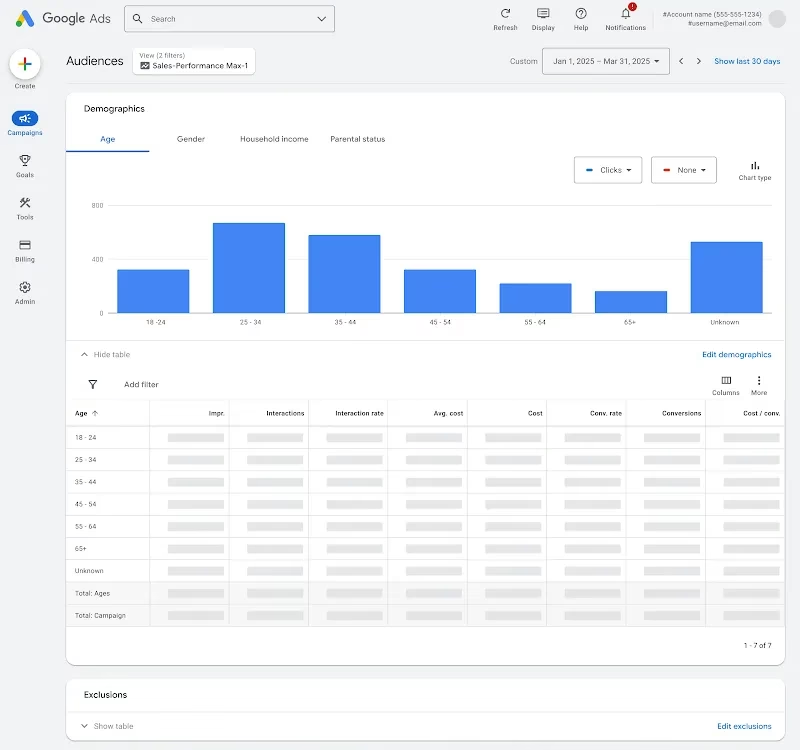
Performance Max has always told you how many conversions a campaign generated. It told you almost nothing about who those conversions came from or which network your ads were running on. Two new reporting additions change that.
Demographic breakdowns
You can now see performance segmented by age range and gender in the audience report. This has existed in Search and Display for years but was absent in PMax. It lets you answer questions like: which age group is consuming the most budget, and is it proportional to the conversions it generates?
Network segmentation in placements
PMax runs across Search, YouTube, Display, Discover, Gmail, and Maps. The placement report now shows which network each placement belongs to, so you can see the split between networks and identify problematic Display placements by network context rather than reviewing them one by one.
Where to find it
Demographics: PMax campaign, Audiences, Demographics.
Network segmentation: PMax campaign, When and where ads showed, Placements, apply the Network segment.
What to configure now
- Check the age and gender breakdown. If one group is consuming a disproportionate share of spend relative to conversions, you have grounds to apply demographic exclusions or adjust creative for that segment.
- Review your network split. A product with a short consideration cycle spending heavily on YouTube or Discover may not be getting the best return from those placements. Use the data to inform where you invest in creative.
- Run a brand safety check on Display placements. Filter by the Display network and look for anything that does not fit your brand. Add the worst offenders to your placement exclusions list.
Why these Performance Max updates matter now
PMax has been used by more than one million advertisers globally, and the main complaint has always been the same: you hand Google your budget and trust the algorithm, but you cannot see enough of what is happening to make informed decisions. Google has been responding to that criticism in stages. Last November they added channel performance reporting and Waze inventory for store campaigns. The 2026 updates add audience control and budget transparency on top of that. None of this changes how PMax fundamentally works. The algorithm still controls bidding, placements, and creative selection. But it gives you enough visibility to actually manage the campaign rather than just monitor it.
Quick reference: all 4 Performance Max updates at a glance
Bottom line
The audience exclusion is the most actionable of the four updates. If you are running PMax for acquisition and your customer lists are reasonably clean, it is worth setting up this week. The budget report and demographic breakdowns are more about reporting quality: they do not change what the campaign does, but they make it easier to explain and defend.
The broader pattern is that PMax is becoming more manageable with each round of updates. The advertisers who will get the most out of these new controls are the ones with clean first-party data and a way to cross-validate what Google reports against their own records. For further reading, Google's official announcement is on the Google Business Accelerate blog, and Search Engine Journal has a detailed breakdown of each feature.



