


Google Ads for eCommerce has trained you to chase ROAS as if it decides everything. So every decision starts bending toward it. But the moment ROAS becomes the main filter, you start favoring demand that already exists. You show up for people who were already close to buying, and everyone else barely gets a chance to enter your world.
But there is a different direction that works better. And that is exactly where we are taking you. You will see 7 advanced strategies for using Google Ads to open up new pockets of demand. We will also help you create a measurement and reporting system that expands over time.
Why Google Ads Remain Crucial For eCommerce: 4 Key Benefits
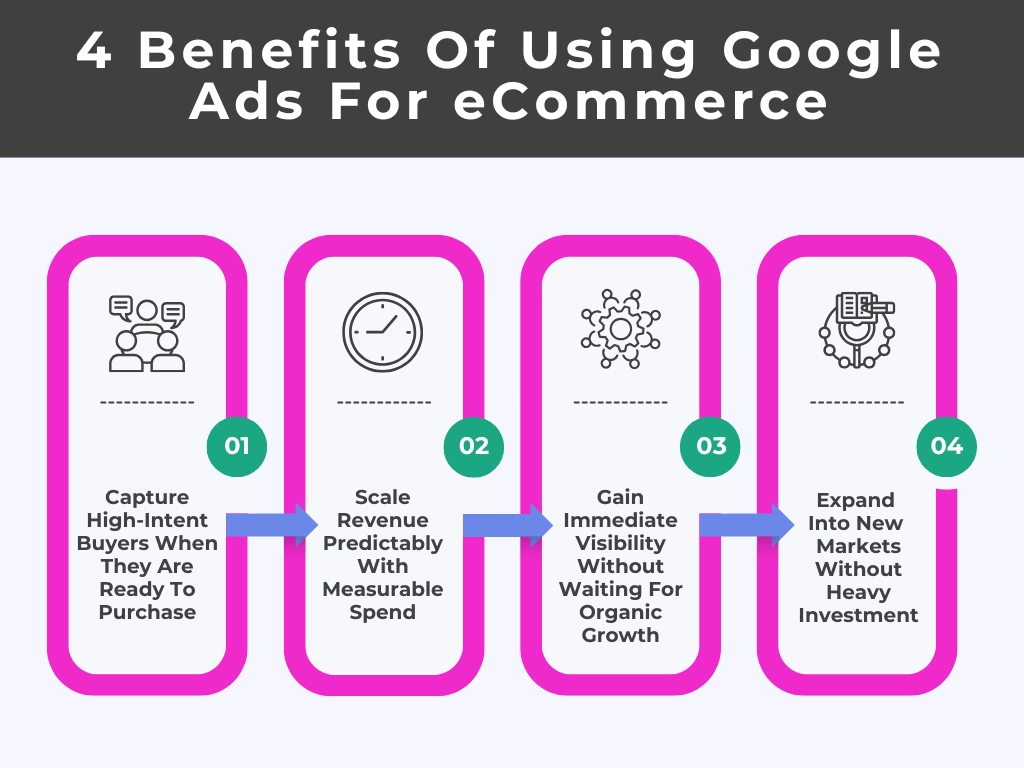
Most eCommerce brands use Google Ads, but very few actually squeeze its full potential. Here’s why it still deserves a core spot in your eCommerce growth strategy.
1. Capture High-Intent Buyers Right When They Are Ready To Purchase
There is a very specific kind of shopper you don’t want to miss… the one who already knows what they want and is just deciding where to buy it. These people are not browsing. They are not comparing lifestyles. They are not here for inspiration.
They are typing things like “buy a standing desk under 300” or “same day delivery protein powder.” That is basically someone standing at a checkout counter… except the counter is Google. If you are not there, someone else is – and the buyer usually won’t go looking for alternatives. They will just pick from whoever showed up first and looked reliable enough.
What makes this powerful isn’t just intent – it is timing. You are catching them at the exact moment they have already warmed themselves up. That is a completely different game from trying to convince someone scrolling through Instagram that they suddenly need your product.
2. Scale Revenue Predictably With Measurable Spend
One of the biggest frustrations in eCommerce is not knowing what is working. Google Ads solves that in a very practical way: it ties money in directly with money out. If a particular product campaign is generating consistent returns, increasing the budget becomes a calculated move.
This creates a kind of controlled growth cycle. Rather than hoping your revenue increases when you “do more marketing,” you can scale in a structured way:
Spend X → Generate Y revenue
Increase X slightly → Measure if Y scales proportionally
If it does, you keep going. If it doesn’t, you adjust.
3. Gain Immediate Visibility Without Waiting For Organic Growth
Organic growth is great… eventually. But in the beginning, it is mostly unpredictable and usually out of your control. Google Ads skips that waiting period entirely. You can go from zero visibility to showing up in search results for real queries the same day. Not after weeks of posting. Not after months of SEO tweaks. Same day.
This is especially important if you are:
- Launching a new store
- Introducing a new product line
- Entering a competitive category
Ads give you exposure, but more importantly, they give you reactions. Clicks, no clicks, purchases, no purchases – that feedback starts immediately. That kind of fast insight is incredibly hard to get through slower channels.
4. Expand Into New Markets Without Heavy Upfront Investment
Trying to enter a new market used to be a commitment. Like you had to “go all in” before even knowing if it would work. Google Ads lets you be a lot more cautious… and a lot smarter. Instead of setting everything up first, you can quickly test product demand in new regions with Google Merchant Center by pushing localized feeds.
You can run shopping ads in a new country or region and just… observe:
- Do people even click?
- Which products get attention?
- Are they price-sensitive or not?
No warehouse. No big launch. No complicated rollout. Just signals. And sometimes those signals save you from making expensive mistakes. You might find that a product you thought would do well gets ignored – or that something you barely promoted suddenly gets traction. That kind of insight is hard to get any other way without spending way more upfront.
How To Manage Google Ads For eCommerce: 7 Modern Strategies That Go Beyond ROAS

Here are the 7 best Google Ads strategies that push past ROAS and open up room for real growth.
1. Split New Customer Acquisition From Returning Buyer Campaigns
Most accounts mix everyone together – first-time buyers and people who already know you. That sounds harmless, but it completely muddies what is actually happening. A returning customer is easier (and cheaper) to convert.
So if both groups are in the same campaigns, performance looks better than it really is. You think you are acquiring customers efficiently… when you are mostly just re-selling to the same people. You have to draw a clean line: who is new vs who is coming back – and treat them differently.
What To Do:
- Create separate campaigns and exclude your existing customer lists from your “new customer” campaigns, so there is zero overlap
- Upload your past buyers (email list) and use it actively – not just for dynamic remarketing ads, but for exclusion where needed
- Adjust bids higher for new users. They need more convincing and cost more to convert
- Track “new customer” conversions separately so you are not judging acquisition performance using blended data. Ad extensions can also be used differently across campaigns to highlight first-time offers versus returning customer messaging
2. Allocate Budget To High-LTV Products, Not Just High-Conversion SKUs
Some products are “easy sells.” They convert fast, look great in dashboards… and attract low-value customers who never come back.
Other products are slower. More expensive. Maybe even annoying to sell. But the people who buy them stay in your corner. They buy again. They actually matter. If you only chase conversion rate, you will keep feeding the wrong side of your business.
What To Do:
- Pull a list of orders and manually trace which products lead to repeat purchases (yes, literally trace them – it is worth it)
- Group those products into their own campaign so budget decisions don’t get diluted
- Set and track OKRs around CLV and repeat purchase contribution, so campaign budgets stay aligned with long-term revenue quality
- De-prioritize products that bring in one-time buyers, even if they look great on surface metrics
3. Use tCPA To Push Volume In Prospecting Campaigns Instead Of Constraining With tROAS
A lot of eCommerce brands accidentally suffocate their own prospecting campaigns with aggressive tROAS targets. The campaign never really gets a chance to explore because Google keeps narrowing delivery toward the safest and most obvious buyers. The result looks efficient on paper… but nothing actually expands.
tCPA changes this because it prioritizes getting conversions at a workable acquisition cost rather than forcing every single click to immediately hit a strict revenue target. That flexibility matters in cold traffic campaigns where people need more warming up.
What To Do:
- Pull a search terms report from your “prospecting” campaigns. If you keep seeing your own brand name, you are not actually prospecting
- Create a dedicated tCPA campaign only for cold traffic and remove every remarketing audience signal from it
- Let the campaign spend 2-3x your target CPA before judging it. tCPA campaigns usually wobble before stabilizing
- Watch for “new users” in GA4 instead of obsessing over ROAS swings during the first few weeks
4. Isolate Branded Search To Prevent It From Inflating Overall Performance
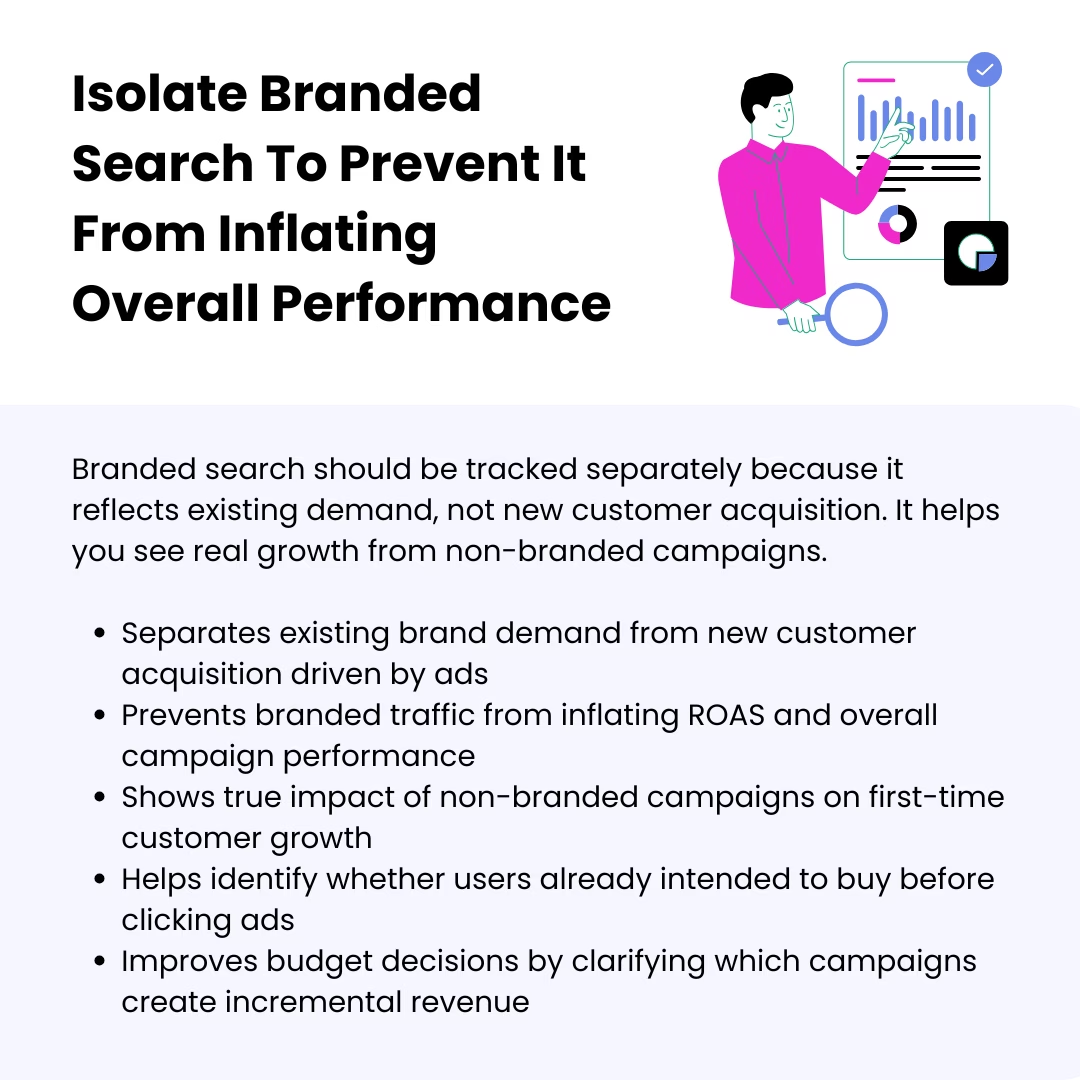
Branded search campaigns are where bad reporting habits go to hide. Somebody types your exact store name into Google, clicks an ad, purchases in two minutes… and suddenly your account looks like a genius. But branded traffic is the demand that already existed before Google Ads stepped in.
When branded traffic is inside blended campaign reporting, it distorts reality. You start scaling campaigns that are just collecting people who were already on the way in. Separating branded search shows whether your non-branded campaigns are genuinely introducing new people to the business.
What To Do:
- Bid aggressively on your own brand terms during peak competitor hours because rival brands usually conquest branded searches late at night and on weekends
- Keep branded campaigns on limited budgets intentionally. They should protect traffic, not consume half the account spend
- Compare branded conversion paths inside GA4. If most users visited directly before searching your brand, another channel is probably doing the work
- Pause branded campaigns for 48 hours in one low-risk market and measure whether sales actually disappear or simply shift to organic listings
5. Feed The Algorithm First-Party Audience Signals Instead Of Relying Only On Keywords
Most advertisers still think Google Ads campaigns are mainly about keywords. It is not anymore. Google’s system cares just as much about how the user is behaving like as what they typed into the Google search bar. That is why first-party data has become such a massive advantage.
When you feed Google detailed customer signals, the algorithm starts recognizing behavioral patterns you could never target yourself manually. And the difference gets very noticeable in broad match and Performance Max campaigns.
What To Do:
- Build audience lists based on buying behavior, not demographics. “Purchased twice in 90 days” is more useful than “women 25-34”
- Create a separate audience of customers who bought without using discount codes and prioritize them as signals in prospecting campaigns
- Upload audiences using customer lifetime value columns so Google can distinguish your best buyers from average ones
- Exclude users who only purchase during heavy sale periods if you are trying to improve margin quality
6. Build Dedicated Campaigns For Demand Creation Using YouTube & Discovery
A lot of eCommerce brands expect Search campaigns to do everything. Generate awareness, educate cold audiences, create interest, close sales. But Search mostly captures existing intent. That is where YouTube and Discovery campaigns become useful – not for instant ROAS screenshots, but for manufacturing familiarity before the search even happens.
Demand creation also extends into placements across the Google Display Network, where product visibility stays active across content sites, mobile apps, and browsing environments that are outside direct search behavior. Different ad formats work together to build familiarity and capture interest before users ever search for your product.
And the biggest mistake brands make here is treating YouTube video ads like a product catalog. Cold audiences don’t care about your SKU list. They care about situations, frustrations, habits, comparisons, routines, and outcomes.
What To Do:
- Open your YouTube ads with a painfully specific customer scenario. “Your gym bag still smells after washing?” works better than “Premium odor spray”
- Run YouTube campaigns heavily in geographic regions where your brand search volume is weak
- Build separate retargeting pools for video viewers who watched 25%, 50%, and 75% of your videos – then message each group differently
- Use Discovery ads to promote quizzes or comparison pages instead of pushing cold traffic straight into PDPs
7. Expand Into Broad Match With Smart Bidding To Unlock New Demand
Broad match used to have a terrible reputation for good reason. And many advertisers still carry that trauma. But broad match today behaves very differently when paired with strong conversion data and a smart bidding strategy.
Google now evaluates intent patterns, browsing behavior, purchase likelihood, previous searches, and audience signals altogether. That is why broad match uncovers conversion paths advertisers never would have found manually. The trick is not launching it recklessly.
Many advertisers now consolidate this into a single campaign structure instead of splitting multiple micro-campaigns, so Smart Bidding can learn faster from a unified data pool.
What To Do:
- Start broad match using relevant keywords that already convert profitably in exact match
- Check search terms every single morning during the first two weeks because broad match patterns reveal themselves very quickly
- Look for weird but valuable searches that humans would never manually target, then create ad groups using those exact search queries
- Keep your broad match campaigns geographically limited at first so you can control damage if targeting quality drifts unexpectedly
How To Build A Google Ads Measurement & Reporting System That Shows True eCommerce Performance
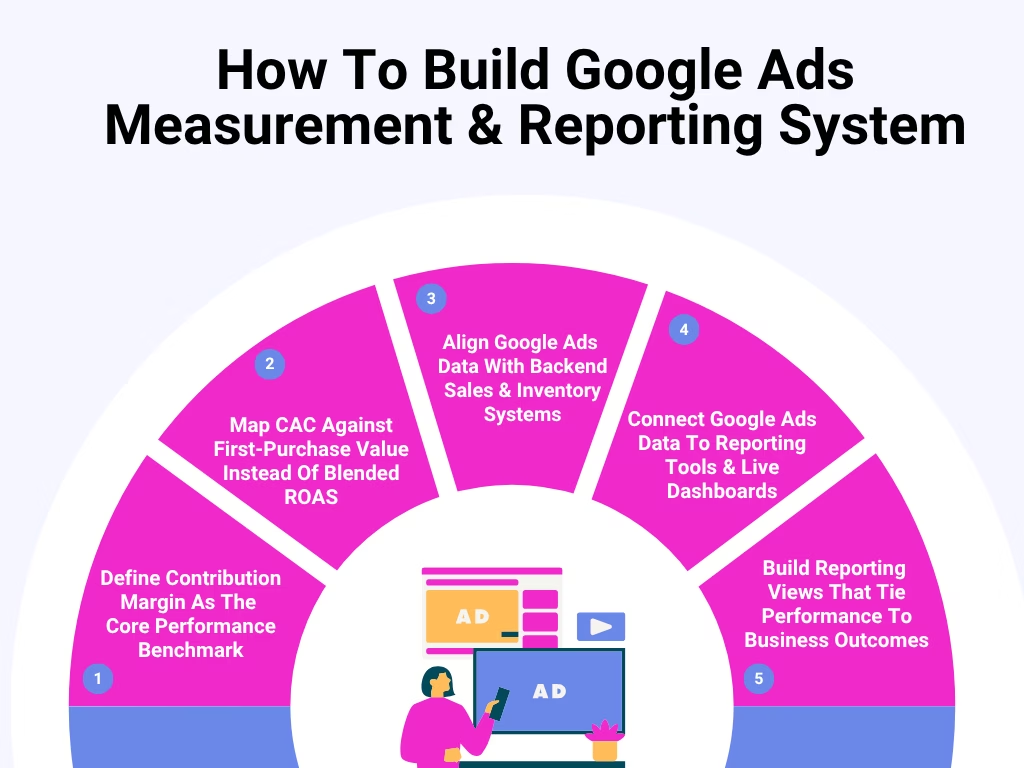
Here’s how to build a measurement setup that connects ad spend to what is really happening.
1. Define Contribution Margin As The Core Performance Benchmark
A campaign can look incredible inside Google Ads and still quietly destroy your margins. That usually happens when reporting stops at ROAS. Revenue comes in, everybody feels good, but nobody checks what happened after the sale. Contribution margin forces you to look at what is actually left after the order is fulfilled.
Do This:
- Pull contribution margin separately for orders using free shipping versus paid shipping – the difference is usually bigger than Google Ads experts expect
- Tag campaigns promoting bulky or fragile products because fulfillment costs for those orders erase strong-looking ROAS
- Build separate reporting for discounted versus full-price purchases so promotions don’t artificially inflate campaign performance
- Check which campaign type generates the highest percentage of exchange requests, not just refunds
2. Map CAC Against First-Purchase Value Instead Of Blended ROAS
Blended ROAS has a habit of hiding weak acquisition systems. Returning customers keep buying. Branded traffic converts cheaply. And the whole account looks healthier than it really is. Meanwhile, new customer acquisition becomes more expensive every month.
First-order economics tell you whether scaling is sustainable right now – not six months later, after retention hopefully fixes everything.
Do This:
- Compare first-purchase value across devices. Mobile-first campaigns bring smaller baskets even when conversion volume looks strong
- Separate first orders containing bundles from single-product purchases to understand what is really lifting acquisition efficiency
- Build a report showing how many days each campaign takes to recover CAC
- Watch for campaigns where the average discount percentage keeps rising to maintain the same acquisition volume
3. Align Google Ads Data With Backend Sales & Inventory Systems
Most Google Ads accounts have no idea what is happening operationally after the click. Google keeps pushing products because they convert well, even if fulfillment teams are stuck, or shipping delays are creating angry customers. When ad reporting gets connected with backend systems, campaign decisions become more grounded in reality.
Do This:
- Build alerts when products hit specific stock thresholds, so eCommerce campaigns don’t continue scaling items about to sell out
- Compare cancellation rates by campaign source because some traffic types consistently create more low-intent purchases
- Track warehouse processing times during major sales pushes so ad spend doesn’t outpace operational capacity
- Prioritize campaigns promoting products with stable supplier lead times
4. Connect Google Ads Data To Reporting Tools & Live Dashboards
Most reporting workflows break the second somebody downloads a spreadsheet. Live dashboards fix that because performance stays connected in real time across platforms. But the real advantage is speed of visibility. You get to see pacing problems, broken funnels, conversion drops, or unusual spikes while they are still fixable – not after the week is over.
Do This:
- Use Dataslayer to automatically pull Google Ads, GA4, Shopify, and CRM data into one live reporting environment instead of updating reports manually
- Add annotations directly inside dashboards whenever pricing changes or promotions launch, so performance shifts have context
- Create separate pacing widgets for spend, conversion rate, and inventory movement instead of relying on one blended performance view
- Build alerts for sudden drops in conversion value per session because those issues usually appear before ROAS visibly declines
5. Build Reporting Views That Tie Campaign Performance To Business Outcomes
A lot of eCommerce reporting stops at ad platform metrics because they are easy to pull. Clicks, CPC, conversions, ROAS. But businesses don’t operate inside Google Ads dashboards. Leadership cares about cash flow pressure, repeat customer quality, inventory movement, and operational strain.
Reporting should reflect that reality. Otherwise, teams end up optimizing campaigns that technically “perform” while creating problems somewhere else in the business.
Do This:
- Add post-purchase support ticket volume into campaign reports to identify traffic sources creating operational issues
- Build reporting segments around customer quality indicators like repeat purchase speed or average refund probability
- Compare advertising spend against inventory aging reports to spot campaigns helping clear stagnant stock efficiently
- Create executive dashboards showing contribution to net profit and cash collection timing
How Successful Brands Used Google Ads For eCommerce Growth: 3 Case Studies
Let’s see how different eCommerce businesses used Google Ads in very different ways to push growth beyond simply targeting ROAS.
1. IceCartel

IceCartel’s moissanite earrings compete in a market where customer hesitation is a huge part of the buying journey. And the brand does something a lot of eCommerce brands avoid because it looks inefficient in the beginning: they spend money on searches that are not directly tied to immediate purchases.
Instead of limiting Google Shopping campaigns to transactional keywords like “buy moissanite earrings,” they also run Google Ads around education-heavy searches, such as:
- “Does moissanite pass diamond tester”
- “Is stainless steel or sterling silver better”
- “Chart types of necklace chains”
That changes the entire role of Google Ads inside the business. Most jewelry brands wait until the customer already wants a product. IceCartel steps in much earlier, during the validation phase, where the buyer is still trying to convince themselves the material is worth considering in the first place.
And here is the important strategic layer most advertisers miss: those user search queries create cheaper audience-building opportunities than bottom-funnel commercial terms.
Someone searching “moissanite earrings” is entering a competitive auction filled with jewelry advertisers fighting over immediate purchase intent. But someone searching “does moissanite pass diamond tester” is cheaper traffic with longer-term value because the buyer is still researching.
This is how they shift away from pure ROAS optimization. The first click doesn’t produce the sale. It manufactures search demand that becomes dramatically easier to convert later. This expands Google Ads beyond product listings and turns it into a trust-building channel that captures shoppers before they finalize material choices.
2. Golf Cart Tire Supply
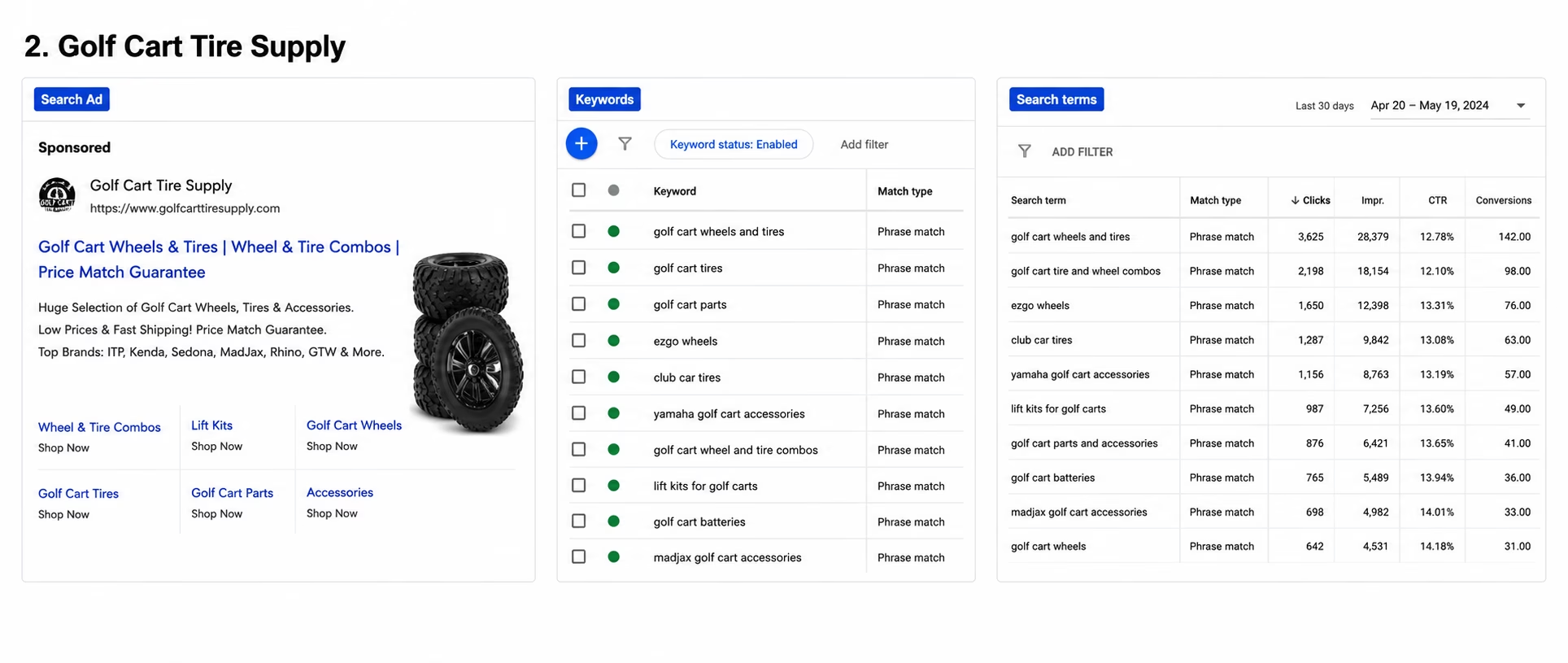
Golf Cart Tire Supply takes the opposite approach from brands that trim keyword lists down to only the “highest ROAS terms.” Instead, they spread aggressively across hundreds of commercial searches tied to:
- Golf cart wheels and tires
- Golf cart tires
- Golf cart parts
- EZGO wheels
- Club Car tires
- Yamaha golf cart accessories
Most advertisers would see this as inefficient because broader keyword coverage naturally creates uneven conversion performance. Some searches convert fast. Others assist conversions weeks later. But Golf Cart Tire Supply is playing a visibility game at the category level.
When somebody modifies a golf cart, the purchase journey rarely stays isolated to one product. Someone shopping for tires ends up purchasing wheel combos, lift kits, suspension upgrades, and accessories.
That is why their ads consistently push bundle-style messaging like:
- “Wheel & tire combos”
- “Price match guarantee”
- Manufacturer brand references
The goal is to increase average order value by pulling buyers deeper into the customization ecosystem once they enter through search. This becomes especially powerful because golf cart buyers browse repeatedly over days while comparing visual setups and fitment options. And broad keyword coverage keeps the brand appearing across multiple stages of that research.
3. Brondell
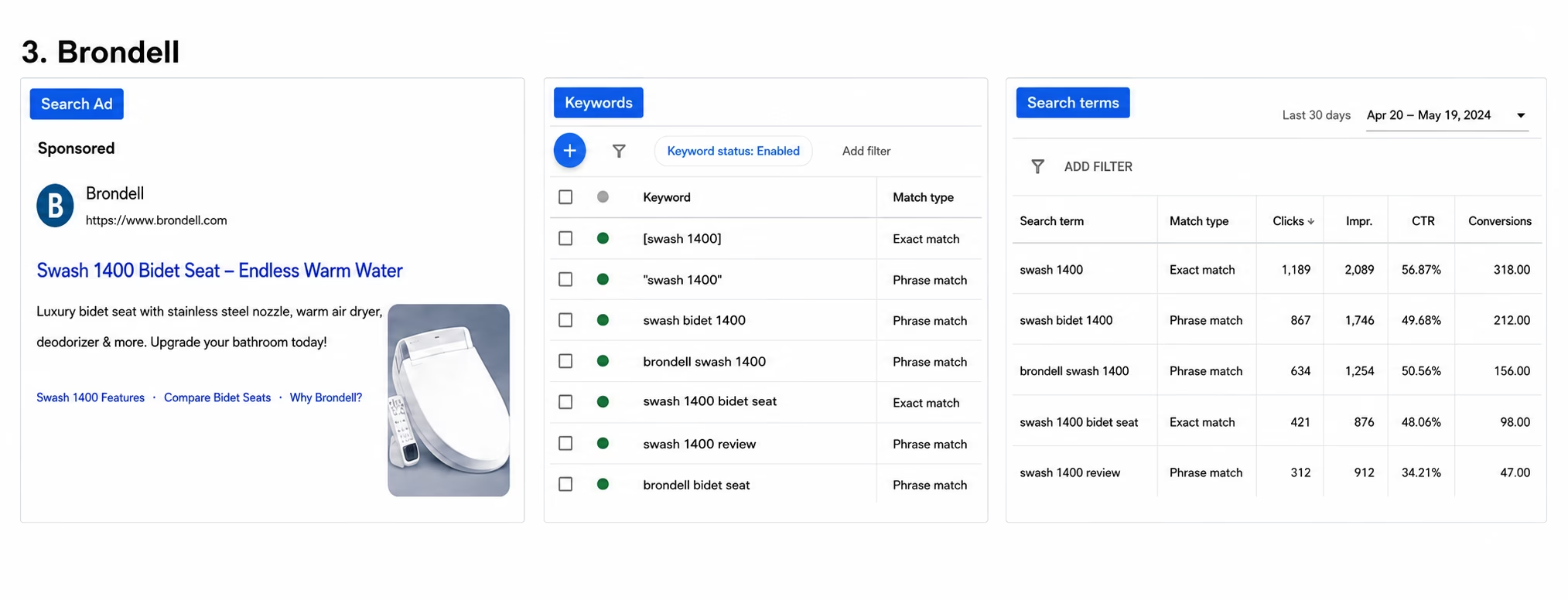
The shoppers of the Swash 1400 luxury bidet seat at Brondell spend a long time researching before finally narrowing down to one specific model. That is why their eCommerce Google Ads strategy around this product is less about acquisition and more about conversion protection.
By the time someone searches “Swash 1400” or “Swash Bidet 1400,” they are usually very close to purchasing. They have usually watched reviews, compared bidet features, opened Amazon tabs, checked Reddit discussions, and narrowed the decision to a few models.
That creates a dangerous stage in the funnel because marketplaces and reseller listings start competing aggressively for the final click. Brondell uses branded product-level campaigns to intercept that moment directly.
Instead of sending users into generic category pages, the ads point toward highly specific product pages loaded with feature validation – endless warm water, stainless steel nozzle, warm air dryer, deodorizer, programmable user presets.
This matters strategically because branded search at the product-model level usually converts differently than generic category traffic. Generic searches like “best bidet toilet seat” create browsing behavior. Product-model searches create decision-confirmation behavior.
Brondell’s dynamic search ads are structured to remove hesitation during that exact stage. And the bigger strategic lesson here is important: sometimes, Google Ads is not primarily a customer acquisition channel. Sometimes it works as a demand-defense system that prevents high-intent buyers from drifting toward third-party sellers or marketplaces right before conversion.
Conclusion
Google Ads for eCommerce works better when they answer a bigger question than “Did this campaign hit 4x?” It should answer whether the business is stronger because of the spending.
So stop letting a single ratio decide winners and losers. Build measurement around margin, customer quality, and clean data connections. Make dashboards automatic, so your team spends energy on interpretation. When you change what you measure, you change what improves.
That is exactly why we built Dataslayer. It is a PPC and SEM reporting tool that pulls your marketing data directly into Google Sheets, Looker Studio, BigQuery, and Power BI so you can build dashboards without copying and pasting anything. Everything connects through APIs, which means your reports update on a schedule.
You can connect sources like Google Ads and other major ad platforms and keep dashboards refreshed automatically. You can schedule updates hourly or daily, depending on your plan, so your team always works from current numbers.
For larger setups, we support unlimited users and advanced data blending, which makes it easier for analysts to combine channels and build more complete performance views.
Try Dataslayer for free and start building reporting systems that stay updated automatically.
Author Bio
Burkhard Berger is the founder of Novum™. He helps innovative B2B companies implement modern SEO strategies to scale their organic traffic to 1,000,000+ visitors per month. Curious about what your true traffic potential is?



