


If you manage Google Shopping for multiple clients, your current workflow probably involves a lot of tab-switching. Log into account A, check feed status, log out, log into account B, repeat. It works until you're managing 15 clients and a feed breaks over a long weekend without anyone noticing.
On March 11, 2026, Google made Merchant Center for Agencies generally available in the US and Canada. It's a dedicated management layer that sits above your clients' individual Merchant Center accounts, with one login, all accounts, and centralized diagnostics and optimization tools built in.
This post covers what it actually does, what it doesn't do, and how to fit it into an agency workflow that also needs performance reporting.
What Google Merchant Center for Agencies Actually Is
Think of it as an MCC account, but for product feeds instead of ad campaigns. Your clients keep their own Merchant Center accounts. You get an agency account that overlays all of them in one interface.
It replaces the old Multi-Client Account (MCA) system, which offered basic multi-account access but no portfolio-level tools. The new interface was designed with agency input during a pilot that ran through late 2024 and into 2025, before the broader October 2025 rollout and the March 2026 GA launch.
Who can access it: Agencies managing Merchant Center accounts for other businesses. Not available to merchants managing their own store. As of March 2026, it's GA in the US and Canada, and in pilot globally, with no published timeline yet for full international GA.
To request an account: fill out Google's agency account conversion form. There's no self-serve activation.
What Merchant Center for Agencies Actually Shows You
All Client Accounts
Your home base. Lists every linked client account with status indicators, user access info, and the ability to star high-priority accounts for quick access. Nothing complicated. It's the account-switching problem, solved.
Agency Overview
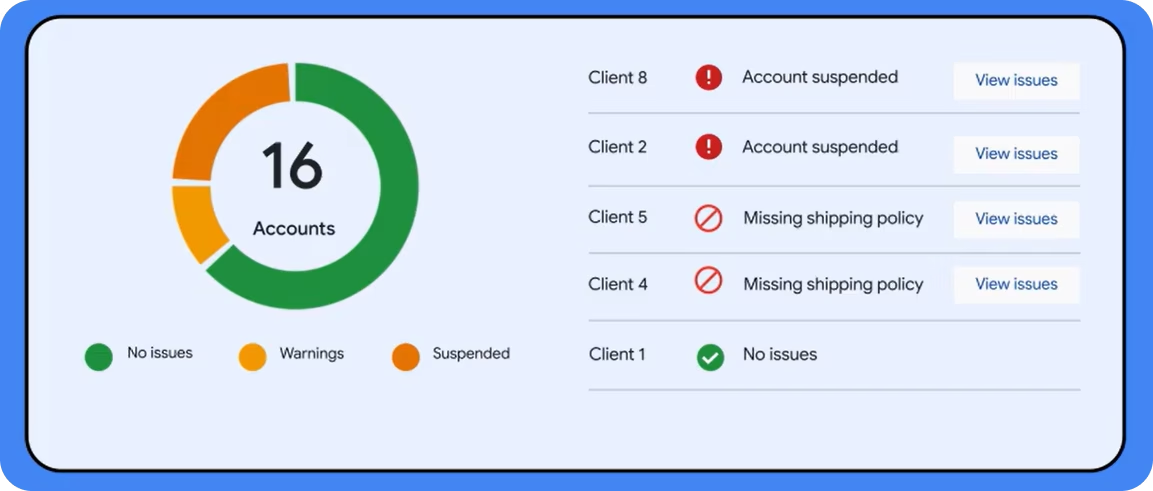
Portfolio-level summary across all clients: account statuses, flagged issues, and a quick view of your top five starred accounts. The useful part is automatic flagging of accounts where clicks or disapprovals have shifted significantly. Instead of finding out a client's feed broke three days ago, you see it flagged the same day.
Diagnostics
This is where the tool earns its keep. It surfaces specific problems across all client accounts in one view, filterable by client, country, or marketing method (Shopping, free listings, etc.).
The key feature is "click potential": an estimate of how many additional clicks you could recover by fixing a specific issue. That framing matters for agency conversations. "Fixing these disapprovals could recover an estimated X clicks per week" is a different conversation than handing a client a list of feed errors.
Socium Media, one of the pilot agencies, reported 50% faster resolution on monitoring tasks after centralizing diagnostics here. That tracks. The bottleneck in multi-account monitoring is usually finding the problem, not fixing it.
Client Optimization + Ads Opportunities
Two tabs worth knowing:
- Client Optimization surfaces out-of-stock products across your entire portfolio with a "Share report" feature that lets you send restocking alerts directly to clients. It also tracks promotions by status (approved, under review, not approved) across all merchants, useful during high-volume periods when you're managing seasonal promos for multiple clients simultaneously.
- Ads Opportunities identifies low-traffic products: items in the catalog getting zero or near-zero ad clicks. You can filter by criteria like "Low price" or "Trending brand," then apply custom labels directly from this view. Those labels flow into a supplemental data source in Merchant Center, which you can then use in Google Ads to target those specific products in campaigns. It's not magic, but it closes a loop that previously required jumping between multiple interfaces.
What It Doesn't Do
Merchant Center for Agencies is an operational management tool. It does not show campaign performance. No ROAS, no CPA, no revenue, no ad spend.
For that you still need to connect Google Ads data to Merchant Center data, per client, which is exactly where reporting tools earn their place in the workflow.
A practical way to split the two:
How This Fits into the Broader Merchant Center Changes in 2026
Merchant Center for Agencies isn't the only thing changing this year. Google is also migrating from the Content API for Shopping to the new Merchant API, with both running in parallel until August 2026. If your agency relies on automated feed tools or third-party connectors, that migration affects you separately from anything in this post.
For a breakdown of what the API migration means for feed management and what the deadline actually requires, that's covered in detail here.
Is It Worth Requesting Access Now?
Yes. If you manage Shopping campaigns for multiple clients, it's worth requesting access now rather than waiting. The diagnostics prioritization by click potential is the standout feature: it turns a list of feed errors into a prioritized action list with estimated business impact, which changes how you triage issues and how you talk about them with clients.
The main thing to keep in mind is that it's an operational tool, not a reporting one. Pairing it with a reporting layer that connects product data to actual campaign results gives you both sides covered: what's broken and what's performing.



