



If you've ever tried bringing Facebook Ads data into Claude, you've probably run into a few common challenges:
- Constant manual exports. Exporting CSVs from Ads Manager every week, then uploading them again whenever you need fresh numbers.
- Seeing only part of the picture. Meta's own MCP covers only Meta data. Your Google Ads, GA4, Shopify, and other essential business metrics sit in different places.
- Numbers that don't match. Meta reports one thing, GA4 another, and there's no quick way to see where the real performance gap or opportunity is hidden.
The Dataslayer MCP connector for Claude addresses these challenges by automating data integration and bringing all your marketing data together. With a single MCP connection, you can analyse Meta Ads alongside data from 60+ other platforms, all within the same Claude conversation. No recurring CSV exports or multiple MCP connectors required.
In this guide, we'll walk you through connecting Meta Ads to Claude with Dataslayer in a few simple steps. We'll also explore practical cross-channel analysis use cases, compare alternative integration methods (including Meta's native MCP, manual CSV uploads, and other third-party connectors), and share important limitations and considerations to keep in mind.
Let's get started! Here's how to connect Facebook Ads to Claude in three simple steps.
Meta Ads in Claude with Dataslayer, step by step
What you need to get started
When using Dataslayer to connect Meta Ads to Claude, you need to have these four things in place:
- A Dataslayer account with the MCP destination included. You can start with Dataslayer's 15-day free trial, no credit card needed.
- Dataslayer MCP installed in Claude from Claude's connector directory. Claude allows directory connectors on every plan, including Free.
- Appropriate Meta permissions: a Facebook user with at least view-performance access (the Analyst role) on each ad account you want to analyse. Advertiser or Admin access also works.
- A Claude account you can add connectors to. On Team and Enterprise plans, an Owner or Primary Owner enables the connector for the organisation first; then each member signs in individually.
How to connect Meta Ads to Claude: 3 steps, no code
You connect Facebook Ads to Dataslayer, then add the Dataslayer MCP in Claude, and just start asking. View the detailed steps in the Dataslayer MCP for Claude guide.
Step 1: Connect Facebook Ads in the Dataslayer Hub
- Log in to Dataslayer and open the Data Sources Hub.
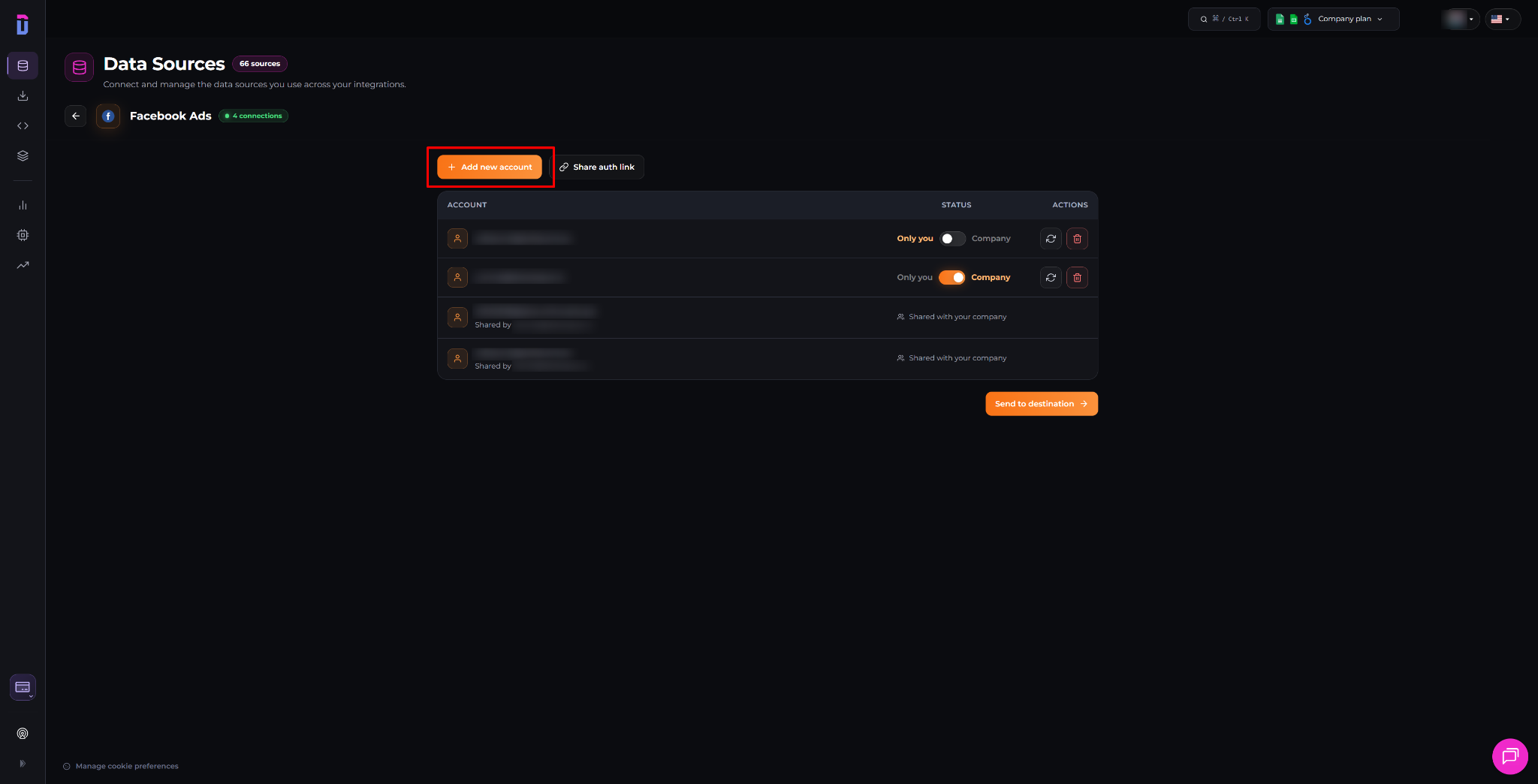
- Select Facebook Ads and click + Add new account.
- Log in with your Facebook account. On Meta's permission screen, accept the permissions and select the ad accounts you want to connect to Claude.
- Back in the Hub, check that the connection is listed under Facebook Ads.
Step 2: Add Dataslayer MCP in Claude
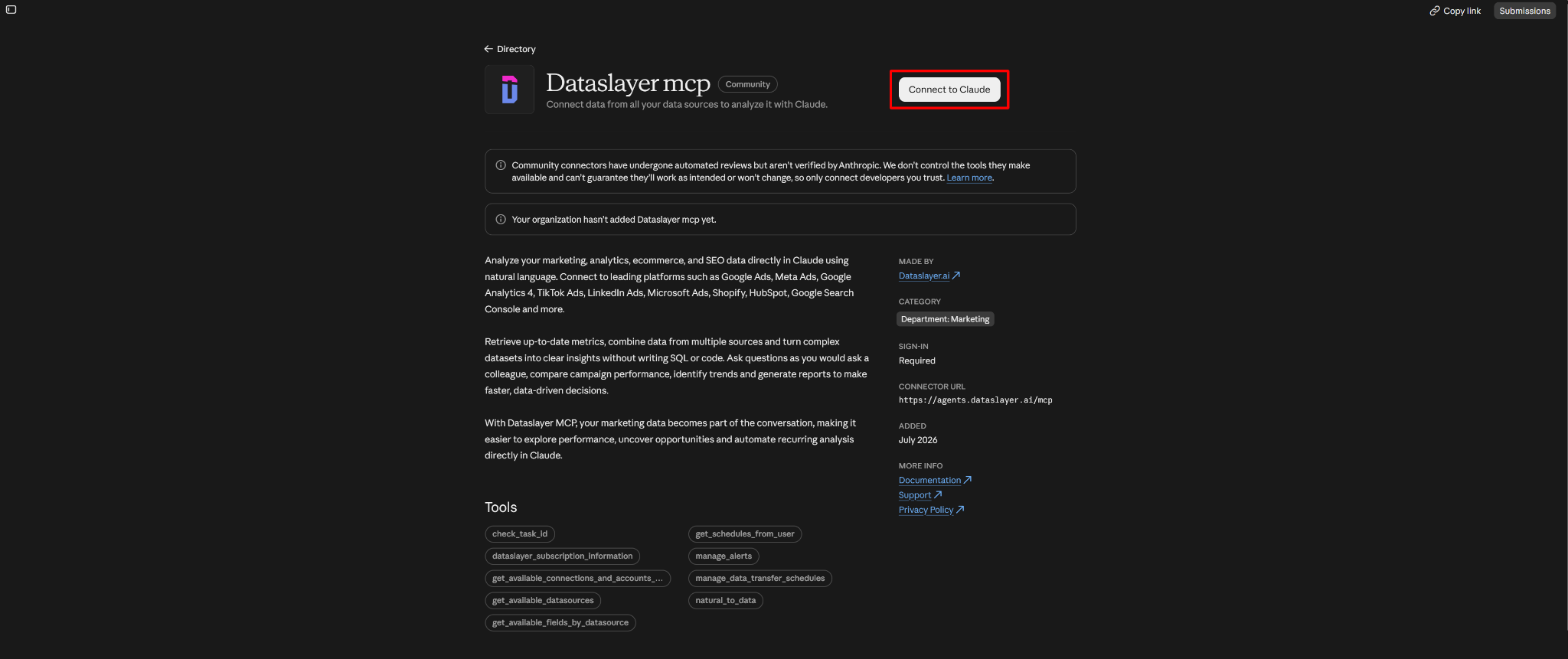
- In Claude, open the Dataslayer MCP connector page and click Connect.
- You can also find it manually in Settings → Connectors → Dataslayer.
- Sign in with your Dataslayer account.
Step 3: Run your first prompt
Open a new Claude chat and ask a question about your Meta Ads data.
To make sure everything is connected and working correctly, start with a simple test prompt:
"Using Dataslayer MCP, show total cost, impressions, and link clicks by account across all my connected Facebook Ads accounts for the last 7 days."
Claude should retrieve the requested metrics and organize them by account, confirming that your connection is working.
Which Meta Ads fields can you analyse in Claude?
With Dataslayer MCP, Claude can access Meta Ads (including Instagram Ads) delivery, conversion, video, creative, and audience data, enabling everything from everyday performance checks to more advanced analysis.
Let’s overview the most essential Meta Ads fields supported by Dataslayer.
See the full Facebook Ads field list in the documentation.
6 Meta Ads prompts for Claude powered by Dataslayer
Not sure where to start with Meta Ads analysis in Claude? Try these prompts to explore your campaign performance, uncover valuable insights, and identify optimization opportunities.
Each prompt has been tested with Dataslayer MCP and uses supported Meta Ads fields. Simply replace the placeholders with your account name and date range, then paste the prompt into Claude.
1. Weekly performance report
Prompt:
"For [account], show Total Cost, Reach, Link clicks, Links CTR, Website purchases and Return on ad spend (ROAS) by Year-Week for the last 8 full weeks, Monday to Sunday. Flag the biggest week-over-week change."
What you get: one row per week with spend, reach, clicks, purchases and ROAS, plus a note on the biggest change. Look for weeks where ROAS moves in the opposite direction to spend.
2. Facebook vs Instagram, by placement
Prompt:
"For [account] over the last 30 days, show Total Cost, CTR (all), CPM and ROAS by Publisher platform and Placement. List placements with spend over [amount] and ROAS below the account average."
What you get: one row per placement, such as Facebook Feed, Instagram Reels or Marketplace. Placements with a noticeable share of spend and ROAS well below average are the first candidates to exclude.
3. Best and worst ads
Prompt:
"Rank Ad names by Website purchase ROAS for the last 30 days. Only include ads with Total Cost over [amount]. Show the top 10 and every ad with zero Website purchases."
What you get: a ranked list of ads with spend, purchases and ROAS. Ads above the spend threshold with no purchases show where budget leaks.
4. Funnel leaks by campaign
Prompt:
"For the top 10 campaigns by Total Cost last month, show Landing page views, Cost per website add to cart, Cost per website checkout initiated, Website purchases and Cost per website purchase. Where is the biggest drop?"
What you get: one row per campaign with the cost of each funnel step. Compare similar campaigns: a step that costs several times more in one of them shows where the leak is.
5. Audiences that pay back
Prompt:
"Show Total Cost, Website purchases and ROAS by Age and Gender for the last 30 days. Exclude rows with Total Cost under [amount]."
What you get: a table by age band and gender. Look for segments with high spend and below-average ROAS, and small segments with strong ROAS that may deserve more budget.
6. Creative fatigue
Prompt:
"For the top 10 ads by Total Cost, show Frequency, CTR (all) and CPM by Year-Week for the last 4 full weeks. List ads where Frequency rose while CTR (all) fell."
What you get: the ads where fatigue is starting. Keep the top-10 limit: ad × week breakdowns can return thousands of rows, which Dataslayer MCP splits into pages.

Best practices: Get more out of Meta Ads data in Claude
Claude adds three things on top of the raw answers. Use them to turn one-off questions into a reporting routine:
- Save your settings in a Project. Create a Claude Project for Meta Ads reporting and add instructions such as: "Use account act_[ID]. Use 7-day click attribution. Group by Year-Week, full weeks only. Exclude rows with Total Cost under [amount]. Report spend in USD." Every chat in the Project starts with those rules, so you stop repeating them and avoid most of the mismatches listed in the gotchas below.
- Turn the answer into a dashboard. After summarizing weekly performance, ask: "Build an interactive artifact with a line chart of weekly Total Cost and ROAS and a table of placements sorted by ROAS." Claude generates an interactive dashboard right in the chat, and you can share it with your team.
- Ask follow-ups on large results. Claude keeps the full result in the conversation. After ranking every ad by ROAS, follow-ups like "group these by creator and format" or "which hooks repeat among the top 20?" work on the same data without a new export.
Analyse Meta Ads with Google Ads, GA4, and other platforms in one Claude conversation
With Dataslayer MCP, you can ask Claude about Meta Ads and any other connected platform in the same conversation. Claude runs one query per platform and combines the results in its answer, enabling advanced cross-channel analysis through a single connection.
What people usually use it for:
- Tracking checks: Meta link clicks vs the sessions GA4 actually records.
- Budget split: spend and return on Meta vs Google Ads, week by week.
- Channel mix: Meta's share of spend and cost per click next to Google Ads and LinkedIn Ads.
- Revenue check: Meta-reported purchase value vs Shopify orders by UTM source. Shopify often splits Meta-driven orders across several UTM labels (fb, ig, facebook, instagram, IGShopping), so ask Claude to group them first.
Here are some practical cross-channel analyses you can run with Dataslayer MCP.
Use case 1: Do your Meta clicks reach the website?
Prompt:
"Compare Meta Ads Link clicks for [account] with GA4 sessions from paid social sources for [property] from [start] to [end]. Group GA4 sessions by Session source / medium and flag inconsistent UTM tags."
What you get: Meta link clicks next to GA4 sessions by source / medium. If GA4 shows far fewer paid social sessions than Meta shows link clicks, or splits them across labels like fb, meta and ig, your UTM tags are missing or inconsistent. A Meta-only connector can't show this gap.

Use case 2: Which channel returns more per unit of spend?
Prompt:
"For [brand], compare weekly Meta Ads Total Cost and Website purchases conversion value with Google Ads Cost and Conversion value for the last 4 full weeks. Calculate return per channel and explain differences in how each platform counts conversions."
What you get: weekly spend and conversion value per channel, with the return per unit of spend. Expect conversion counts to differ a lot: Google Ads' Conversions column includes every primary conversion action you've set up, while Meta's Website purchases counts only purchases. Compare value and return, not raw conversion counts.
Use case 3: Where does Meta sit in your channel mix?
Prompt:
"For May to July 2026, show monthly spend and clicks for my Meta Ads, Google Ads and LinkedIn Ads accounts. Calculate each channel's share of total spend and cost per click."
What you get: each channel's monthly spend, clicks, share of spend and cost per click. Check that all accounts report in the same currency before comparing, or ask Claude to use the EUR or USD cost fields where available.
Why use Dataslayer MCP for Meta Ads in Claude?
The main reason people choose Dataslayer MCP for Meta Ads to Claude integration is cross-channel analysis. A single connector gives Claude access to Meta Ads data alongside data from 60+ other platforms. This means you can answer questions like the examples above in one conversation, without switching between multiple tools or integrations.
Here's what makes Dataslayer MCP stand out:
- One connector, 60+ platforms. Query Meta Ads, Google Ads, GA4, TikTok, LinkedIn, Shopify and more. Native MCPs and DIY scripts cover one platform each.
- One-click install from Claude's connector directory. No manual MCP server configuration, no code.
- Built for agencies. Connect multiple Facebook Ads accounts, share connections, and include data from several ad accounts in a single query.
- More than just AI chat. Schedule data transfers to BigQuery or Snowflake for advanced analytics and internal reporting. The same Dataslayer connection can also power your Google Sheets, Data Studio, and other reporting environments.
- Built-in AI agents. Dataslayer also offers AI-powered tools within its platform: the AI Agent, with a chat interface and MCP already configured, and the Alerts Agent, which monitors your data and sends anomaly alerts. Both are part of AI Insights, so you can use them without leaving Dataslayer.
- Dedicated support. Get 24/5 live chat support across Europe, the Americas, and Asia on every plan, plus a dedicated account manager with Pro and Business plans.
Dataslayer MCP pricing
Dataslayer MCP offers a 15-day free trial with no credit card.
After that, you can get Dataslayer MCP in two ways: choose MCP as your core destination on any plan for unlimited messages, or, from the Advanced plan, get it included with any other destination with a daily message limit.
See our pricing plans for details.
Other ways to connect Meta Ads to Claude
Besides Dataslayer MCP, there are alternative ways to get Meta Ads data into Claude. The choice depends on how many platforms and ad accounts you need to analyse and the level of automation you prefer.
- Meta's native connector. Meta provides Meta Ads AI Connectors and Meta's own MCP server. You add it in Claude as a custom connector and sign in with Facebook Login for Business. It can create and edit campaigns (new items start paused), but it covers Meta only, and during the beta not every advertiser has had access. It’s a good option if you only run Meta and want to manage campaigns from Claude.
- Other third-party connectors. Such platforms as Porter Metrics and Supermetrics also connect Meta Ads to Claude alongside other platforms. The main difference is how many ad accounts each plan covers: Porter charges per ad account, and Supermetrics' Growth plan ($177/month) includes only 7 accounts per source. Dataslayer's Advanced plan ($115/month) includes 50 accounts per connector, which matters once you manage several clients.
- Manual CSV export. Free and fine Meta Ads to Claude integration method for a one-off analysis. However, you re-export whenever data changes, and combining it with other platforms is manual.
- DIY with AI (Claude Code + Meta Marketing API). Fine for one custom report if you have developer support. You maintain a Meta app, token refreshes and rate limits, plus Advanced Access for client accounts. Each extra platform is another build.
Meta Ads gotchas to know before you trust the numbers
Even when your data connection works correctly, some Meta Ads reporting specifics can affect how you interpret the results. Attribution settings, reporting time zones, and metric aggregation rules can all lead to misleading conclusions if you overlook them.
Here are the main things to keep in mind when analysing Meta Ads data with Claude through Dataslayer MCP:
- Instagram Ads are already included. Split by Publisher platform or Placement (e.g. "instagram | instagram_reels | mobile_app"). For video prompts, include only ads with video plays above zero. Organic Instagram is a separate connector.
- Attribution changes conversion totals. Choose 1-, 7- or 28-day click, 1-day view or engaged-view, or the account's own setting, and whether conversions count on impression or conversion date. Match Ads Manager.
- Use exact dates, not "yesterday". Dataslayer MCP works out relative ranges such as "yesterday" or "last 7 days" in UTC, while Meta reports each day in your ad account's time zone. Name exact dates to avoid an off-by-one-day mismatch, and ask for the Account Timezone field if you're unsure which zone an account uses.
- Reach can't be added up. Ask for reach over the whole period.
- Mixed currencies. Summing accounts adds different currencies. Use Total Cost (EUR) or (USD).
- "Unknown" rows with almost no spend can show extreme ROAS values. Exclude rows below a minimum spend.
- Ban risk. Dataslayer MCP doesn't use browser automation or scraping. It pulls data through Meta's official Marketing API, using the same Hub connection as Dataslayer's Google Sheets and Data Studio connectors.
Security and limits
With Dataslayer, you control which ad accounts Claude can reach, and Claude never sees your Facebook password.
- Access: you choose the ad accounts on Meta's permission screen. Only those are available.
- Authentication: OAuth 2.1, with access tokens that expire automatically. Your platform credentials stay with Dataslayer, not with the AI provider.
- Data protection: encrypted in transit and at rest. Dataslayer is ISO 27001 and ISO 27701 certified and supports GDPR and CCPA compliance.
- Data storage: Dataslayer doesn't store the data the ad platforms return. It keeps only query parameters, such as metrics and dates, for debugging, and deletes them within a week. Dataslayer doesn't use your data to train or fine-tune AI models. What you share with Claude falls under Anthropic's own terms.
- What it does today: Dataslayer MCP reads and analyzes data. Campaign editing is in development.
- Usage limits: your Dataslayer plan sets message limits, and Claude applies its own usage limits on top.
Troubleshooting Meta Ads in Claude
Here are a few common issues you might encounter when connecting Meta Ads to Claude, along with tips to resolve them:
FAQs
What's the best way to connect Meta Ads to Claude?
It depends on your needs. Use Dataslayer MCP to analyse Meta with other platforms or for multi-client agency reporting. Alternatively, you can use Meta's native connector if you only run Meta and want Claude to edit campaigns or a manual CSV export for a one-off question.
Is there an automated way to connect Facebook Ads to Claude?
Yes. With Dataslayer MCP or Meta's native connector, Claude pulls data from Meta's API each time you ask. You don't need to export or upload data manually.
How do I connect Meta Ads to Claude with Dataslayer?
Connect Facebook Ads in the Dataslayer Hub, then add Dataslayer MCP in Claude, and authorize your Dataslayer account.
How much does Dataslayer MCP for Claude cost?
Paid plans start at $35/month billed annually, with a 15-day free trial and no credit card. MCP is also included from the Advanced plan when you use another core destination.
Why use Dataslayer MCP instead of Meta's native MCP or a DIY setup?
One Dataslayer connector covers Meta Ads and 60+ other platforms, so you can compare channels in one chat. In addition, you install it with one click and there’s no ongoing maintenance required, unlike a DIY build.
What can I do with Meta Ads data in Claude?
Common Meta Ads analysis use cases in Claude include weekly reporting, placement and audience analysis, ad-level ROAS comparisons, funnel diagnostics, creative fatigue analysis, and cross-channel performance comparisons.
Can I analyse Meta Ads together with other platforms?
Yes. When you use Dataslayer MCP, you can ask about Meta Ads and Google Ads, GA4, TikTok or any other connected platform in the same conversation. Claude queries each one and combines the results.
Does it include Instagram Ads?
Yes. Instagram Ads run from your Meta ad account. Split results by Publisher platform or Placement.
Why don't Claude's numbers match Ads Manager?
Usually it happens because of a different date range, time zone or attribution window. Match the settings and don't add up daily reach.
Can Claude change my campaigns through Dataslayer MCP?
Not yet. Campaign editing using Dataslayer MCP is in development. Today you can only analyse data, set alerts, and schedule exports.



