


Performance Max finally shows Search Partners data. After three years of advertisers running blind, Google added Search Partners as a separate channel segment in December 2025.
Research from Seer Interactive found some accounts waste 30% of their Search Partner budget on parked domains, bot clicks, and spam sites that never convert. Now you can see it happening and stop it.
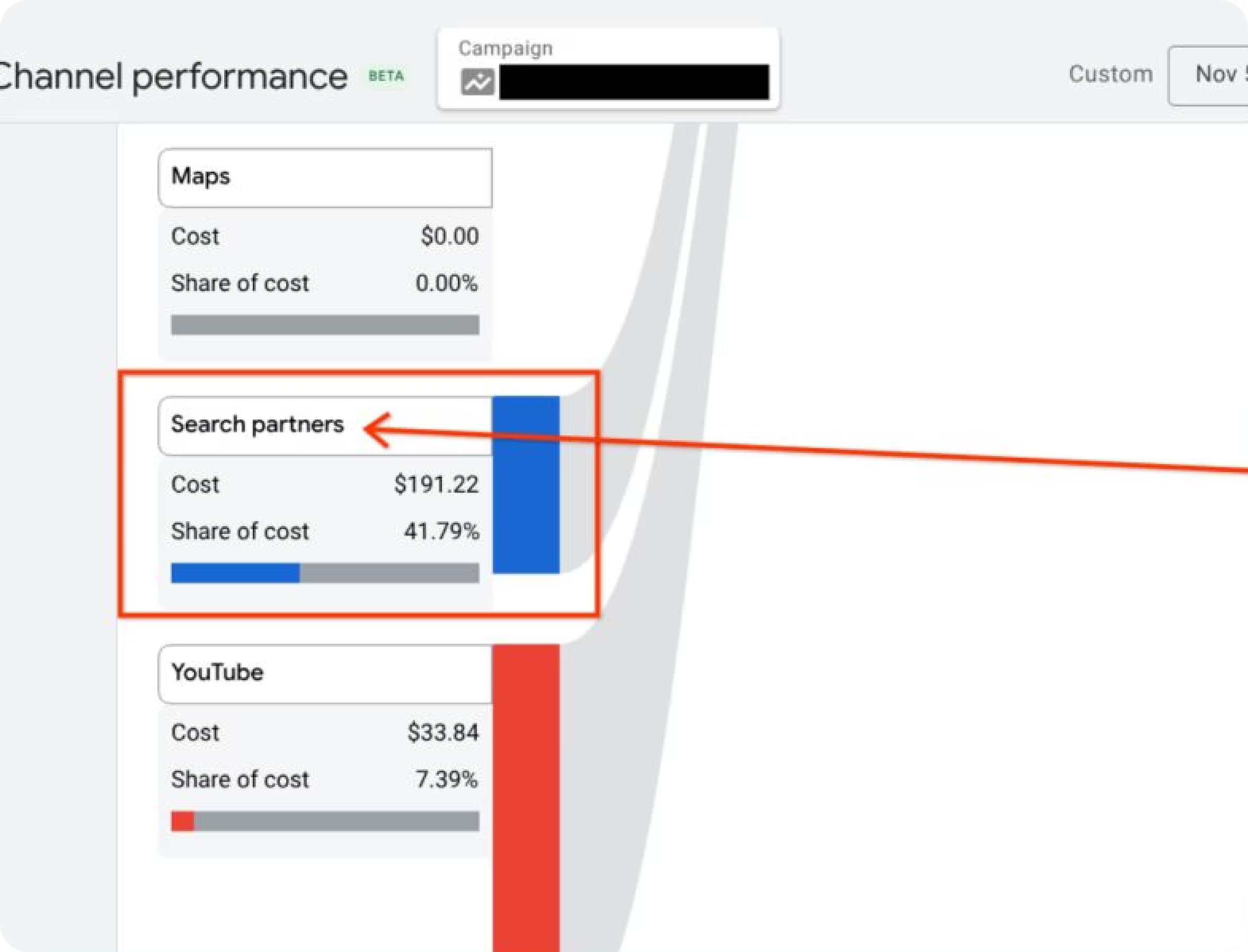
The December 2025 update shows total Search Partners spend, conversion rates, and CPA compared to Google Search. Combined with placement reporting (rolled out in March 2024), you can audit exactly which sites are burning your budget.
Where to Find Your Data
Open Google Ads → Your PMax campaign → "Insights & reports" → "Channel performance."
Search Partners now appears alongside Search, Shopping, YouTube, Display, Discover, Gmail, and Maps. The channel distribution table shows impressions, clicks, CTR, conversions, CPA, and total spend for each channel.
Download it to CSV or pull it into your reporting dashboard for weekly tracking.
If your Search Partners CPA is 50%+ higher than Google Search, you've got a problem worth solving.
Why Google Finally Added This
Google didn't do this out of kindness. In November 2023, Adalytics published an investigation showing Google ads appearing on pornographic sites, pirated content platforms, and Iranian websites potentially under U.S. sanctions.
Disney ads on adult sites. U.S. Treasury ads on copyright-violating domains. Luxury brands (Prada, Burberry) showing up alongside explicit content. Brands that had blacklisted specific sites found their ads there anyway through Search Partners.
Google initially denied it, then rolled out fixes: temporary opt-out in December 2023, placement reporting in March 2024, and channel-level visibility in December 2025.
The Big Problems With Search Partners
Parked domains are the worst offender. These are registered domain names that show nothing but a search box and ads. They generate traffic through typo domains (ggogle.com), expired domains that still get visitors, or traffic arbitrage where someone buys cheap clicks to monetize through Google.
Red flags: CTRs of 8-15% when your Google Search CTR is 2-3%, near-zero conversions, URLs like "domain-parking-search-123.info." Google phased out parked domains for all campaigns in March 2025, but you can still exclude them manually under Tools → Content Suitability if needed.
Bot traffic and click fraud hit Search Partners harder than Google Search because Google has less control over third-party sites. One analysis of 220,000+ placements found 30% of Search Partner spend going to fraudulent traffic in some accounts. The fix is systematic placement exclusions.
Low intent traffic happens even on legitimate Search Partners sites. Someone on Google.com opened a browser to search—that's high intent. Someone who clicked an ad on a Search Partners directory page might not even realize it's an ad. Search Partners typically deliver 20-40% lower CTR and 30-50% lower conversion rates versus Google Search.
Strange query matching means your PMax campaign targeting "commercial espresso machines" might trigger on "home coffee maker comparison" or auto-generated nonsense like "commercial coffee equipment espresso machine business supplies." PMax added campaign-level negative keywords in January 2025—use them. Common Search Partners negatives: free, review, comparison, tutorial, DIY, how to.
Brand safety violations were the trigger for Google's changes. For healthcare, finance, government, or B2B companies, appearing on inappropriate Search Partners sites damages the trust you've spent months building.
Google added Pre-screen brand safety in April 2025, powered by DoubleVerify, IAS, and Zefr. Enable it under Tools → Content Suitability if you're in a regulated industry.
How to Clean Up Your Search Partners Spend
Pull your placement report: Google Ads → Report Editor → "Performance Max campaigns placement" → Filter to "Search partner network."
Export it. You'll see thousands of placements with impression counts (Google still doesn't show clicks or conversions per placement).
Sort by impression volume and look for obvious spam: .info domains, "search" or "parking" in URLs, foreign-language sites when you target English speakers, auto-generated domains like xyz123abc.com, or sites with 5,000+ impressions you've never heard of.
Calculate your baseline in the channel performance report:
- Search Partners CPA ÷ Google Search CPA = Efficiency ratio
- Search Partners conversion rate ÷ Google Search conversion rate = Quality ratio
If either ratio is below 0.5, you have serious quality issues.
Go to Tools → Content Suitability → Advanced Settings → Excluded Placements. Do three things:
- Check "Parked domains" to block them immediately
- Paste your worst 500-1,000 placements from the report (remove www. so example.com blocks all subdomains)
- Enable Pre-screen brand safety if you care about where your ads appear
Exclusions take 12 hours to activate. Check Tools → Change History after 24 hours to confirm they're live.
Two weeks later, re-pull your channel performance report. Did Search Partners CPA improve? Did overall PMax conversions drop significantly? If you removed 30% of Search Partners spend but total conversions only dropped 5%, you made the right call.
When to Give Up on Search Partners
You should consider aggressive exclusions (Google doesn't offer a direct opt-out) if Search Partners CPA is consistently 2x+ your Google Search CPA and only adds 5-8% incremental volume. Or when Search Partners converts at under 1% while Google Search sits at 4-6%. Or if you're in healthcare, finance, government, or B2B services where one bad placement undoes months of reputation building.
For ecommerce and retail, Search Partners often delivers 5-10% incremental conversions at 20-40% higher CPA. That's marginally positive. For B2B lead gen and high-ticket sales, Search Partners typically bleeds budget on unqualified clicks that never close.
Track It Across Campaigns
Export your channel performance reports weekly. Watch for Search Partners CPA spikes (new low-quality placements entering), conversion rate drops (bot traffic increased), or impression volume changes after exclusions (confirms your blocks worked).
For automated reporting across Google Ads, Facebook, LinkedIn, and other platforms, you can export CSVs manually or use connectors like Dataslayer that pull everything into Google Sheets, Looker Studio, BigQuery, or Power BI. Helps when you're building executive dashboards that need PMax channel data alongside other metrics.
Quick Answers
Can I disable Search Partners in PMax?
Not directly. Google doesn't offer a campaign-level toggle. You can reduce spend by 70-80% through account-level exclusions (up to 65,000), excluding parked domains, and brand safety filters.
How do I know if my traffic is mostly bots?
CTR above 6% when Google Search is 2-3%, conversions under 1%, session duration under 15 seconds in Analytics. Pull your placement report—if 40%+ of top placements are .info domains or have "parking" in URLs, you have a bot problem.
Search Partners in PMax vs Standard Search?
Standard Search lets you opt out with one checkbox. PMax requires account-level exclusions affecting all campaigns. The December 2025 update brought channel-level data to PMax that Standard Search has had since launch.
Are exclusions separate from Display?
No. Account-level exclusions block placements across Search Partners, Display, and YouTube simultaneously. You can't exclude a site from Search Partners while keeping it on Display.
How often should I review?
Monthly minimum for campaigns spending $5,000+. New spam domains constantly enter the network. Pull the placement report first of each month, add 500-1,000 new exclusions. Enterprise accounts ($50,000+/month) should audit weekly.
Can I see which sites generate conversions?
Not yet. Google shows impression data per placement but not clicks or conversions. Workaround: use Google Analytics 4 to identify referring domains, cross-reference with your placement report.
What to Do This Week
Pull your channel performance report and check Search Partners CPA versus Google Search CPA. Export your placement report and sort by impressions. Add your worst 500 spam domains to account exclusions. Enable parked domain opt-out.
Most advertisers discover 10-20% of Search Partners budget goes to garbage placements. Clean those up and watch your PMax efficiency improve while everyone else keeps paying for bot clicks.



