



If your Instagram reach tanked in the past 3 weeks, you're not alone. On December 10, Instagram launched its most aggressive algorithm shift of 2025, and it's sorting accounts into winners and losers fast. Aggregator accounts saw 60-80% reach drops overnight. Original creators? 40-60% reach increases.
Here's exactly what changed and the 5 fixes to implement before you post again.
What Instagram Changed on December 10, 2025
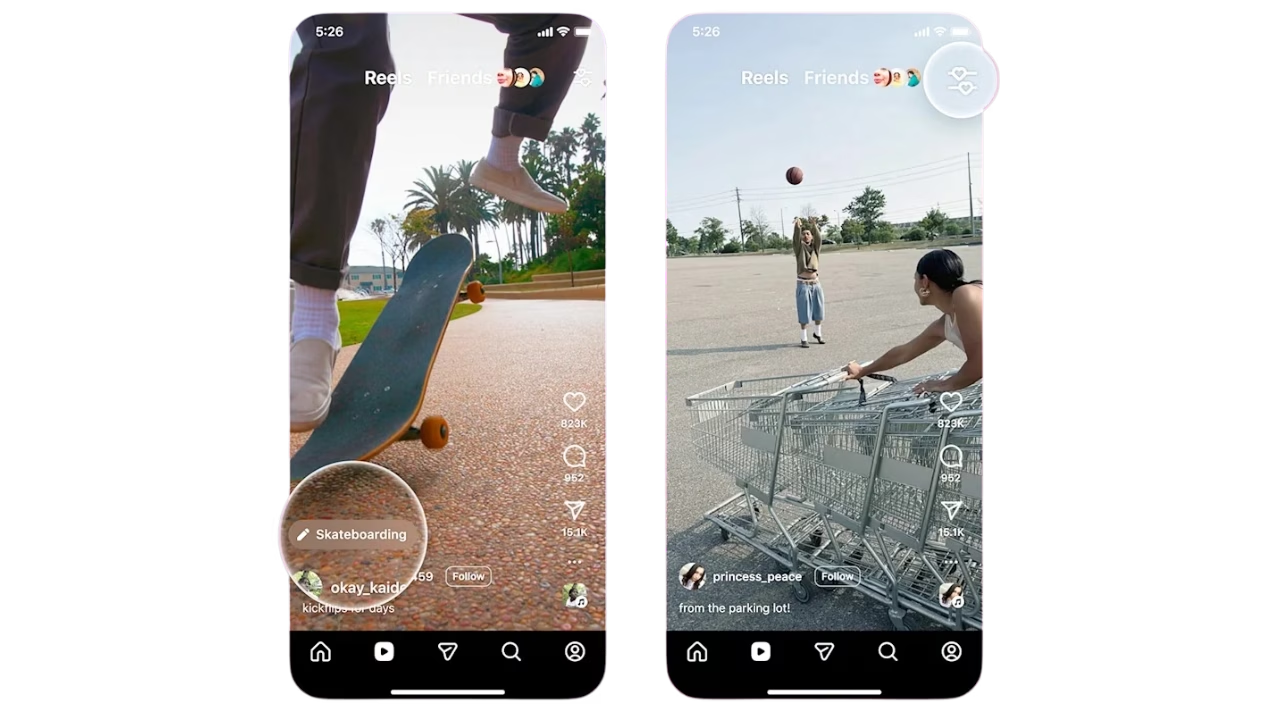
Instagram rolled out the "Your Algorithm" feature, giving users direct control over their Reels recommendations for the first time. But the real story is what happened behind the scenes: Instagram now enforces topic clarity more aggressively than ever.
How to access "Your Algorithm": Open Reels, tap the icon in the top right (two lines with hearts), view your interest topics.
You'll see a summary like "Lately you've been into creativity, sports hype, fitness motivation, and skateboarding." Below that, individual topics you can mark "show more" or "show less." You can also add topics Instagram missed.
The feature launched in the U.S. on December 10, 2025, with global English rollout planned. Instagram confirmed it will expand beyond Reels to Explore and other surfaces in 2026.
Why This Actually Matters
This isn't just a settings menu. It's a structural change to how Instagram categorizes content. If Instagram can't confidently categorize your content into specific micro-niches, it won't recommend it to users who've declared those interests.
For the fundamentals of how Instagram's algorithm works, including the three core ranking factors (watch time, likes per reach, and DM shares), read our complete Instagram algorithm guide. This article focuses specifically on December's changes.
The 5 Algorithm Changes Affecting Your Reach Right Now
1. Micro-Niche Categorization Is Now Mandatory
Instagram's AI groups content into hyper-specific categories instead of broad topics. Instead of "fitness," the algorithm now recognizes "home workout routines for beginners," "bodybuilding meal prep," and "yoga for flexibility" as separate niches.
Your last 9-12 posts determine your algorithmic category. Topic inconsistency triggers distribution penalties. If you post about travel, food, fashion, and productivity in the same week, Instagram struggles to place you in user feeds because those users have different declared interests.
Fix: Define 2-3 core content pillars. Maintain consistency for at least 12 posts before testing adjacent topics. Instead of "digital marketing tips," narrow to "Google Ads optimization for e-commerce brands."
2. Keywords Replaced Hashtags as Discovery Signals
Hashtags officially became a minor ranking signal in December 2024 when Instagram removed the ability to follow new hashtags. December 2025 formalized the shift to keyword-based discovery.
Instagram now scans keywords in your caption text, alt text, profile bio, and on-screen text in videos.
Fix: Use 3-5 relevant hashtags (they still help with search indexing), but prioritize natural keyword placement. If you sell project management software, use phrases like "task automation for teams" in captions instead of just #productivity.
3. Aggregator Accounts Got Crushed, Original Creators Won
December's update hit accounts that repost others' content without transformation. Multiple sources report:
Aggregator accounts: 60-80% reach decline
Original content creators: 40-60% reach increase
Instagram expanded its "too promotional" filter on Explore, flagging sales-focused content for limited distribution even if it performs well with followers.
Fix: Create original content or substantially transform what you share. Add unique commentary, compile multiple sources with analysis, or create derivative works. Simply reposting screenshots won't distribute like it did in 2024.
4. Early Access Reels for Followers Launched
Instagram introduced an option to show Reels exclusively to your followers for 24 hours before public release. Strong performance from followers during the exclusive window increases likelihood of broader distribution after public release.
Fix: Reserve this for your best content to maintain exclusivity value. Don't use for every Reel, or it loses special status.
5. Algorithm Reset Became More Accessible
Instagram's recommendation reset feature became easier to find. Go to Settings, Content Preferences, Reset Suggested Content to wipe your algorithmic history.
When to use: Agency accounts managing multiple client industries, accounts that pivoted business focus entirely, or if your Explore page is fundamentally broken for competitive research.
What Changed in Practice: Before vs. After December
5 Fixes to Implement This Week
1. Audit your niche positioning
Review your last 12 posts. Can you describe your content focus in one specific sentence? If not, Instagram can't either. Define 2-3 core pillars before posting again.
2. Replace hashtag strategy with keywords
Update your bio with specific keywords. Add alt text to your recent posts. Rewrite saved caption templates to include natural keyword phrases instead of relying on hashtags alone.
3. Check "Your Algorithm" as research
Open the feature in Reels and see which topics Instagram assigned you. This reveals how Instagram categorizes content in your industry. Add relevant topics to understand what competitive content looks like.
4. Find your shareable content patterns
Check Insights for posts with the highest "Sends" metric (under individual post, then Shares). Identify what made people share those specific posts. Create more content in that format.
5. Track the metrics that matter now
Set up simple tracking for: post date, format (Reel, carousel, single image), watch time %, sends per reach, engagement rate, non-follower reach. Compare weekly to identify what works under the new algorithm.
If you're managing multiple accounts or pulling Instagram data alongside other platforms, you can export manually from Meta Business Suite or automate with tools like Dataslayer to consolidate metrics in Google Sheets or Looker Studio.
FAQ: December 2025 Algorithm Update
How do I access Instagram's "Your Algorithm" feature?
Open Instagram Reels and look for the icon in the top right corner (two lines with hearts). Tap it to see topics Instagram thinks you're interested in. You can toggle topics to see more or less of them, add new topics, or share your algorithm to your Story. The feature launched in the U.S. on December 10, 2025, and is rolling out globally in English.
Are hashtags completely dead on Instagram?
Hashtags aren't dead but significantly deprioritized. You can't follow new hashtags (removed December 2024), and they're now a minor SEO signal rather than a discovery tool. Use 3-5 relevant hashtags per post for search indexing, but prioritize natural keyword placement in captions, alt text, and bio.
How many posts do I need to establish my niche?
Your last 9-12 posts determine your algorithmic category. Maintain consistency in those posts before testing adjacent topics. If you post inconsistently across different niches, Instagram struggles to place your content in user feeds because those users have declared different interests.
What happened to aggregator accounts in December?
Accounts that primarily repost others' content without transformation saw 60-80% reach declines. Instagram now labels reposted content and expanded its "too promotional" filter. Original content creators saw 40-60% reach increases as the algorithm prioritizes creation over curation.
Should I use the Early Access Reels feature?
Use it strategically for your best content, not every Reel. Strong performance from followers during the 24-hour exclusive window signals quality to the algorithm. Overuse reduces the exclusivity value that makes followers engage during early access.
What's the difference between algorithm reset and "Your Algorithm"?
Algorithm reset (Settings, Content Preferences, Reset Suggested Content) wipes your entire algorithmic history and starts fresh. "Your Algorithm" (Reels icon) lets you keep most interests but adjust specific topics with toggles. Reset is nuclear, use only if your feed is fundamentally broken. "Your Algorithm" is surgical, use for fine-tuning.
How do I know if the December update hurt my account?
Compare your metrics from November vs. December: Did non-follower reach drop significantly? Did engagement rate decline on similar content types? Check if Instagram categorizes your last 12 posts into one clear niche. If your positioning is vague or you primarily repost content, you likely felt negative impact.
What to Do Next
Instagram's December update signals a clear direction: the platform is becoming a search engine rather than a purely social feed. The accounts that win in 2026 will commit to specific micro-niches, create original content worth sharing via DM, and optimize for keyword discovery instead of hashtag reach.
Start with your next 12 posts. Make them clearly focused on one specific topic. Use natural keywords instead of vague descriptions. Track what gets shared via DM.
Want to automate Instagram performance tracking across multiple accounts? Try Dataslayer free for 15 days to connect Instagram Insights to Google Sheets, Looker Studio, BigQuery, or Power BI so you can measure the impact of these algorithm changes without manual exports.



