


You're here because something about Whatagraph isn't working. Maybe it's the €199/month minimum when you only need basic reporting. Maybe you tried exporting to Snowflake and realized they don't support it. Or maybe the credit-based pricing system feels unnecessarily complex for your team's needs.
This isn't a takedown. Whatagraph works well for specific teams, particularly agencies that prioritize visual polish and don't mind the premium. But if your data lives in a warehouse they don't support, or if their pricing model doesn't match how your team actually works, you'll need something different.
What you'll actually learn here:
- Why Whatagraph's credit system confuses teams (and what the actual costs are)
- The one limitation that matters most: data destinations
- When Whatagraph makes sense vs when it doesn't
- What Dataslayer does differently (and honestly, where it doesn't)
Why Teams Start Looking
Three patterns show up in verified reviews from the past year:
The credit system complexity
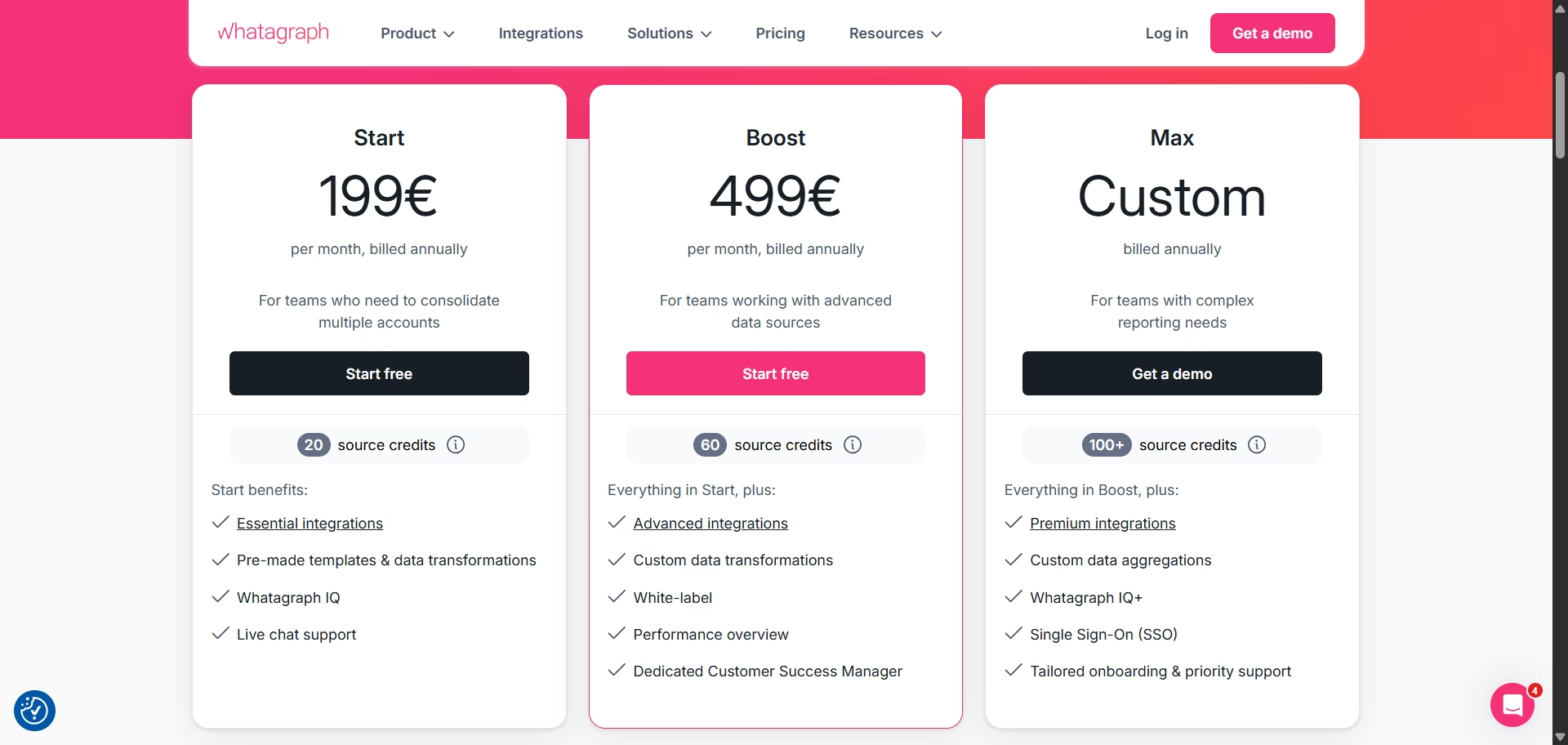
Whatagraph uses a credit-based pricing model: 1 credit = 1 connected account. According to Whatagraph's pricing page, their plans range from €199/mo (20 credits) to custom pricing for 100+ credits.
One agency owner wrote in a verified G2 review: "I found its pricing structure to be somewhat complex, especially for larger teams."
The challenge isn't just the credits themselves. It's that you need to calculate exactly how many accounts you'll connect across all platforms before you know your actual monthly cost. Connect 18 Google Ads accounts + 5 Facebook accounts + 2 GA4 properties = you need at least the Boost plan (60 credits) at €499/mo, even if you're only using 25 credits.
Export limitations
Whatagraph sends data to three places: BigQuery, Looker Studio, and Google Sheets. That's it. No Snowflake. No Redshift. No direct database connections.
If your analytics team works in Snowflake or your BI dashboards pull from a SQL database, you'll need to use manual exports or build custom ETL pipelines.
Connector reliability concerns
In a verified Capterra review, one user noted: "Many times the connectors get disconnected. This becomes a pain to keep relinking."
Other users report reliable connections, so your experience may vary depending on which specific connectors you use and your setup.
What Whatagraph Actually Costs
From their official site, they use credits: 1 credit = 1 connected account.
*Billed annually
Here's the problem: you pay for credit tiers, not for actual usage. If you need 25 accounts, you can't buy a 25-credit plan. You jump from 20 credits (€199/mo) to 60 credits (€499/mo), paying for 35 credits you don't use.
Real scenario: Marketing team needs to connect:
- 12 Google Ads accounts
- 6 Facebook Ads accounts
- 4 LinkedIn Ads accounts
- 3 GA4 properties= 25 total connections
With Whatagraph:
- Start plan (20 credits): Not enough
- Boost plan (60 credits): €499/mo = €5,988/year
- You're paying for 60 credits while using 25 (35 credits wasted)
The Real Differentiator: Where Your Data Can Go
This is the biggest practical difference between the two platforms.
Whatagraph exports to 3 destinations:
- BigQuery
- Looker Studio
- Google Sheets
Dataslayer exports to 10+ destinations:
Core destinations (unlimited rows): Looker Studio, Google Sheets, Excel, Power BI
Enterprise destinations (row limits per plan): BigQuery, Snowflake, Amazon Redshift, Amazon S3, Database (MySQL, PostgreSQL, SQL Server, Oracle, MariaDB), Google Cloud Storage, API Query Manager
Why This Actually Matters
If your stack includes Snowflake, Redshift, or direct database connections, Whatagraph can't support it. You'd need to export to BigQuery first, then build custom ETL to move data into your warehouse. That's added complexity, latency, and engineering time.
With Dataslayer, you get direct warehouse integration. Schedule it once, data flows automatically to where your analysts actually work.
Connectors: What They Actually Cover
Both platforms handle the major sources you'd expect.
Whatagraph: 55+ connectors organized in three tiers
- Essential (all plans): Google Ads, Facebook, GA4, Instagram, LinkedIn
- Advanced (Boost+): SEO tools, email platforms, ecommerce
- Premium (Max only): Enterprise advertising platforms
Dataslayer: 50+ connectors, choose by plan tier
- Starter: Choose any 3 connectors from 50+ available sources
- Advanced: Choose any 7 connectors from 50+ available sources
- Pro: Choose any 10 connectors from 50+ available sources
- Business: Custom connector limits
- Recent additions: Reddit Ads, AppsFlyer, Amazon DSP, Zoho, Criteo
The key difference: Whatagraph gates certain connectors behind expensive tiers (you can't use Premium connectors on Start plan). Dataslayer lets you choose any connectors you need, you just pay for how many you connect. Need Amazon DSP on Starter? You can use it, it just counts as one of your 3 connectors.
Whatagraph has 5 more total connectors. That might matter if one of those five is critical for you. For most teams, the difference isn't the connector count. It's whether you can access the connectors you need without being forced into expensive tiers.
Data Refresh: How Often Your Numbers Update
Whatagraph: According to their official integrations page, they offer "consistent 30-minute data refresh rates across all integrations, data sources, and accounts" across all pricing plans.
Dataslayer: Refresh schedules vary by plan:
- Starter: Daily
- Advanced: Hourly
- Pro: Hourly + Custom (including more frequent options)
- Business: Hourly + Custom (including more frequent options)
Different approaches for different needs. Whatagraph prioritizes consistency with frequent updates. Dataslayer ties refresh frequency to plan tier.
AI Features: Different Problems They Solve
Whatagraph IQ (included in all plans):
- Generates reports from prompts: "Build me a Facebook Ads report"
- Answers questions about your data
- Auto-writes performance summaries
- Creates themes from your logo
- Auto-fixes broken widgets
Focus: Report generation and formatting automation.
Dataslayer AI (available on Advance+ plans):
- MCP integration with Claude, ChatGPT, Mistral
- Dataslayer GPT
- Natural language queries that return actual data tables
- Example: "Show me Facebook campaigns with ROAS above 2.5" gets real table with campaign names, spend, revenue
Focus: Conversational access to actual campaign data.
Different tools for different problems. Whatagraph automates report building. Dataslayer lets you ask questions and get data back without building queries.
Where Whatagraph Falls Short (According to Users)
Only 3 export options
If your team uses Snowflake, Redshift, or database destinations, Whatagraph can't support it. You'll need a different solution or custom workarounds.
Credit-based pricing jumps
€199/mo to €499/mo jump means you often pay for credits you don't use. No flexibility between tiers.
Limited trial for testing
Their "Free" plan has 5 credits. You can't test advanced integrations, goals, or most real-world scenarios without upgrading first.
Dataslayer offers 15 days, full features, no credit card required. That's a meaningful difference when you're evaluating tools.
What Dataslayer Costs (New Pricing Feb 2026)
From our official pricing page:
*Billed annually (€348, €1,188, €3,588 per year). Monthly billing available at higher rates.
Key differences from Whatagraph:
- Transparent pricing (pay per connector, not credits)
- No wasted capacity (choose exact number of connectors you need)
- Core destinations: Unlimited rows
- Enterprise destinations: Row limits vary by plan (50K-2M rows/month)
- Customizable branded reports included in all plans
Quick Comparison
When Each One Makes Sense
Whatagraph works if:
- Visual report aesthetics are your top priority
- You only need BigQuery + Looker Studio
- €199-€499/mo fits your budget comfortably
- You want frequent data updates (30 min) regardless of plan
- You want a proprietary report builder with AI automation
Dataslayer works if:
- You use Snowflake, Redshift, or databases
- €348/year starting price matters
- You need flexibility: 10+ destinations vs 3
- You want to work in tools you already use (Power BI, Excel, Sheets)
- You prefer transparent connector-based pricing over credits
Common Questions
Can I test Dataslayer before canceling Whatagraph?
Yes. 15-day free trial, no credit card. Connect your actual accounts, build reports, verify the data matches. Many teams run both in parallel during testing to avoid reporting gaps.
What happens to historical data?
Depends on your destination. Google Sheets and Excel can backfill historical ranges. BigQuery and Snowflake store unlimited history. Whatagraph data stays in Whatagraph. Export before canceling if you need it.
How long does setup actually take?
About 1-2 hours total:
- List current sources: 15 min
- Connect in Dataslayer: 30-60 min
- Rebuild reports: 30-60 min
- Set automation: 15 min
Can I customize reports with my branding?
Yes. Dataslayer includes customizable branded reports in all plans. Add your logo, colors, and branding to client-facing reports without needing expensive tiers.
Where can I see real results from other teams?
Check out Dataslayer's customer case studies from agencies and marketing teams using the platform in production.
Switch in Less Than 2 Hours
What you get in the 15-day trial:
- Connect all 50+ data sources (Google Ads, Facebook, LinkedIn, TikTok...)
- Export to Snowflake, Redshift, BigQuery, or any database
- Create customizable branded reports with your logo
- Full AI features (MCP, GPT, natural language queries) in Advance+plans
- Dedicated support
No credit card. Cancel anytime. Keep your data.
Information verified from official sources: Whatagraph pricing, Whatagraph integrations, and Dataslayer pricing as of February, 2026. User reviews from verified G2 and Capterra sources.



