



Walk into any marketing team running TikTok ads in 2026 and ask "are you using Smart+ or Symphony?" and you will get one of three answers: "both", "I am not sure what the difference is", or a confident answer that is actually wrong. The confusion is not the marketer's fault. TikTok has positioned the two products as a unified AI ad stack, with Smart+ Symphony Automation, integrated workflows, and overlapping messaging that makes the distinction harder to extract than it should be.
This guide separates the two products cleanly. Smart+ is the campaign execution layer. Symphony is the creative production layer. They were built for different problems, they automate different parts of the workflow, and the April 2026 integration that put Symphony Automation inside Smart+ did not collapse them into one thing. It just made the boundary between them easier to miss. We cover what each one actually does, what the integration changed, the decision matrix for when to use which, the measurement implications nobody is talking about, and the playbook for teams adopting both.
What Smart+ actually does (and what it does not)
Smart+ is TikTok's end-to-end AI-powered ad buying solution. The simplest description: it automates the campaign execution layer. Targeting, bidding, placements, and budget allocation are handled by TikTok's algorithm rather than configured manually by the media buyer.
What Smart+ does:
- Targeting automation. Smart+ identifies and reaches audiences likely to convert without requiring manual audience segmentation. The system uses signals from your conversion event setup to find lookalikes and high-intent users at scale.
- Bidding automation. Bids are optimized in real time across the auction surface, with the system shifting spend to where conversions are cheapest.
- Placement automation. Inventory across the TikTok feed and ad surfaces is selected dynamically. Manual placement selection is the override, not the default.
- Creative testing and rotation. Smart+ scans the creatives you upload, identifies top performers, and rotates spend toward the assets driving conversions cheapest.
- Module-by-module control. A 2026 upgrade lets advertisers turn automation on or off at the module level, as detailed in TikTok's official Smart+ updates documentation. You can let the platform handle creative rotation while you manually set audience segments, or lock your bidding strategy while allowing the system to manage placements. The granularity is real.
What Smart+ does not do:
- Generate creative assets. Smart+ rotates and tests creatives you upload. It does not produce new video, image, or copy from scratch. That is Symphony's job.
- Replace conversion event setup. Smart+ requires functioning conversion tracking. Without clean conversion events firing, the optimization signal is too weak to drive results.
- Bypass the learning phase. Smart+ campaigns still go through an exit-learning period. The commonly cited industry threshold across automated campaign systems is around 50 conversion events per week, with Smart+ performance stabilizing once that volume is established.
- Eliminate the need for human creative judgment. The system rotates what is uploaded. If everything uploaded is mediocre, rotation cannot create excellence.
The performance claims TikTok publishes for Smart+ are concrete enough to be useful. TikTok's internal testing shows Smart+ outperforming manual campaigns in over 80% of test cases, with reported CPA reductions of 10-15% on average and individual brand case studies showing larger lifts. A documented Kooapps Smart+ case study published by TikTok For Business walks through the configuration and the result pattern. Other commonly cited brand examples in the public coverage include Bolt at -27% CPA + 40% more purchases in a 14-day A/B test, Dr. Squatch at 1.6x ROAS, and Fabletics at -11% CAC.
What Symphony actually does (and what it does not)
Symphony is TikTok's generative AI suite for creative production. Where Smart+ optimizes the buying layer, Symphony produces the actual videos that run through the buying layer.
What Symphony does:
- Generates video from scripts and prompts. Marketers can type a script or a text prompt and Symphony produces a video asset suitable for the Smart+ feed. The 2026 integration with ByteDance's Dreamina (Seedance 2.0 model) substantially improved the realism of generated video.
- Converts product images into video ads. Static product imagery is transformed into short-form video creative with motion, music, and pacing optimized for TikTok's feed dynamics.
- Generates creator-style avatars. AI-generated avatars in creator-aesthetic formats reduce the dependency on hiring real creators for every test cycle.
- Automatic Enhancements on existing assets. Symphony's enhancement layer takes existing video and image assets and optimizes video and image quality, resizes for TikTok's vertical 9:16 format, refreshes music or hooks, and translates plus dubs content into 50+ languages.
- Recommended Creatives. The system surfaces which existing creative assets are likely to perform best, and generates TikTok-ready videos directly from product URLs as a starting point for new tests.
What Symphony does not do:
- Buy media. Symphony produces assets. It does not target, bid, or allocate budget. That is Smart+'s job.
- Guarantee creative-market fit. AI-generated video is faster to produce, not automatically more effective than human-produced video. The assumption that generated creative always outperforms hand-crafted creative is not borne out in early operator results.
- Replace brand strategy. Symphony optimizes execution within whatever brand voice and visual identity you provide. It does not invent the strategy.
- Solve the volume-without-direction problem. Generating 50 variants does not help if you do not know what you are testing for or what defines success.
The April 2026 integration that put Symphony inside Smart+
The change that confused marketers was the April 2026 announcement that Symphony Automation was integrated directly into the Smart+ workflow, as documented by MediaPost's coverage of TikTok World 2026. Before that announcement, Smart+ and Symphony were two adjacent products. After it, marketers running a Smart+ campaign could trigger Symphony's generation and enhancement layer from inside the same campaign setup flow.
What the integration actually changed:
- Symphony tools are accessible inside Smart+. A Smart+ campaign can call Symphony's Recommended Creatives and Automatic Enhancements without leaving the campaign builder. The workflow is unified at the UI level.
- Symphony-generated assets enter the Smart+ creative rotation automatically. Assets produced through Symphony are eligible for the Smart+ scan-and-rotate logic by default, removing a manual upload step.
- The two products still optimize different things. The integration is at the workflow level, not the optimization level. Smart+ still optimizes spend allocation; Symphony still optimizes asset production. The distinction matters when you are diagnosing a campaign that is not performing.
What the integration did not change:
- You can still use Smart+ without Symphony. Manual creative upload remains supported. Teams with strong in-house creative production can run Smart+ purely on human-produced assets.
- You can still use Symphony without Smart+. Symphony can produce assets for manual campaigns, organic posts, or for export to other ad surfaces. It is not locked to the Smart+ workflow.
- The performance optimization model. Smart+ still rewards conversion-event-rich campaigns. Symphony still produces variant volume. The integration speeds the loop between them without changing what each one does.
The decision matrix: when to use which (and when to use both)
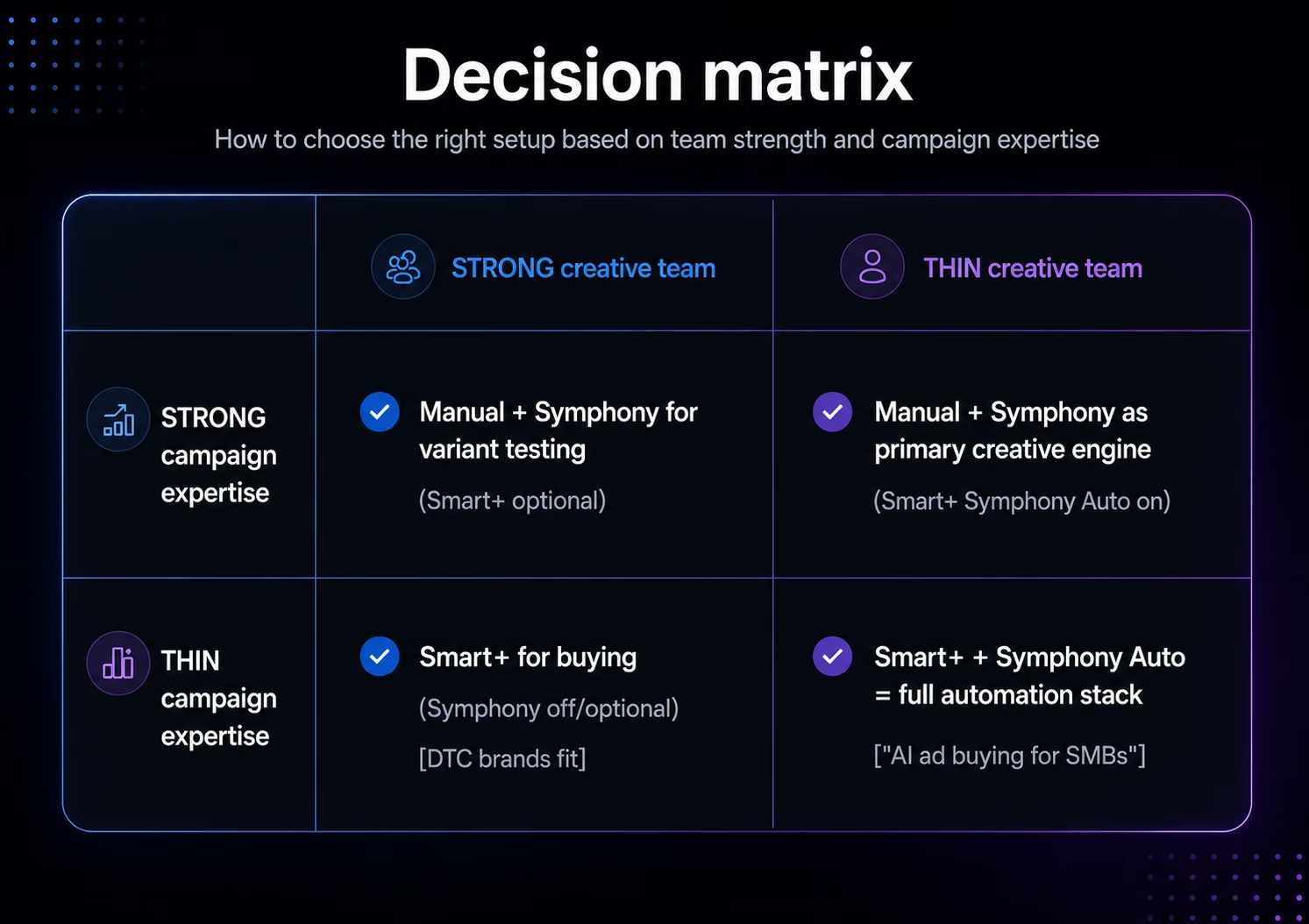
The clearest way to think about Smart+ versus Symphony is to ask two questions: do you have campaign management expertise, and do you have creative production capacity. The combination of answers points to the right starting configuration.
- Strong campaign expertise + strong creative team. Start with manual campaign structure, supplement with Symphony for variant testing at scale. The campaign execution decisions stay with humans; Symphony accelerates the creative test cycle. Smart+ becomes optional rather than default in this profile.
- Strong campaign expertise + thin creative team. Manual campaign management with Symphony as the primary creative engine. Smart+ Symphony Automation accelerates asset production without giving up control over targeting and bidding. This is the configuration for performance teams at brands that historically struggled to keep creative cadence.
- Thin campaign expertise + strong creative team. Smart+ for the buying layer, Symphony optional or off. The brand's creative team produces the assets; Smart+ optimizes the auction work. This profile fits most direct-to-consumer brands with strong in-house production and lean media buying teams.
- Thin campaign expertise + thin creative team. Smart+ with Symphony Automation enabled. The full automation stack. This is the configuration TikTok positions as "AI ad buying for SMBs" and is the most common starting point for brands new to TikTok at scale.
Operator-observed pattern: the failure mode for teams in the fourth quadrant (thin expertise, full automation) is not that Smart+ + Symphony performs badly. It is that the team has no diagnostic vocabulary for figuring out why a campaign is underperforming when both layers are automated. The system reports aggregate performance but the question "is this a creative problem or a buying problem?" becomes hard to answer without human judgment about both layers.
Where Smart+ and Symphony performance data actually lives
Both products generate substantial data, but the data lives in different places and the native TikTok Ads Manager view does not present it in a way that makes the Smart+-versus-Symphony diagnostic easy. This is the operational gap most teams hit in the first 60 days after switching to the full stack.
The data sources at play:
- Smart+ campaign performance. Standard ad metrics (spend, impressions, clicks, conversions, CPA, ROAS) at the campaign, ad group, and ad levels. Available through the TikTok Ads Manager UI and through the TikTok Marketing API.
- Smart+ automation module state. Which automation modules are turned on (targeting, bidding, placements, creative). Reported in the campaign settings but not surfaced cleanly in performance reporting. This matters because comparing "Smart+ with full automation" against "Smart+ with manual targeting" against pure manual campaigns requires knowing which automation state each campaign was in.
- Symphony-generated asset metadata. Which assets in a campaign were Symphony-generated versus uploaded directly. Available but requires a breakdown by asset source that is not the default Ads Manager view.
- Symphony enhancement signals. When Symphony enhanced an existing asset (changed music, refreshed hooks, translated to another language), the enhancement metadata informs which version performed best. Available through asset-level reporting.
- TikTok Insights organic data. If Symphony-generated assets are also published organically on the brand's TikTok account, the organic performance signals (views, engagement, follower growth) live in TikTok Insights, separate from the Ads Manager paid reporting.
The dashboard that makes the Smart+ + Symphony diagnostic tractable pulls TikTok Ads data and TikTok Insights data into the same workspace, segments by automation module state and asset source, and presents the full picture in a single view. Both connectors are available from Dataslayer: the TikTok Ads connector pulls the paid layer, and the TikTok Insights connector pulls the organic layer. Both run on unlimited rows in Looker Studio across all paid plans.
Operator-observed pattern: teams that build the cross-source view in the first 30 days of running the full stack diagnose creative-versus-buying performance issues at least twice as fast as teams that work from the native TikTok Ads Manager UI. The native view is sufficient for aggregate performance; it is not sufficient for the "which layer is the problem?" question.
The migration playbook for teams adopting both
For teams moving from a manual TikTok campaign structure to a Smart+ + Symphony stack, the migration is not a single switch. It is a phased rollout that protects performance while the team builds confidence in the automation layers.
- Phase 1, weeks 1-2: baseline measurement. Before changing anything, run the manual campaigns for two weeks with clean conversion event tracking and document the CPA, ROAS, and conversion rate baselines. The baseline becomes the comparison reference for everything that follows.
- Phase 2, weeks 3-4: Smart+ with manual creative. Switch to Smart+ for campaign execution while continuing to upload creative manually. This isolates the impact of buying-layer automation from the impact of creative-layer automation. If performance improves, the buying automation is working; if performance dips, you know to look at the buying layer first.
- Phase 3, weeks 5-6: layer in Symphony for variant testing. Once Smart+ is stable, add Symphony Automatic Enhancements to refresh existing assets and Symphony Recommended Creatives to surface new variants. Treat each Symphony-generated asset as a test against a manually-produced control.
- Phase 4, weeks 7-8: full stack with module-level controls. Once the team has measured both automation layers separately, opt into the full Smart+ + Symphony Automation stack with the module-level controls configured based on what the previous phases revealed. If creative testing was where you got the biggest lift, leave that module on full automation; if targeting performed best in a partial-automation configuration, lock it there.
- Phase 5, ongoing: measurement discipline. The full stack is most efficient when paired with a reporting discipline that separates Smart+ buying-layer performance from Symphony creative-layer performance. The cross-source dashboard pattern covered above is what makes this sustainable past the initial rollout.
Common pitfalls and how to avoid them
Operational details that trip teams up after the campaigns are running.
- Treating Smart+ as a black box. The system reports aggregate performance but the diagnostic information is available if you query it. Teams that accept aggregate-only reporting lose the ability to optimize beyond the algorithm's defaults.
- Generating Symphony variants without a hypothesis. Volume is not strategy. Each Symphony-generated variant should test a specific hypothesis (a different hook, a different CTA, a different creator aesthetic). Variants without hypotheses produce data that is hard to act on.
- Ignoring the organic feedback loop. Symphony-generated assets that also publish organically generate additional signal about audience response. Teams running Smart+ + Symphony as a pure paid play miss the organic performance data that disambiguates "audience response" from "auction efficiency."
- Skipping the baseline measurement phase. Without a documented manual baseline, performance changes after enabling automation are unmeasurable. Teams that skip Phase 1 frequently report "performance improved" with no defensible number behind the claim.
- Conflating Smart+ with Symphony in reporting. A campaign report that bundles "TikTok AI performance" without separating buying-layer and creative-layer effects buries the diagnostic signal. The two products optimize different things; the reporting should reflect that.
- Underestimating the learning phase. Smart+ campaigns need conversion event volume to optimize. The 50-events-per-week threshold is a guideline, not a hard rule, but campaigns below the threshold typically underperform until the volume catches up.
- Over-reliance on AI-generated avatars early. Symphony's creator-style avatars are convincing but not always more effective than real creators. The cost savings on creator hiring are real, but performance parity is the more honest framing than performance superiority.
FAQ
Is Smart+ the same as a Performance Max campaign?
No. Smart+ is TikTok's AI-powered campaign solution, conceptually similar to other platforms' automated campaign types but distinct from any Google Ads campaign type. The naming similarity to Google's product can cause confusion in cross-platform conversations.
Can I run Symphony without running Smart+?
Yes. Symphony is a creative production tool that produces assets usable in any TikTok ad campaign type, including manually-configured campaigns. The April 2026 integration made Symphony accessible from inside the Smart+ workflow, but Symphony remains usable as a standalone creative tool.
How much creative volume should I generate with Symphony per campaign?
The standard guidance is 5-10 variants per audience segment, with each variant testing a distinct hypothesis (hook, CTA, visual style, music). Volume beyond that point usually produces diminishing returns because the Smart+ algorithm needs sufficient conversion data per variant to identify winners, which becomes harder when the variant count is too high.
Does Smart+ work without Symphony-generated creative?
Yes. Smart+ rotates and tests whatever creative you upload, regardless of whether it was produced by Symphony or manually. Teams with strong in-house creative production can run Smart+ on entirely human-produced assets with no functional loss.
How do I separate Smart+ buying-layer performance from Symphony creative-layer performance in reporting?
Pull the TikTok Ads data into a dashboard tool and segment by asset source (Symphony-generated vs manually-uploaded) and by Smart+ automation module state (which modules are on or off). Then build phase-specific views that separate creative performance from buying performance. The cross-source dashboard pattern covered in this article is the most common implementation.
What is the learning phase for Smart+ campaigns?
Smart+ campaigns require sufficient conversion event volume to fully optimize. The widely cited threshold is around 50 conversion events per week, after which the algorithm stabilizes and produces consistent performance. Campaigns below that threshold typically perform inconsistently until volume catches up.
Conclusion
Smart+ and Symphony are different products solving different problems on the TikTok ad surface. Smart+ automates the campaign execution layer. Symphony automates the creative production layer. The April 2026 integration unified them at the workflow level without collapsing them at the optimization level. Teams that understand the distinction adopt both confidently and diagnose performance issues efficiently. Teams that treat the two as a single black-box AI stack lose the ability to optimize beyond the algorithm's defaults.
The measurement implication is the part most coverage of TikTok's AI stack misses. The native TikTok Ads Manager view is sufficient for aggregate performance reporting; it is not sufficient for the "which layer is the bottleneck?" diagnostic. Building the cross-source dashboard early, in the first 30 days of running the stack, is what makes the difference between "we are running Smart+ + Symphony" and "we are getting the most out of Smart+ + Symphony."
Start a free Dataslayer trial to connect TikTok Ads, TikTok Insights, GA4, and 50+ other marketing sources into Looker Studio in under 15 minutes, with unlimited rows on Looker Studio across all paid plans. For teams running vertical-video paid placements across platforms, our companion guide on YouTube Shorts Ads covers the equivalent measurement build for the Google side of vertical video. And if your team is preparing for TikTok's other 2026 deadline, our guide to the TikTok Custom Identity F.I.R.S.T. transition covers the identity-layer changes that affect how Smart+ conversion events are tracked.



