


PPC reporting in 2026 is harder than at any point in the last decade. Cookieless tracking strips 25-35% of conversions before they ever reach Google Ads or Meta. GA4's data controls consolidation on June 15, 2026 handed Consent Mode the keys that Google Signals used to hold, changing what counts as a measurable conversion. AI Overviews now appear on 80% of informational queries according to Semrush's analysis of 200,000 keywords, hollowing out the top-of-funnel traffic that paid-media attribution models assumed would always be there. And the tools most marketers learned reporting on, the Google Ads native dashboard and a weekly CSV export to a slide, no longer reflect how decisions are actually made.
This guide is the playbook we use at Dataslayer to help marketing teams report on paid media in this new environment. It covers the seven KPIs that actually move the needle in 2026, the three distinct reports every team needs, the most expensive mistakes we see in client audits, ready-to-clone templates for every major channel (Google Ads including Performance Max, Meta, LinkedIn, TikTok, Criteo, Campaign Manager 360), and how to automate the whole stack.
Why PPC reporting is harder than ever in 2026
Four forces have broken the way PPC reports were built between 2015 and 2022. If your reporting stack predates these shifts, your numbers are misleading by default.
1. Cookieless reality. Safari's Intelligent Tracking Prevention, Chrome's third-party cookie deprecation completed in early 2025, and the steady rise of ad blockers mean that pixel-based conversion tracking now misses roughly 25-35% of conversions across paid channels (operator-observed in Dataslayer audits, 2026). Google Ads partially fills the gap with modeled conversions, but model accuracy depends on first-party data quality. Most teams now need server-side tracking and CAPI per platform just to keep their numbers honest.
2. Cross-platform reality. Marketing teams now run paid campaigns across multiple platforms simultaneously, with five or more common in mid-sized teams. The same dollar of spend shows up in Google Ads, Meta, LinkedIn, TikTok, and Reddit reports with overlapping attribution claims, and no single platform's UI shows you the actual blended cost per acquisition. We covered the operational consequences of this in our cross-platform ad budget optimization guide.
3. AI Overviews and zero-click search. Semrush's July 2025 study of 200,000 keywords found that 80% of desktop AI Overviews appeared on informational queries, hollowing out the top-of-funnel traffic that fed paid attribution multi-touch models. Seer Interactive's longitudinal study measured a 61% decline in organic click-through rates on AIO-triggered queries over a 15-month window. LinkedIn's own data goes further: AI Overviews cut non-brand B2B clicks by up to 60% in certain topics despite stable rankings. For PPC reporting, this means commercial-intent searches still drive paid clicks but the informational searches that used to seed the funnel (and that multi-touch models gave organic credit for) no longer produce the traffic the model expects. Paid attribution looks artificially efficient on the way up, then collapses when you scale spend.
4. Privacy-first measurement. Google's Consent Mode v2 is mandatory in the EU, Meta's Engage Through Attribution requires explicit re-mapping of conversion events, and Apple's expansion of Mail Privacy Protection has gutted email-based attribution. Reporting that does not surface modeled versus measured conversions overstates real performance by 15-25% (operator-observed in Dataslayer audits, Q1-Q2 2026).
The combined effect: a KPI set and dashboard template designed in 2020 will give you a confidently wrong picture in 2026. Everything below is rebuilt for the current landscape.
“Dataslayer saves me a lot of time by automating multichannel reports in Looker Studio. Being able to combine data from different sources in the same table is key for cross-analysis and client presentations. The data loading and updating speed is quite good.”
— Verified User in Marketing and Advertising, Small-Business agency · G2 Review · Dec 22, 2025 · 5.0/5
The 7 PPC KPIs that actually matter in 2026
Most PPC dashboards track 30+ metrics. The problem is not that those metrics are wrong, the problem is that 23 of them do not drive decisions. The seven below do.
1. Return on Ad Spend (ROAS)
What it is. Revenue generated by paid campaigns divided by ad spend. It is the north-star efficiency metric for any paid campaign tied to direct revenue (ecommerce, transactional B2B).
Formula. ROAS = Revenue from ads / Ad spend
Healthy ROAS by industry (Dataslayer audit benchmarks, Q1-Q2 2026, across 200+ accounts):
For external benchmarks, WordStream publishes annual Google Ads industry benchmarks that complement these.
2026 nuance. Platform-reported ROAS is 15-30% inflated vs. real ROAS in most multi-platform accounts (Dataslayer audit observation, 2026), because each platform attributes modeled conversions to itself first. Cross-platform deduplication and incrementality testing (see KPI 7) are the only way to know your true ROAS. If you are scaling spend based on platform-reported ROAS alone, you are flying blind.
2. Customer Acquisition Cost (CAC)
What it is. The total cost of acquiring a new paying customer, including ad spend, sales effort, content production, and platform fees. CAC is what your CFO actually cares about, not CPA.
Formula. CAC = (Ad spend + Sales costs + Content costs + Tool costs) / New customers acquired
Why it differs from CPA. Cost per acquisition typically only includes ad spend divided by conversions. CAC includes the full go-to-market cost. A campaign with a $50 CPA can have a $400 CAC once you account for the SDR who closes the lead. CFOs run the business on CAC, marketing teams optimize CPA. You need both, on the same dashboard, in sight of LTV.
Healthy CAC:LTV ratio. 1:3 or better. If your LTV is $1,500, your blended CAC ceiling is $500. Below 1:3 means you are growing unprofitably. Above 1:5 usually means you are under-investing in growth.
3. Conversion rate by funnel stage
What it is. The percentage of users who advance from one funnel stage to the next, measured at every transition: impression → click, click → page view, page view → micro-conversion, micro → macro conversion.
Why it matters. A 3% landing-page conversion rate is meaningless unless you know the click-through rate above it and the lead-to-customer rate below it. A campaign with low CTR but high page CVR is a creative problem. A campaign with high CTR but low page CVR is a targeting-or-landing-page problem. The funnel diagnostic tells you which lever to pull.
What to report. For every campaign, show the four-stage funnel as a single tracked metric, not four disconnected ones. The shape of the funnel tells the story.
4. Cost per Qualified Lead (CQL)
What it is. The cost to generate one sales-qualified or marketing-qualified lead, as defined by your sales team. CQL is the right KPI for B2B and lead-generation businesses where the macro conversion (closed deal) sits weeks or months downstream.
Formula. CQL = Ad spend / Qualified leads (per your CRM definition)
Why CPA is misleading for B2B. Cost per lead can drop 40% while CQL doubles if the campaign is bringing in junk traffic that converts on the form but never qualifies. Report CQL alongside CPA. If they move in opposite directions, you have a quality problem your CPA is hiding.
5. View-through conversions (and what to use now that they are broken)
What it is. A conversion that happens after a user sees an ad but does not click it. Critical for awareness-heavy campaigns (display, video) where the user remembers your brand and comes back later through direct or organic.
The 2026 problem. Pixel-based view-through tracking has been gutted. Safari blocks it entirely, Chrome's tracking protection limits it to seven days, and ad blockers strip it on roughly 30% of impressions.
What to use instead.
- Modeled conversions. Google Ads and Meta both model what view-through likely produced based on user cohorts. Imperfect but better than zero.
- Server-side conversion APIs. Meta CAPI, Google Enhanced Conversions, and TikTok Events API push first-party data server-side, recovering 10-25% of lost conversions in typical accounts. Our cookieless tracking guide walks through the per-platform setup.
- Incrementality testing. Geo-split tests where you turn off awareness campaigns in one region and measure the lift difference (see KPI 7).
Report view-through conversions explicitly labeled as modeled, never mixed with click-through conversions.
6. Quality Score (Google Ads) and platform equivalents
What it is. Google's 1-10 rating of how relevant your ads, keywords, and landing pages are to a user's query, based on expected CTR, ad relevance, and landing page experience. Per Google's own documentation, Quality Score is a diagnostic, not an input in the ad auction. However, the underlying signals (expected CTR, relevance, landing page experience) directly drive Ad Rank and therefore cost.
Why most teams report it wrong. Most dashboards show Quality Score at the keyword level as a static number. The actionable view is Quality Score trend over time, segmented by the three sub-components. A drop from 8 to 6 across an ad group is a leading indicator of CPC increases that show up 4-6 weeks later. The relationship is widely documented in agency practice: WordStream's Quality Score guide covers improvement levers in detail.
Equivalents on other platforms.
- Meta: Quality Ranking, Engagement Rate Ranking, Conversion Rate Ranking (the three "above average / average / below average" labels).
- LinkedIn: relevance score per campaign, surfaced in the Audit Log.
- TikTok: Ad Quality Score in the new attribution dashboard.
Report these as leading indicators of next quarter's CPC, not as vanity numbers.
7. Cross-platform incrementality
What it is. The actual additional revenue or conversions your paid campaigns generated, compared to what would have happened without them. This is the metric platform-reported ROAS does not give you.
Why it matters. Add up the platform-reported ROAS of every channel you run, and the number will exceed your actual blended ROAS by 30-50% in most multi-platform accounts (Dataslayer audit observation, 2026). Every platform takes credit for the same conversion. Branded search Google Ads campaigns are the worst offender: 60-80% of those clicks would have come through organic anyway, but Google Ads reports 100% of the conversions.
How to measure it without a data science team.
- Geo holdout tests. Turn off the campaign in one region for two weeks, measure the revenue gap, scale the difference back up.
- Brand campaign pause tests. Pause branded search for one week per quarter, measure the recovery of direct/organic conversions.
- Time-based holdouts. Turn off all paid for one weekend per quarter, measure baseline conversions.
For deeper attribution methodology choices behind incrementality, see single-touch vs multi-touch attribution and the Google Ads + GA4 attribution dashboard guide for how to surface the discrepancy in your reporting.
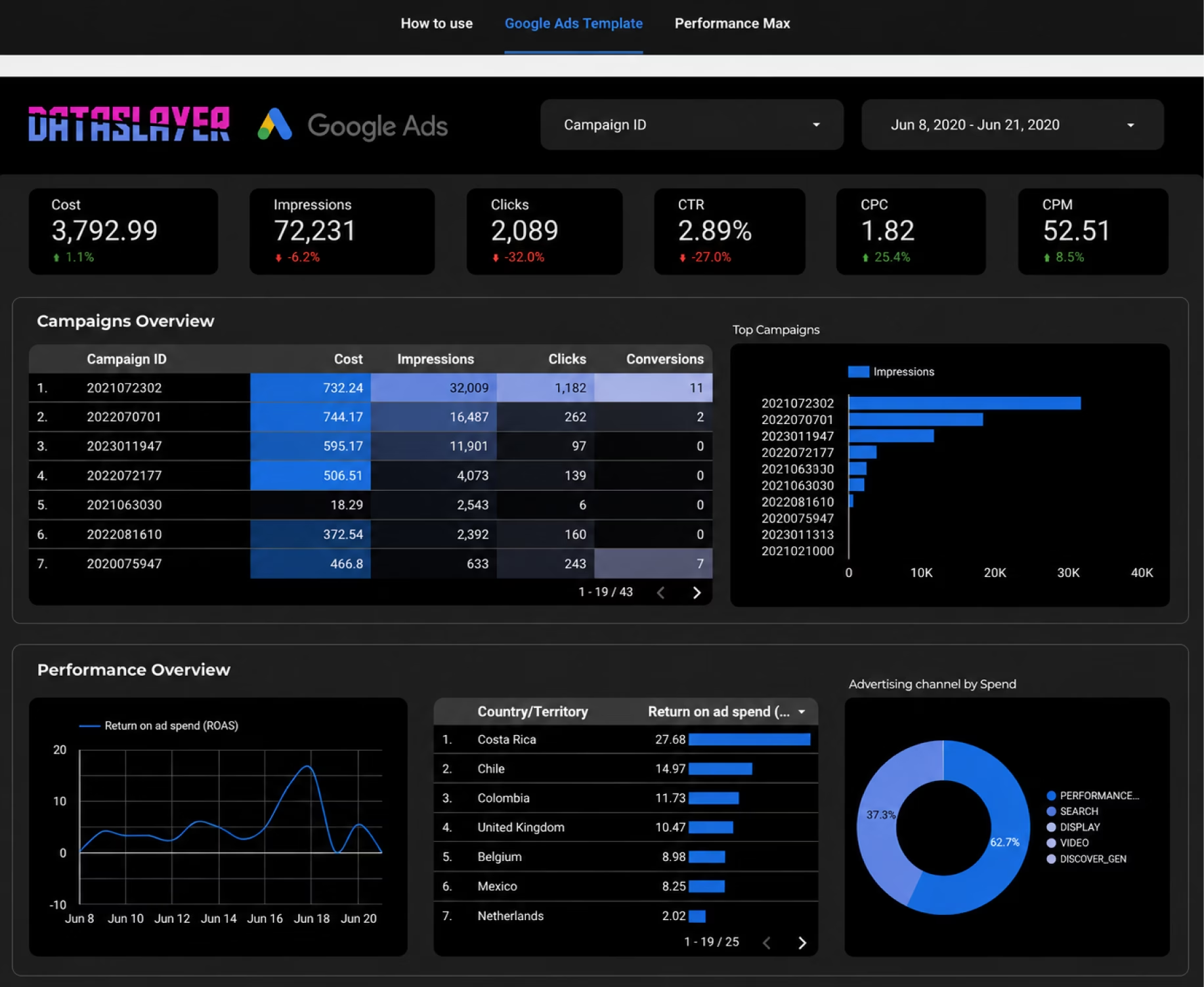
Clone the Google Ads dashboard with all 7 KPIs in one click
Dataslayer's Google Ads Paid Media Performance Dashboard ships with ROAS, CAC, conversion rate, Quality Score trend and the rest of the KPIs above as a ready-to-clone Looker Studio template. Connect your Google Ads in 10 minutes with no credit card required.
Try Dataslayer FreeThe 3 PPC reports every marketing team needs (in-house vs agency)
The most common reporting mistake we see is one report trying to serve three audiences. The CMO does not need to see daily pacing, and the campaign manager does not need a quarterly LTV chart. Build three reports, refresh them at different cadences, send them to different people.
Report 1: Daily ops report (5-10 minute review)
Audience. The campaign manager, the one or two people running the campaigns day to day.
Cadence. Every weekday morning, ideally before 9am.
Purpose. Spot anomalies and fires before they cost money. This is the air traffic control view, not the strategy view.
What to include (max 10 widgets):
- Spend pacing vs. budget (with 7-day burn rate)
- CPC trend, last 14 days, by platform
- Campaigns in learning phase (Meta) or low data status (Google)
- Top 5 spending campaigns yesterday, sorted by spend
- Top 5 underperformers yesterday (high spend, no conversions)
- Bid cap or budget cap warnings
- Ad approval and policy issues
- Conversion volume vs. 7-day average (anomaly alert)
- Account-level CPM trend (creative fatigue signal)
- Yesterday's spend vs. yesterday a week ago
Format. A single Looker Studio dashboard or Google Sheet, max one screen, no scrolling. The point is 5-minute consumption.
Report 2: Weekly performance report (30 minute review)
Audience. The marketing team, the head of marketing or growth, sometimes a CMO who likes detail.
Cadence. Every Monday 10am for the previous week.
Purpose. Understand what happened, why, and what to change this week.
What to include:
- KPI scorecard (5-7 KPIs) with week-over-week change, color-coded
- Top performing campaigns by ROAS or CPA
- Bottom performing campaigns by ROAS or CPA
- New creative performance vs. control
- Audience and placement performance breakdown
- Search query insights (Google Ads) or interest insights (Meta)
- 1-2 paragraph narrative: "what happened, what we are changing this week"
Format. Dashboard plus a written summary. The narrative is the deliverable, the dashboard is the backup. Without the narrative, the report is just numbers.
Report 3: Monthly strategic report (30 minute executive presentation)
Audience. CEO, CMO, head of sales, board (occasionally).
Cadence. First Friday of the following month.
Purpose. Tie paid media to business outcomes (pipeline, revenue, LTV), justify the budget, surface strategic decisions for executive input.
What to include:
- ROAS by channel, blended ROAS (with incrementality adjustment), trend
- CAC by channel, blended CAC, CAC:LTV ratio
- Contribution to pipeline or revenue, by channel and by campaign cluster
- Budget allocation summary and recommendations
- 3-5 decisions made this month and why
- 1-2 strategic questions for the leadership team to weigh in on
Format. 8-10 slide deck plus a linked dashboard for the executive who wants to drill down. The deck is what gets discussed in the meeting. Without a deck, you will spend 20 minutes explaining the dashboard instead of debating strategy.
In-house vs. agency: the cadence is the same, the audience changes
For agencies running 10-50 PPC clients, the same three-report structure applies but the audience shifts:
The biggest agency-specific addition is the monthly strategic deck doubling as a renewal/upsell touchpoint. Build it for the client decision-makers who will decide whether to keep paying you next quarter, not for the marketing operator who already knows the campaign details. For the full agency workflow (white-labeling, per-client tabs, automated client emails), see our guide on automating multi-client dashboards across all your clients.
Summary: how the three reports compare
For vertical-specific dashboard layouts (SaaS, DTC, agency, B2B, content), see our 5 marketing dashboard examples by vertical guide.
7 common PPC reporting mistakes that cost you money
Every quarter we audit dozens of marketing teams' PPC reporting. The seven below show up in roughly 80% of audits, each one costing real budget.
Mistake 1: Tracking too many KPIs. Adding a metric feels safe. Removing one feels like you might miss something. Cost: roughly 6-10 hours per week of analyst time spent on numbers nobody uses, and a signal-to-noise ratio so low that real changes go unnoticed. Fix: cap your dashboards at 7-10 metrics. Anything not actively used to make a decision in the last quarter gets cut.
Mistake 2: Single-touch attribution in a multi-touch world. Default Google Ads and Meta reporting credits the last platform-click. Easy to read, mostly wrong. Cost: over-spending on bottom-funnel channels and under-investing in awareness, which produces a slow decline in top-of-funnel pipeline that takes 6-9 months to show up. Fix: use data-driven attribution in GA4 as a baseline, run quarterly incrementality tests to validate.
Mistake 3: Not normalizing currencies and time zones. Each platform reports in its own time zone and currency. Pulling them into one dashboard without normalization gives you Wednesday's Google Ads spend mixed with Tuesday's Meta spend. Cost: real ROAS calculations off by 5-15%. Fix: set every connector to UTC in your data layer, convert currencies daily not monthly.
Mistake 4: Comparing CTR across platforms. Each platform defines CTR differently. Google Ads counts ad clicks. Meta counts engagement (likes, comments, expansions) as clicks in some campaign objectives. LinkedIn counts video views as engagement. Cost: strategic mis-allocation when teams shift budget based on metrics that are not comparable. Fix: use platform-specific CTR for in-platform optimization, use landing-page-arrival rate (sessions / impressions) for cross-platform comparison.
Mistake 5: Ignoring cohort analysis. Most reporting compares last week to the week before, which hides slow degradation. Cost: a campaign delivering $40 CAC in January and $55 CAC in June looks "stable" week-over-week but has actually degraded 37%. Fix: add a monthly cohort view showing CAC and ROAS for users acquired each month.
Mistake 6: Not separating brand from non-brand spend. It is annoying to set up branded-keyword carve-outs, so most teams skip it. Cost: branded search has 10-15× ROAS in most accounts, but most of those conversions would have happened through organic anyway. Mixing brand into blended ROAS makes non-brand campaigns look 2-3× worse than they are, leading to under-investment in new customer acquisition. Fix: report brand and non-brand as separate lines on every report, run a brand-pause test quarterly.
Mistake 7: Manual CSV exports. Our audits consistently show 4-6 hours per week of analyst time wasted, a 5-8% error rate on manual reports (typos, wrong date ranges, missed accounts), and a 1-2 day delay before data is usable. Any team running more than two paid channels and spending more than $5,000 per month should automate. Cost of automation typically pays for itself in saved analyst time within 2-3 months.
How to automate PPC reporting cross-platform
Automation is three layers. Most teams only think about the third one (the dashboard) and end up with broken reporting because the first two are unstable.
DATA INGESTION → TRANSFORMATION → VISUALIZATION
- Data ingestion is how raw data leaves the ad platforms and arrives in your storage or reporting tool. Native connectors, API pulls, or third-party tools.
- Transformation is where currencies normalize, time zones align, campaign names map to a clean taxonomy, and calculated fields (blended ROAS, CAC) are computed.
- Visualization is the dashboard, slide, or sheet stakeholders look at.
The four common approaches:
If you are weighing third-party tools specifically, our deep dives compare 12 Supermetrics competitors with transparent pricing, Funnel.io alternatives after their February 2026 price hike, and Adverity vs. transparent-pricing alternatives.
Which stack for which team
Solo marketer, 1-2 platforms, under $10k/month spend. GA4 + native platform reports + a single Google Sheet you maintain manually. Automation overhead is not worth it yet.
Small marketing team, 3-5 platforms, $10-100k/month spend. Third-party tool connecting all platforms to Looker Studio. Setup takes 30-60 minutes per platform, dashboards refresh automatically. This is the highest-ROI tier for automation.
Agency, 10-50 clients. Third-party tool with white-label dashboards and scheduled reporting. The unit economics flip from "we'd need 3 analysts" to "1 analyst handles everything." Our marketing agency reporting guide walks through flat-pricing vs. per-user economics.
In-house team, 50+ campaigns or $500k+/month spend. Data warehouse (BigQuery is the default choice) ingesting from a third-party tool's BigQuery export, then Looker Studio or Tableau on top. The third-party tool handles platform APIs (which break constantly), the warehouse gives you unlimited history and the ability to run incrementality models.
Connect Google Ads, Meta, LinkedIn and TikTok to one dashboard in 10 minutes
Dataslayer connects 50+ marketing sources to Looker Studio, Google Sheets, BigQuery, or any other destination. Unlimited rows on paid plans, flat pricing with no per-user fees, 15-day free trial with no credit card.
Try Dataslayer Free“Dataslayer.ai has been a game-changer for our Looker Studio integration, especially when native connectors fall short. It reliably pulls in all our clients’ data without the usual headaches. Within just a day or two, I was able to build a comprehensive 8-page reporting template that we use across clients.”
— Sapphire C., Digital Marketing Manager · G2 Review · Feb 18, 2026 · 5.0/5
PPC reporting software: how to choose the right platform in 2026
By this point you have KPIs, report types, and an automation blueprint. The next question is which PPC reporting software actually fits your team. This section is a decision guide, not a leaderboard: the right platform depends on how many ad channels you run, whether you need agency-grade client reporting, and what stack you already own.
What is PPC reporting software?
PPC reporting software pulls performance data from paid ad platforms (Google Ads, Meta Ads, LinkedIn Ads, TikTok Ads, Microsoft Ads, and others), normalizes it into a shared schema, and pushes it into dashboards, spreadsheets, or a warehouse for analysis. The good ones handle three problems most spreadsheets cannot: cross-platform blending, scheduled refresh at scale, and consistent metric definitions across channels that name conversions differently.
There are three categories worth knowing:
- Native dashboards (Google Ads UI, Meta Ads Manager). Free, real-time, but each platform sees only its own data.
- Data connector platforms (Dataslayer, Supermetrics, Funnel.io, Improvado). They pull data into Looker Studio, Google Sheets, Excel, BigQuery, Snowflake, or Power BI. This is where 90% of teams live in 2026.
- Warehouse-first stacks (BigQuery Data Transfers, Fivetran, custom ETL). Enterprise-grade, higher ceiling, higher setup cost.
PPC metrics your reporting software must track
Before you compare vendors, agree on the PPC metrics you actually need. Cross-platform PPC metrics fall into five buckets:
- Spend and pacing. Cost, cost per day, budget delivery percentage, forecast to end of month.
- Efficiency. CPC, CPM, CPA, ROAS, MER, contribution margin per platform.
- Volume. Impressions, clicks, conversions, revenue, purchases, leads.
- Quality and creative. CTR, thumbstop rate, hook rate, ad relevance, quality score, engaged sessions.
- Attribution and modeled. Reported vs modeled conversions, view-through vs click-through, blended CAC, incrementality lift.
The PPC metrics list matters because reporting software that cannot expose all five buckets forces you back into per-platform silos, which is exactly what you are trying to escape.
Best PPC reporting software compared (2026)
Rather than a top-10 listicle, here is a decision matrix based on the four questions that actually predict a good fit.
| Situation | Recommended category | Why |
|---|---|---|
| Solo marketer, 1-2 platforms | Native dashboards + GA4 | Zero cost, no learning curve. Only worth adding a connector when you cross to 3+ platforms. |
| In-house team, 3-8 platforms | Data connector platform | Dataslayer, Supermetrics, and Funnel.io all cover this. Pricing tiers matter more than feature parity. |
| Agency, 10+ clients, monthly reports | Connector platform + Looker Studio templates | Client-branded reports need duplicable templates. Look for per-account pricing, not per-user. |
| Enterprise, warehouse-first | BigQuery Data Transfer or Snowflake + Power BI | Governance and data lineage beat plug-and-play. Higher setup cost, lower per-row cost at scale. |
Google Ads reporting: native tools vs third-party
Google Ads reporting deserves its own note because most teams start here. The native Google Ads UI covers 80% of single-channel needs: real-time metrics, custom columns, saved reports, and scheduled email exports. Where native breaks down is cross-account rollups, cross-channel blending with Meta or LinkedIn, and clean handoff to a warehouse for LTV analysis.
Third-party Google Ads reporting software (Dataslayer, Supermetrics, Improvado) solves those three problems specifically: multi-account aggregation, cross-platform blending, and destinations beyond Google's own ecosystem (Excel, BigQuery, Snowflake, Amazon S3). If your Google Ads reporting stops at "how did last week perform" you can stay native. If it needs to answer "which channel actually drove pipeline" you have already outgrown it.
PPC reporting software for agencies vs in-house teams
Agencies and in-house teams often end up on different tools because their pricing math is different. In-house teams optimize for team seats and platform coverage. Agencies optimize for the number of client accounts and the ease of duplicating a report across accounts without rebuilding it from scratch.
For agencies, three features matter more than they seem:
- Per-account or per-connector pricing instead of per-seat. Client rosters scale faster than headcount.
- Report templates that can be cloned with a new account and rendered in the client's brand colors.
- White-label PDF export for clients who still want a monthly email attachment.
Whichever category you fall into, the sanity check is the same: your PPC reporting software should reduce the number of tabs your team has open, not add another one.
Free PPC report templates by channel
Skip the design work and start from a template. Every template below is free, lives in Looker Studio (formerly Data Studio), and connects to your own ad accounts in minutes with Dataslayer.
Cross-platform PPC reporting template
For teams running paid media on more than one channel (which is most teams in 2026), the right starting point is a cross-platform dashboard that unifies spend, conversions, CPA and ROAS across every channel in one view.
The PPC Advertising Dashboard template covers 7 advertising platforms (Google Ads, Facebook Ads, Bing Ads and four others) in a single dashboard, with platform-level breakdowns, blended KPIs, and configurable date ranges. Best for marketers who want a single page they can share with leadership without explaining "why does Google Ads not include Meta."
Google Ads reporting template (including Performance Max)
Google Ads is the single biggest reporting headache in 2026 because Performance Max campaigns now make up a substantial share of spend in most accounts, and PMax's "black box" attribution makes it impossible to see what is actually working without dedicated reporting.
Google Ads Paid Media Performance Dashboard (new for 2026) ships with all 7 KPIs from the framework above plus a dedicated Performance Max tab. For deeper drill-down by campaign, ad group and keyword, the Google Ads Campaigns, Ad Groups & Keywords Overview and Google Ads Overview Report templates handle the granular structure view.
Performance Max reporting: what to add to your standard Google Ads dashboard. PMax campaigns hide audience and placement allocation behind the Google AI optimizer, which means the default Ads Manager view of a PMax campaign is essentially a black box. To make PMax accountable, add these specific widgets to any Google Ads dashboard:
- Asset group performance. PMax shows performance at the asset-group level if you query the right field. Surface each asset group's spend, conversions, and ROAS separately so you can identify which asset groups are pulling the campaign average up or down.
- Search themes performance. Since April 2026, PMax exposes audience exclusions, budget reporting, and demographic breakdowns. Use search themes (the closest thing PMax has to "keywords") to see which themes are driving conversions and which are wasting budget.
- Channel mix attribution. PMax distributes spend across Search, YouTube, Display, Discover, Gmail, and Maps. Use the channel allocation breakdown to see where PMax is spending your budget. It is not always where you would expect.
- New vs. returning customer split. PMax can over-attribute conversions from existing customers (cheap to convert, no incremental revenue). Pull the new-customer flag and report ROAS for new customers separately.
- Brand vs. non-brand asset group separation. If PMax is allowed to run on brand terms, it will, and it will claim those conversions. Either exclude brand from PMax entirely or carve out a separate brand asset group you can pause-test.
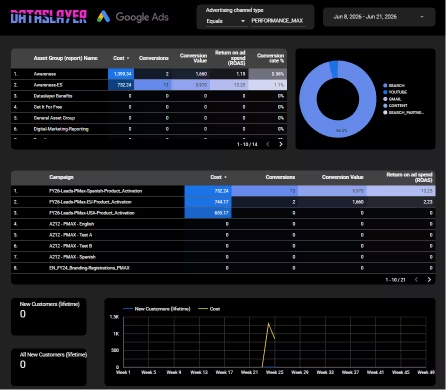
This Performance Max view is the single biggest reporting gap in most Google Ads accounts in 2026, and the one that produces the largest budget reallocation decisions when surfaced.
Meta Ads (Facebook & Instagram) reporting template
Meta reporting in 2026 has two layers: paid campaign performance (Facebook Ads and Instagram Ads spend, ROAS, placement mix) and organic page performance (Pages and Instagram engagement). Most marketing teams want both in one dashboard to see paid-organic interaction.
Facebook Public Data Performance Dashboard (new for 2026) covers the competitive and share-of-voice view, plus organic Facebook page performance. For paid Meta Ads specifically, the Facebook Ads Overview Report and Facebook Ads Efficiency Report templates focus on KPI tracking and creative efficiency.
For the full reporting workflow including Conversions API reconciliation, placement mix (Reels and Stories on their own view), and Advantage+ vs. Manual campaign separation, see our companion guide on Meta Ads to Looker Studio with 3 dashboards you can build this week.
LinkedIn Ads reporting template
LinkedIn Ads is the B2B paid channel where CPL and CQL diverge the most, because junk B2C leads can sneak in through poor targeting and inflate the front-end conversion rate. The right LinkedIn dashboard separates campaign-level KPIs from lead-quality KPIs.
LinkedIn Company Pages Performance Dashboard (new for 2026) covers the organic LinkedIn Pages side, which pairs with paid LinkedIn campaigns to show organic-paid overlap (a key reporting gap for B2B). For paid LinkedIn Ads specifically, the LinkedIn Ads Report template covers CTR, conversion rate, CPC, and campaign-level performance.
TikTok Ads reporting template
TikTok Ads reporting in 2026 has to handle Smart+ (TikTok's AI campaign type, equivalent to Meta Advantage+) and Symphony (TikTok's creative AI) separately from manual campaigns. Mixing them in account-level averages produces misleading KPIs.
The TikTok Campaign Performance template gives a quick overview of campaign-level performance. For the deeper Smart+ vs Symphony reporting framework, see our guide on TikTok Smart+ vs Symphony in 2026 and the dedicated TikTok ads reporting metrics that actually drive ROAS breakdown.
Ecommerce PPC reporting template
Ecommerce PPC reporting needs three things the general templates do not provide: revenue and AOV by product, attribution between Google Ads and Google Analytics (which always disagree), and post-purchase metrics like LTV and refund rate per channel.
The Ecommerce PPC Dashboard template joins Google Analytics and Google Ads data into one view focused on revenue, ROAS, AOV, and product-level performance.
Programmatic & display reporting template (Campaign Manager 360)
Teams running display and programmatic alongside Search need a separate reporting layer because Campaign Manager 360's data model (placements, sites, creatives) does not map cleanly to Google Ads' structure (campaigns, ad groups, keywords).
Google Campaign Manager 360 Paid Media Performance Dashboard (new for 2026) handles the placement-level reporting CM360 requires, with viewability, completion rate, and post-impression conversion metrics that Search dashboards do not include.
Retargeting reporting template (Criteo)
Retargeting reporting requires separating prospecting from retargeting cleanly, because mixing them inflates retargeting ROAS (it gets credit for users prospecting brought in) and depresses prospecting ROAS (it loses credit for users who later convert via retargeting).
Criteo Paid Media Performance Dashboard (new for 2026) handles Criteo's specific retargeting workflow with audience segmentation, frequency capping reports, and product-level performance for retail media network campaigns. For ad-hoc Criteo analysis, the Criteo Campaign Performance template gives a quick overview.
Complete your reporting stack: organic and analytics templates
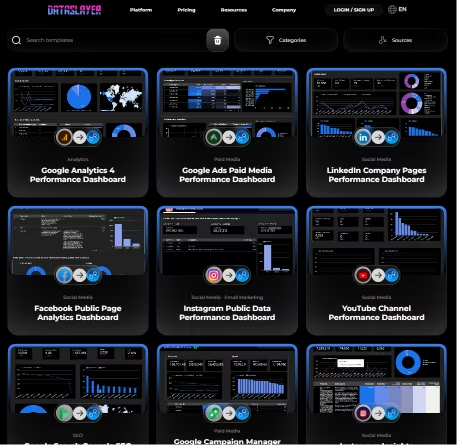
The PPC templates above pair naturally with organic and analytics dashboards to give marketing leadership the full picture. Dataslayer's June 2026 Performance Dashboard series also includes Google Analytics 4 Performance Dashboard, Google Search Console SEO Performance Dashboard, YouTube Channel Performance Dashboard, Instagram Insights Performance Dashboard, and Instagram Public Data Performance Dashboard, all in the full template gallery.
PPC reporting FAQ
What is PPC reporting? PPC reporting is the practice of measuring, analyzing, and communicating the performance of paid advertising campaigns across search, social, and display platforms. A complete PPC report covers efficiency metrics (ROAS, CAC), funnel metrics (CTR, conversion rate), and business outcomes (pipeline, revenue, LTV) for a defined time period and audience.
What KPIs should I include in a PPC report? In 2026, the seven KPIs that drive decisions are ROAS, Customer Acquisition Cost, conversion rate by funnel stage, Cost per Qualified Lead for B2B, view-through conversions (including modeled), Quality Score (and platform equivalents), and cross-platform incrementality. Vanity metrics like impressions, raw clicks, and ad-position ranking should be deprioritized unless they are diagnostic for one of the seven above.
How often should I send PPC reports? Three cadences, three audiences. Daily ops reports for campaign managers, weekly performance reports for the marketing team, monthly strategic reports for executive leadership. Trying to serve all three audiences with one report is the most common reporting failure.
What is the difference between PPC metrics and PPC KPIs? Every PPC KPI is a metric, but not every metric is a KPI. KPIs are the small number of metrics (typically 5-10) that you actually use to make decisions. Metrics is the broader set of numbers the platforms produce. CTR is a metric. ROAS tied to a quarterly target is a KPI.
How do I report on PPC across multiple platforms? Three options. Native platform reports pulled manually and combined in a spreadsheet, viable for 1-2 platforms. GA4's native cost import for the platforms it supports. A third-party automation tool like Dataslayer that connects to 50+ platforms and unifies the data in Looker Studio, BigQuery, or another destination.
How do I report on Performance Max campaigns specifically? Performance Max default reporting hides asset-group, search-theme, and channel allocation behind the Google AI optimizer. To make PMax accountable, add five widgets to your Google Ads dashboard: asset-group performance, search-themes performance, channel-mix attribution, new vs. returning customer split, and brand vs. non-brand carve-out. Each surfaces a different aspect of the "black box" PMax presents in default reporting.
What is a good ROAS in 2026? Benchmarks vary by industry. Ecommerce healthy ROAS is 3:1 (mass) to 4.5:1 (luxury), top quartile 5-7×. B2B SaaS is 2.5:1 healthy, 4:1 top quartile. Finance and insurance run 4:1 healthy, 6.5:1+ top quartile. Travel and hospitality see the highest ROAS, 5:1 healthy and 8:1+ top quartile. Important: platform-reported ROAS overstates real ROAS by 15-30% due to attribution inflation, so always cross-check with incrementality tests.
What are the best PPC reporting tools in 2026? The right tool depends on team size and platform count. For solo marketers on 1-2 platforms, native dashboards plus GA4 are sufficient. For teams running 3+ platforms, third-party automation tools dominate the market, with Dataslayer, Supermetrics, and Funnel.io being the most commonly evaluated. For enterprise teams with custom modeling needs, BigQuery + Looker Studio (or Snowflake + Tableau) is the standard. Our 12 Supermetrics competitors comparison and Funnel.io alternatives review cover the trade-offs in detail.
How do I handle cookieless tracking in PPC reports? Three practices together. Implement server-side conversion APIs on every platform that supports them (Meta CAPI, Google Enhanced Conversions, TikTok Events API, LinkedIn CAPI). Our server-side tracking guide walks through each. Report modeled conversions separately from measured conversions, never blended into the same column. Run quarterly incrementality tests (geo holdouts or brand-pause tests) to calibrate the gap between platform-reported and real-world results.
Wrapping up
PPC reporting in 2026 demands three things that the 2020 playbook did not: honest treatment of cookieless attribution (modeled vs. measured, separately), cross-platform incrementality (because the sum of platform ROAS is a lie), and audience-specific reports (daily for ops, weekly for team, monthly for executives). Cut your KPI list to the seven that drive decisions, automate the data pipeline so analysts can spend their time on analysis instead of CSV exports, and treat your reports as the artifact that informs decisions, not as the proof you did work.
The three reports above cover the audiences that matter. The seven KPIs above cover the decisions that matter. The templates above cover every major channel. The automation layer ties them together so the data is always one click away from the question.
“Dataslayer has been the ultimate tool for our agency’s Looker Studio integration. The reliability is unmatched — where native connectors often fail or time out, the Dataslayer connector consistently pulls in all my clients’ data without a hitch.”
— Kim F., Agency Owner · G2 Review · Dec 29, 2025 · 5.0/5
Clone the full PPC reporting stack in one click
Get the Google Ads, Meta, LinkedIn, TikTok, Criteo and Campaign Manager 360 Performance Dashboards as a connected stack, refreshing automatically with your data. 15-day free trial, no credit card, unlimited rows on Looker Studio across all paid plans.
Start Free Trial


