


.avif)
Google's Consent Mode V2 became mandatory for EEA and UK advertisers in March 2024. If you're still struggling with data gaps or haven't implemented it properly, you're bleeding conversions. Only 31% of users accept tracking cookies on average, which means nearly 70% of your traffic is invisible to traditional tracking. But conversion modeling, Enhanced Conversions, and server-side tagging can recover 30-50% of those lost conversions while keeping you compliant. This guide shows you exactly how.
The Current State of Google Ads Tracking
Google rolled out Consent Mode V2 in late 2023 to comply with Europe's Digital Markets Act, with enforcement starting March 2024. Nearly two years later, many advertisers are still dealing with incomplete conversion data, shrinking audience lists, and campaigns optimizing on partial information.
The fundamental problem is consent rates. Cookie Script's research shows that globally, only 31% of users accept tracking cookies. Poland leads at 64% acceptance, while the US sits at 32%. For most advertisers, two-thirds of your traffic denies cookies.
Consent Mode V2 added two parameters to the original four: ad_user_data (controls whether user data gets sent to Google for advertising) and ad_personalization (governs remarketing). Without these signals properly configured, you lose the ability to capture new EEA users in GA4 audience lists, share audiences with Google Ads for remarketing, or get accurate conversion attribution.
Google enforces this strictly. Accounts without proper consent signals get blocked from audience building and remarketing. Your Performance Max campaigns suffer because they can't build accurate audience insights. Smart Bidding strategies optimize on incomplete data. Your ROAS reports don't reflect reality.
Basic vs. Advanced Consent Mode: Pick the Right One
Most advertisers default to Basic Mode because it seems simpler. That's usually wrong.
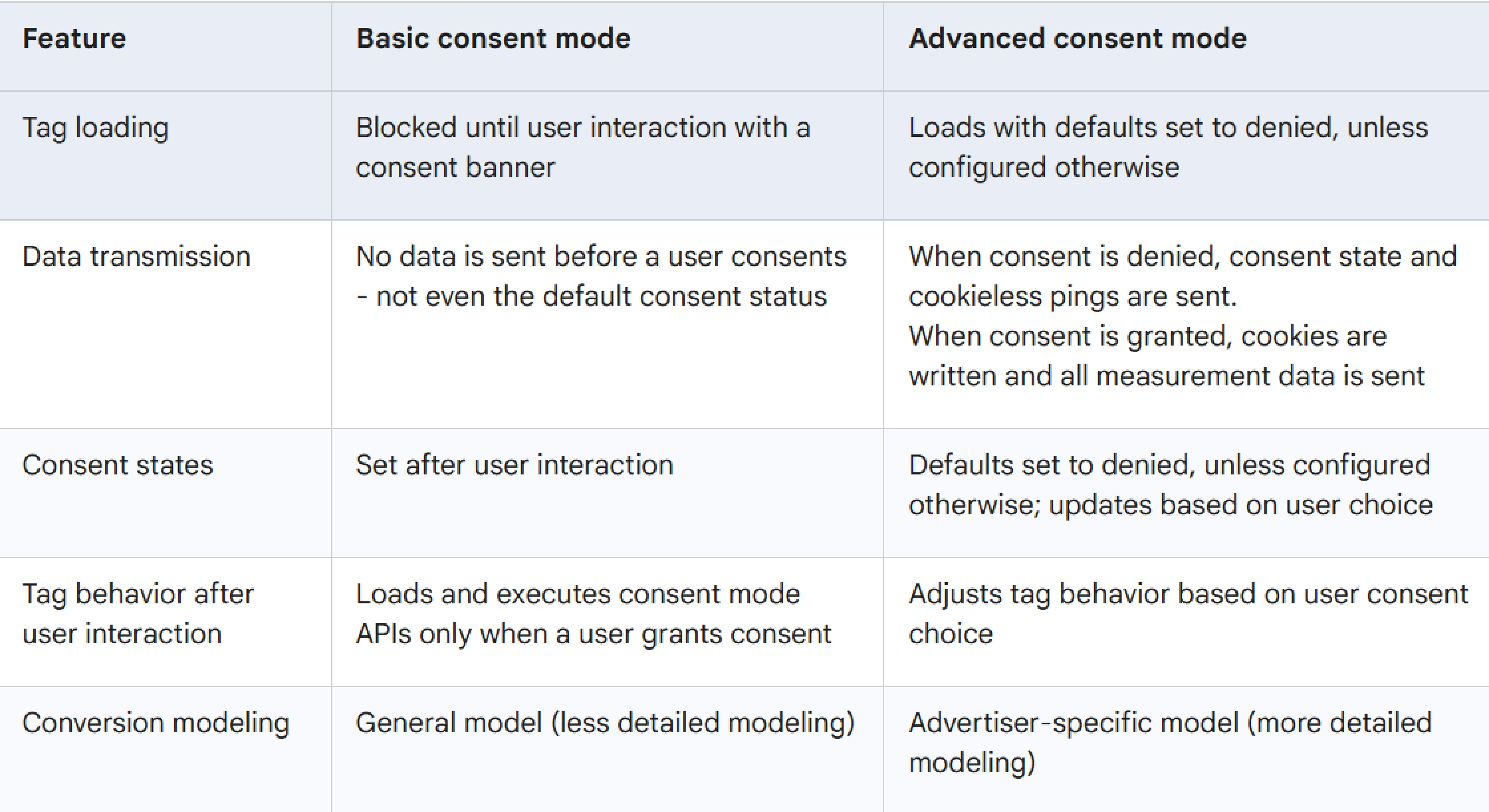
Basic Consent Mode blocks Google tags completely until users accept cookies. Someone denies consent? No data goes to Google, not even anonymized signals. It's straightforward to explain to your legal team, but you get zero conversion modeling benefits from the 69% of users who deny tracking. You're optimizing campaigns based on 31% of your traffic.
Advanced Consent Mode loads Google tags immediately but adjusts behavior based on consent status. When users deny cookies, tags send "cookieless pings", anonymized data like location, pages visited, and conversion events, but no cookie IDs that link to individuals.
Why this matters: Google's AI uses patterns from consented users to estimate conversions from unconsented traffic. Advertisers typically see 15-25% uplift in reported conversions from modeling alone. Without it, you're flying blind on most of your traffic.
Requirements for modeling to work: Advanced Consent Mode implemented, at least 700 ad clicks over 7 days per country and domain, seven full days of data collection, and a reasonable consent rate (typically 20%+ helps with model accuracy).
Use Advanced Mode unless your legal team has specific objections to cookieless pings. The accuracy improvement is too significant to leave on the table.
Start With Enhanced Conversions
If you only implement one thing from this guide, make it Enhanced Conversions. It sends hashed first-party data (email addresses, phone numbers) to Google Ads. This helps Google match conversions to logged-in Google users even when cookies are blocked or deleted.
Safari and Firefox limit cookie lifespans to 1-7 days. Someone clicks your ad Monday, browses Tuesday, and converts Saturday? The cookie might be gone. Enhanced Conversions can still attribute that conversion using the email they provided at checkout. Most advertisers see 5-25% conversion uplift after implementation.
Three Ways to Set It Up
Automatic Collection takes 10 minutes. Go to Google Ads > Goals > Conversions, select your conversion action, edit settings, and under "Enhanced conversions" select "Automatic." Google detects and hashes email fields automatically. Works if you have standard form fields.
Manual Code gives you control over exactly what data gets sent:
gtag('event', 'conversion', {
  'send_to': 'AW-CONVERSION_ID/CONVERSION_LABEL',
  'email': 'user@example.com',
  'phone_number': '+1234567890'
});
Google hashes this before transmission. Use this for custom checkout flows where automatic detection fails.
Google Tag Manager is most flexible. Create Data Layer variables for user data, add Enhanced Conversions settings in your Google Ads Conversion tag, map variables, publish. Takes 30-45 minutes but works with complex tracking setups.
Verify it's working: Goals > Conversions > Summary in Google Ads, click your conversion action, check Diagnostics tab for "Enhanced conversions: Active." You want 50%+ of conversions enhanced for optimal results. Below 30% means your implementation needs fixing.
Server-Side Tagging: Worth the Complexity?
Server-side tagging moves data collection from browsers to your server, bypassing ad blockers entirely. Instead of loading tracking pixels in visitors' browsers, data flows through your server first.
The upside: 10-30% more accurate data because ad blockers can't interfere, faster page loads since processing happens server-side, extended cookie lifespans in restrictive browsers, and complete control over what data gets shared with Google.
The downside is setup complexity. You need a Google Cloud Platform account, a server container in Google Tag Manager, a custom subdomain (like analytics.yoursite.com), and proper tag configuration in both web and server containers.
Google Cloud Run typically costs $10-50/month depending on traffic. Lower traffic sites often stay under $20. If you're processing 100,000+ events monthly, expect closer to $50.
Don't want to deal with infrastructure? Managed services like Stape.io, TAGGRS, or Elevar handle server-side tagging for $20-50/month. They manage everything, you just connect accounts.
Is it worth it? If you're seeing significant gaps between Google Ads and GA4 conversion data, server-side tagging often fixes attribution issues. If you're running Performance Max campaigns that need accurate conversion data for optimization, the data quality improvement directly impacts ROAS. For advertisers spending $10,000+/month on ads, the improved tracking typically pays for itself within the first month.
Let Conversion Modeling Fill the Gaps
Conversion modeling is Google's AI estimating conversions from users who denied consent. It works by analyzing patterns from the 31% who accepted cookies, then estimating what the other 69% likely did.
For modeling to activate, you need Advanced Consent Mode implemented, at least 700 ad clicks over 7 days per country/domain pair, seven full days of data collection, and sufficient consent rate (typically 20%+).
Check your status in Google Ads > Goals > Conversions > Summary. Select a conversion action and look at "Tracking status" for the arrow icon. Hover, you should see "Conversion modeling for consent mode is active." Click "View Impact" for uplift data.
Google shows modeling uplift for four weeks after modeling starts. You'll see observed conversions (tracked with cookies), modeled conversions (AI estimates), and uplift percentage. Most advertisers see 10-30% modeling uplift, though higher consent rates provide better training data.
Low uplift (below 10%)? Check that Consent Mode fires on every page using Google Tag Assistant, confirm default consent states are "denied," verify your banner appears before tags fire, and make sure you're hitting 700+ clicks weekly per country/domain.
Verify Everything Works in 5 Minutes
Use Google Tag Assistant for the fastest verification. Install the Tag Assistant Companion extension, go to Tag Assistant, enter your URL, click Start.
Before accepting cookies: Find the earliest "Consent" event in Tag Assistant. Check "API Call" section, ad_storage, analytics_storage, ad_user_data, and ad_personalization should all show "denied."
After accepting cookies: Find the "Consent Update" event. Those parameters should now show "granted." Check the Tags tab to confirm Google Ads tags fired after consent and were blocked before.
Three green checks means you're good. The Google support docs have detailed troubleshooting if something's off.
Track What Actually Matters
Once everything's running, monitor these weekly: total conversions (observed plus modeled), modeling uplift percentage trends, cookie acceptance rates by country and traffic source, and how CPA and ROAS compare to your baseline before implementation.
If you're tracking Google Ads alongside Facebook, TikTok, and LinkedIn, manual exports get tedious fast. You're logging into four platforms, exporting CSVs, normalizing date ranges and currency, building reports. That's 8-12 hours monthly for most marketing teams according to HubSpot's 2024 State of Marketing Report.
Automating this, connecting all platforms to Google Sheets, Looker Studio, or Power BI, saves that time. When new platforms launch (like ChatGPT advertising), having consolidated reporting infrastructure means you're not starting from scratch.
Always compare year-over-year, not just before/after implementation. A 15% drop in November vs. October might be seasonality, not tracking problems.
Mistakes That Kill Performance
- Setting default consent to "granted" defeats the purpose and violates GDPR. Default to "denied" always.
- Only implementing on conversion pages won't work. Consent Mode fires on every page, landing pages, product pages, blog posts, not just checkout.
- Choosing Basic Mode when Advanced would work means losing all modeling benefits. Unless your legal team specifically prohibits cookieless pings, use Advanced.
- Skipping Enhanced Conversions leaves easy recovery on the table. Enhanced Conversions handles cookie-deleted conversions, Consent Mode handles denied users. Different problems, both critical.
- Ignoring server-side tagging might be fine today, but Safari and Firefox already block third-party cookies entirely. Chrome delayed full deprecation but it's coming. Server-side tagging future-proofs your setup.
US Advertisers: Do You Need This?
Consent Mode V2 isn't legally required for US-only advertisers in 2025, but implementing it still helps. Safari and Firefox restrict cookies globally, not just in Europe. State privacy laws in California (CPRA), Colorado (CPA), Virginia (VCDPA), and Connecticut create US-based data requirements. Conversion modeling improves accuracy regardless of legal mandates.
Plus you're future-proofing. Several states have privacy laws taking effect in 2026-2027. Better to implement now than scramble when enforcement starts.
If you're US-only: use Advanced Mode for modeling benefits, implement Enhanced Conversions, and monitor state-level regulations as they evolve.
Budget-Smart Implementation
Not everyone can implement everything simultaneously.
Start free (4-6 hours): Implement Advanced Consent Mode plus automatic Enhanced Conversions. Expected recovery: 10-20%.
Add $20-50/month (8-12 hours total): Manual Enhanced Conversions setup for better control and managed server-side tagging. Expected recovery: 20-30%.
Go full stack at $50-200/month (16-24 hours total): Self-hosted server-side tagging, custom tracking logic, advanced audience strategies. Expected recovery: 30-50%.
Most advertisers should knock out the free tier this week. Spending $10,000+/month on ads? The second tier pays for itself in improved attribution within the first month.
FAQ
My consent rate is only 20%. Will modeling even work?
Yes, but accuracy suffers below 20% consent. Focus on improving your banner design, neutral language like "We use cookies to improve your experience" performs better than aggressive "Accept all cookies now!" popups. Consider offering granular choices (analytics vs. advertising) rather than all-or-nothing.
Can I turn off modeling for specific campaigns?
No. Modeling applies at the account level for all campaigns using the same conversion actions. You can't selectively disable it. If you're uncomfortable with modeled conversions, you'll need to use Basic Consent Mode, but you'll lose those conversions entirely.
Does Enhanced Conversions work for phone call conversions?
Yes, if you capture phone numbers during the call tracking process. Most call tracking platforms can pass hashed phone numbers to Google Ads. Check your platform's documentation for Enhanced Conversions support.
My modeling uplift was 25% the first month but dropped to 10%. What happened?
Seasonal changes in consent rates. Holiday shoppers often accept more cookies (they want the purchase to go smoothly). Summer traffic might be more privacy-conscious. Also check if you changed your consent banner design or implementation, any changes affect modeling accuracy.
Can I use a consent banner that pre-selects "Accept all"?
Legally risky in Europe. GDPR requires affirmative consent, pre-checked boxes typically don't qualify. Most consent management platforms default to nothing selected for compliance. Check with your legal team.
Does server-side tagging help with iOS tracking limitations?
Yes, but not dramatically. iOS restrictions affect attribution across platforms, not just browser tracking. Server-side tagging helps with cookie persistence and ad blocker bypassing, but can't solve device-level privacy controls.
Take Action This Week
Consent Mode V2 changed Google Ads tracking permanently, but proper implementation recovers 30-50% of lost conversions. The three-part strategy: Advanced Consent Mode for modeling (15-25% uplift), Enhanced Conversions for cookie-deleted recovery (5-25% uplift), and server-side tagging for bypassing browser restrictions (10-30% accuracy improvement).
Start with Advanced Consent Mode and automatic Enhanced Conversions this week, both are free and take 4-6 hours total. Add server-side tagging next month if budget allows.
Consolidating Google Ads data alongside Facebook, LinkedIn, TikTok, or other platforms? Try Dataslayer free for 15 days to connect 50+ marketing platforms to Google Sheets, Looker Studio, BigQuery, or Power BI. Track consent-adjusted conversions across all channels without manual exports.



