Meta Ads Manager gives you plenty of campaign data, but turning those raw numbers into actionable insights takes time. With Dataslayer MCP, you can connect Facebook Ads to ChatGPT in just a click and analyse campaign performance, track spending, compare results, and uncover optimization opportunities using simple prompts.
You can also connect Google Ads, GA4, Shopify, LinkedIn Ads, and 65+ other platforms to analyze advertising performance, website traffic, and sales in the same conversation.
This guide shows you how to connect Meta Ads to ChatGPT, which metrics you can access, and which prompts to use for campaign and cross-channel analysis. We'll also compare alternative integration methods and explain their specifics.
3-step guide to connect Meta Ads to ChatGPT with Dataslayer
What you need to get started
Before setting up the connection, make sure you have:
- A Dataslayer account. You'll use it to connect Meta Ads in the Dataslayer Hub and authorize ChatGPT.
- A ChatGPT account. You'll use it to access the Dataslayer ChatGPT plugin.
- Access to your Meta Ads account. Make sure your Facebook profile has the required permissions.
Once these prerequisites are in place, you can connect your Meta Ads data to ChatGPT in three simple steps.
Meta Ads to ChatGPT integration process
Step 1: Connect Meta Ads inside the Dataslayer Hub
- Log in to Dataslayer and open the Data Sources Hub.
- Select the Facebook Ads connector and add a new account.
- Sign in to your Facebook account and approve the permissions requested by Dataslayer.
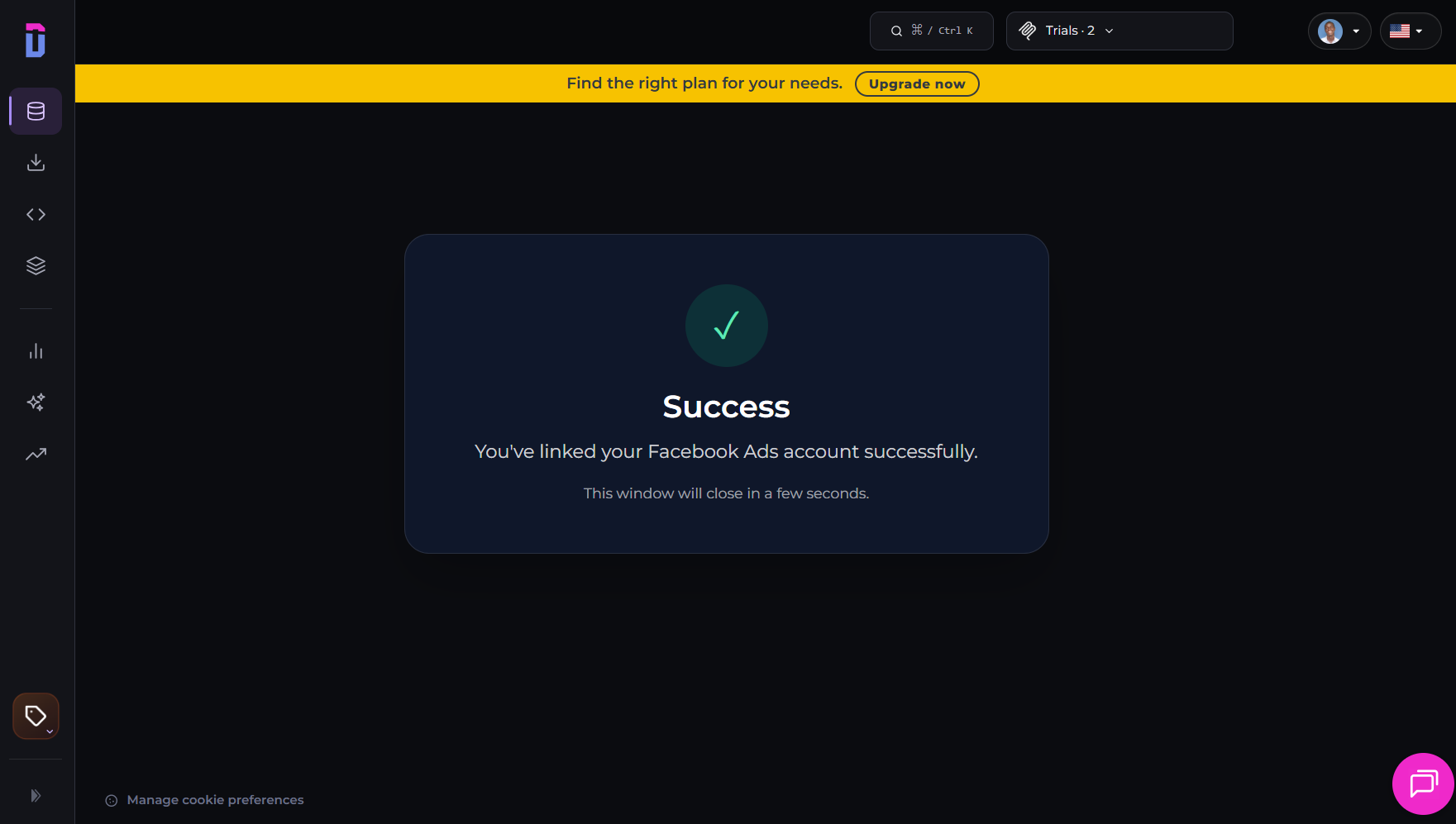
- Select the Meta Ads accounts you want to authorize and complete the connection.
Step 2: Add Dataslayer in ChatGPT
- Open Dataslayer in ChatGPT and click + Install plugin.
- Alternatively, find Dataslayer in the ChatGPT plugin directory and install it with one click.
- When prompted, authorize your Dataslayer account to complete the connection.
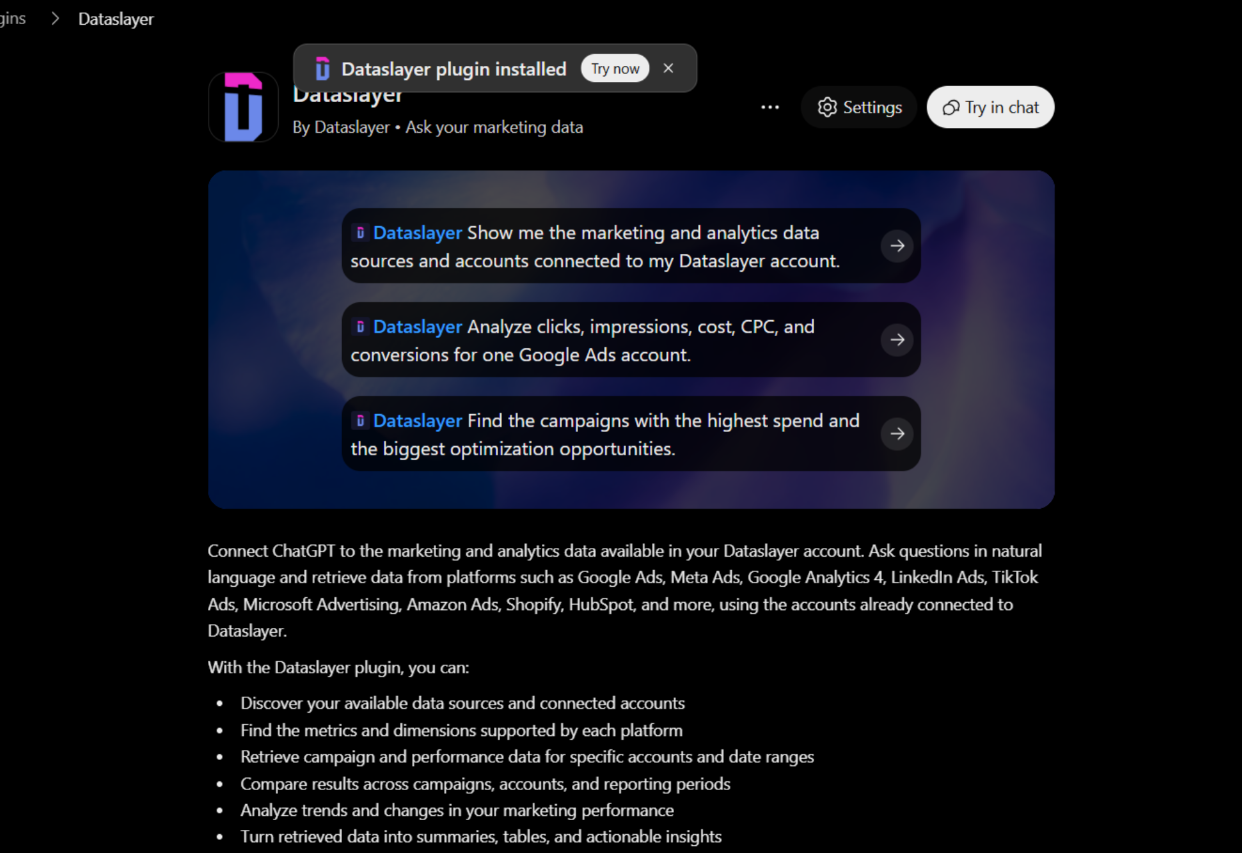
Once connected, all your Dataslayer sources, including Meta Ads, will be available in ChatGPT.
Step 3: Ask ChatGPT about your Meta Ads data
Open a new ChatGPT chat and start talking to your data.
We recommend starting with a simple prompt to test the connection, such as:
“What Meta Ads accounts do I have connected through Dataslayer? List their campaigns and lifetime spend.”
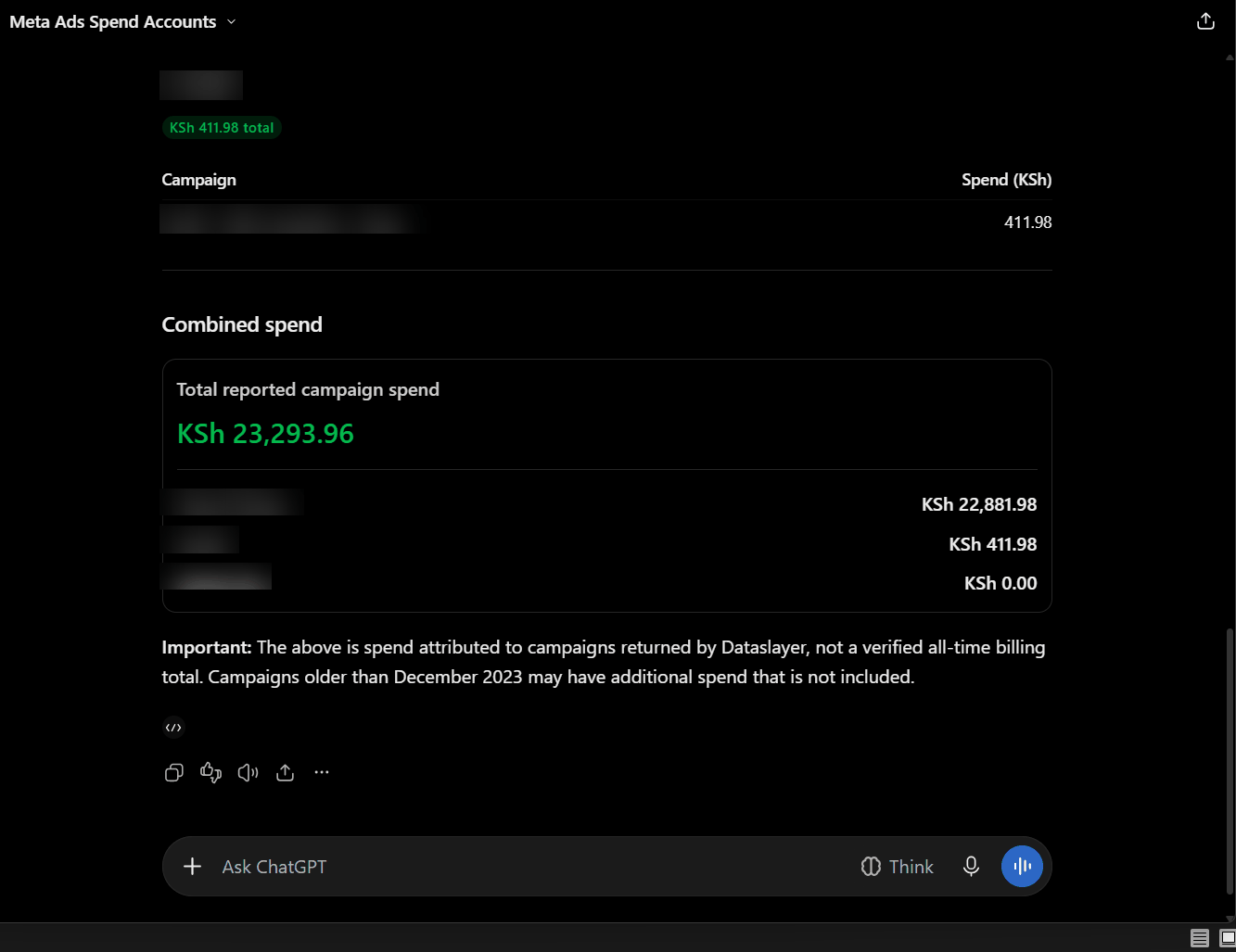
ChatGPT connects to Dataslayer MCP to retrieve the latest available data from your source account and generate a grounded answer based on your actual Meta Ads data. This means you can get up-to-date insights whenever you ask a question, without manually exporting or refreshing reports.
What ChatGPT can see in your Meta Ads account
ChatGPT can access hundreds of Meta Ads metrics and dimensions through Dataslayer, including campaign performance, conversions, creatives, and audience data.
Below are some of the most commonly used fields. For the complete list of available fields, visit Dataslayer's Meta Ads fields documentation.
Spotting Meta Ads reporting issues with ChatGPT
Meta Ads Manager reports campaign results, but top-line figures don't always show what's happening across individual ad sets and placements.
Having Facebook Ads data in ChatGPT makes those breakdowns easier to explore, but you still need to understand what the metrics mean.
Here are five reporting issues worth checking before making campaign decisions:
- "Results" doesn't always mean website purchases. Meta reports results based on the campaign objective and selected performance goal. A Traffic campaign, for example, may count link clicks or landing page views rather than purchases. When measuring sales, check Website purchases and Cost per website purchase separately.
- The learning phase can make early results unstable. Meta's learning phase applies at the ad set level, particularly after creation or significant edits. Performance typically stabilises after around 50 optimisation events within seven days, although this isn't a guaranteed threshold. Avoid judging an ad set solely by its results during this period.
- Campaign averages can hide underperforming ad sets. Campaign-level Cost per Result combines performance across its ad sets. One strong ad set can make the overall campaign look healthy while another spends without generating comparable results. Break down performance by Ad Set name to see where the differences lie.
- Placement performance can vary significantly. The same creative may perform differently across Facebook Feed, Instagram Reels, Stories, and Audience Network. Compare results by Placement and Ad name rather than relying on campaign totals alone.
- Rising frequency doesn't automatically mean creative fatigue. It shows that people are seeing your ads more often, but that alone doesn't confirm performance is declining. Check Frequency alongside CPM and Cost per website purchase over time.
These checks help you look beyond campaign totals and identify where performance needs closer attention. The prompts below show how to apply ChatGPT Meta Ads data analysis to each of these areas.
Prompt ideas for your Meta Ads account
Ready to dig deeper into your Meta Ads performance with ChatGPT? Try these prompts to analyse campaign results, compare ad sets and placements, identify potential performance issues, and uncover insights beyond what you see in Ads Manager.
Just don’t forget to replace the placeholders with your account details and reporting period to get started.
1. Compare campaign performance
Prompt:
Review the performance of all campaigns in [account] over the last 30 days. Show Campaign name, Total Cost, Impressions, Clicks, CPM, and ROAS. Rank campaigns by ROAS, from highest to lowest, and include the total spend for each. Based on the results, identify the best- and worst-performing campaigns and recommend how to optimize budget allocation to improve overall performance.
What you get: A campaign-level comparison of advertising spend, delivery, and return. You can quickly identify which campaigns generate the highest reported conversion value relative to their ad spend and where budget adjustments may be worth considering.
2. Track spend and delivery trends
Prompt:
“Show Date, Total Cost, Impressions, and Clicks for [account] across the last 8 complete weeks. Group the results by week and flag any week when Total Cost increased by more than 20% compared with the previous week. For each flagged week, compare the percentage changes in impressions and clicks with the increase in spend. Calculate the cost per click and CPM, then identify whether advertising efficiency improved or declined. Recommend which increases in spend are worth reviewing.”
What you get: A weekly breakdown of advertising spend, impressions, and clicks, with changes in cost efficiency highlighted. You can see whether higher spending brought more visibility and clicks, or simply increased costs without a comparable improvement in delivery.
3. Compare creative performance
Prompt:
“Compare ads in [account] over the last 30 days using Ad name, Ad creative image, Link clicks, Total Cost, CTR (all), and Return on ad spend (ROAS). Rank the ads by ROAS. Identify the best-performing creatives and explain what they have in common. Based on these findings, suggest new creative concepts, messaging angles, and formats to test in upcoming campaigns.”
What you get: A comparison of individual ads, including their creative assets, click-through performance, spend, and reported return. You can identify which creatives drive stronger results, spot patterns in successful ads, and get ideas for new creatives to test.
4. Compare Facebook and Instagram distribution
Prompt:
“Break down performance by Publisher and Device platform for [account] over the last 30 days. Include Total Cost, Impressions, CPM, Reach, and Frequency to compare delivery and costs across platforms and devices. Identify which combination of publisher and device delivers reach most efficiently, and recommend where to shift budget for a better cost per reach.”
What you get: A breakdown of where your ads appeared across Facebook, Instagram, and other available placements, along with the cost of reaching people on each. You can identify which placements deliver reach at the lowest cost and where shifting budget could improve efficiency.
5. Detect potential creative fatigue
Prompt:
“Analyse my Meta Ads performance over the last 30 days to identify ads that may be experiencing creative fatigue. Break down the results by ad and compare performance over time. Look for: Increasing frequency, Declining Link CTR, Increasing CPM, Increasing cost per website purchase, Declining conversion rate and ROAS. Identify ads showing multiple signs of declining performance, compare their recent results with their earlier performance, and highlight the strongest potential cases of creative fatigue. For each flagged ad, include its campaign and ad set names, the metrics that changed, and the recommended next action (e.g. refresh the creative, test a new angle, or monitor performance further). Do not classify an ad as fatigued based on frequency alone. Distinguish between potential creative fatigue and audience saturation, and explain when the available data is insufficient to draw a conclusion.”
What you get: A time-based view of audience exposure and ad performance. Identify ad sets where audiences are seeing ads more frequently without significant reach growth, and spot potential signs of creative fatigue through declining engagement or rising acquisition costs.
6. Compare audience performance by age and gender
Prompt:
“Compare performance across the available age and gender segments for [account] over the last 30 days. Break down Total Cost, Impressions, Clicks, Reach, and On Facebook Leads for each group, highlighting differences in spending, audience reach, and lead generation. Identify which segments generate leads at the lowest cost, and recommend where to reallocate budget toward the most cost-efficient groups.”
What you get: An audience breakdown showing where your budget is going and which age and gender groups generate more leads through Meta's on-platform forms, along with a recommendation on where to shift spend for more cost-efficient lead generation.
Beyond Meta Ads: cross-channel analysis with TikTok Ads, Google Ads, and Klaviyo
Most businesses don't run their marketing on just one platform. They use multiple advertising channels, analytics tools, and e-commerce platforms to attract visitors, measure performance, and generate sales. But understanding how these activities connect requires looking beyond individual platform reports.
With Dataslayer, you can connect Meta Ads, Google Ads, TikTok Ads, and Klaviyo (along with 65+ other platforms) to ChatGPT and analyse data across these apps in one conversation. Compare paid social spend and efficiency across platforms, and see whether ad activity is moving email-driven revenue.
Common cross-channel analyzes include:
- Paid social efficiency: Line up spend, cost per conversion, and conversions across Meta and TikTok Ads to see which platform delivers cheaper results.
- Channel efficiency: Weigh advertising spend against reported ROAS across Meta and Google Ads.
- Email-attributed revenue: Check whether Meta ad spend moves Klaviyo's revenue per recipient — a sign campaigns are reaching email-driven sales.
- Cross-platform conversions: Match Meta-reported Website purchases against TikTok Ads conversions to spot differences in how each platform counts results.
Use these comparisons to identify patterns and potential tracking issues, rather than reconcile totals. Attribution windows, conversion definitions, currencies, and time zones can differ across platforms.
Here are three prompts you can use to run these widespread analyzes:
1. Compare Meta and TikTok Ads efficiency
Prompt:
“Compare weekly Total Cost for [Meta account] with Cost for [TikTok Ads account] over the last 6 complete weeks, alongside each platform's Conversions and Cost per conversion (CPA). Show each platform's share of combined spend and flag any week where CPA shifts by more than 20% on either platform. Identify which platform is currently delivering cheaper conversions, whether that's changed recently, and recommend how to shift budget between the two if the gap holds.”
What you get: A side-by-side comparison of ad spend and conversion efficiency across Meta and TikTok Ads. You can identify which platform delivers conversions at a lower cost and spot rising costs before putting more budget into either channel.
2. Compare Meta and Google Ads performance
Prompt:
“Compare weekly Total Cost and ROAS for [Meta account] and [Google Ads account] over the last 30 days. Show each platform's share of combined advertising spend and reported ROAS. Identify which platform delivers a higher reported return, how budget allocation compares with performance, and whether there are significant changes over time. Based on the results, suggest opportunities to optimize budget allocation and explain what additional metrics should be considered before making changes.”
What you get: A comparison of advertising spend and reported returns across Meta and Google Ads. You can see which platform delivers better returns on your investment, assess how effectively your budget is allocated, and identify opportunities to improve campaign performance.
3. Compare Meta spend with Klaviyo email revenue
Prompt:
“Compare weekly Total Cost for [Meta account] with Klaviyo's Revenue per recipient and Conversions for [account] over the last 12 complete weeks. Show week-on-week changes in both metrics. Identify periods when email-attributed revenue increased or decreased alongside changes in Meta ad spend. Highlight any notable trends or potential correlations, and suggest what additional data would help determine whether Meta advertising is contributing to changes in email-driven revenue.”
What you get: A view of how Meta ad spend and email-attributed revenue change over the same period. You can identify periods when increases or decreases in ad spend coincide with changes in email revenue and investigate whether the two are related.
Why use Dataslayer for Meta Ads analysis in ChatGPT
Dataslayer's main advantage is that it lets you analyze Meta Ads alongside your other marketing channels in ChatGPT.
One MCP connection gives ChatGPT access to data from 65+ widely used marketing platforms. That’s how you can easily compare ad spend with website traffic and sales in the same conversation, rather than switching between tools.
Here’s why users choose Dataslayer MCP for Meta Ads to ChatGPT integration:
- Manage multiple accounts in one place. Agencies can connect several Meta Ads accounts through the Dataslayer Hub, share connections with their teams, and analyze performance across client accounts. Available account and user limits depend on the plan.
- Use your marketing data across different tools. Dataslayer also connects to Google Sheets, Data Studio, Power BI, BigQuery, and other reporting destinations, depending on your plan. You can keep using the same data across your entire data stack and put ChatGPT on top of it.
- Run AI analysis without opening another tool. Dataslayer's built-in AI Agent lets you analyze marketing data within the platform. You can also use AI Alerts to monitor unusual performance changes and schedule dashboard delivery.
- Get support when you need it. Dataslayer provides 24/5 live chat support across its plans. Pro and Business customers also have access to a dedicated account manager.
Dataslayer MCP access starts at $35/month and is included in every plan, along with your core reporting destination. For unlimited queries, you can purchase MCP subscription as a separate destination.
You can also start with a 15-day free trial without a credit card. See the Dataslayer pricing plans for details.
Other ways to connect Meta Ads to ChatGPT
Several other options let you connect Meta Ads to ChatGPT automatically. The best route depends on whether you need Meta-only access, cross-channel reporting, or a one-off analysis.
- Meta's native Ads MCP server. If you only need Meta Ads, its native MCP server offers a direct connection to your ad account. To set it up in ChatGPT, enable Developer Mode, create a custom MCP app, enter Meta's server URL (https://mcp.facebook.com/ads), select OAuth authentication, and authorize access through Facebook Login for Business. Once connected, you can analyze campaign performance and create or edit campaigns, ad sets, and ads. New campaigns, ad sets, and ads are created paused by default. The integration covers Meta's advertising ecosystem only, and the availability of specific tools may vary by account and permissions.
- Other third-party connectors. When your reporting also involves other platforms, a third-party connector may be more suitable. For example, Porter Metrics and Supermetrics offer a ChatGPT connector that connects Meta Ads with other marketing sources. Their pricing and account limits differ, as shown in the comparison table below.
- Manual CSV export. For a one-off analysis, you may not need a connector at all. Export a report from Ads Manager and upload it to ChatGPT. However, each update requires another export, and comparing Meta Ads with other platforms means combining the files yourself.
- DIY with the Meta Marketing API. If you need more control and have developer support, you can build a custom integration using Meta's Marketing API. This gives you control over how data is retrieved, but your team must manage the developer app, client-account access approvals, token refreshes, and API rate limits.
The table below compares these options by setup, platform coverage, campaign editing, account limits, and pricing.
If you only need Meta Ads, a manual CSV export or Meta's native connector may be enough. If you're looking for a Meta Ads MCP ChatGPT custom connector that also supports cross-channel reporting, compare Dataslayer, Porter, and Supermetrics based on your required capacity and budget.
Tips for consistent Meta Ads reporting in ChatGPT
Once you know how to integrate Meta Ads data into ChatGPT, a few habits can make recurring reports more consistent:
- Save your best prompts. Keep frequently used prompts in a separate document. To send Meta Ads data to ChatGPT regularly, reuse them with the relevant account, campaign, and date range rather than rewriting each request. Use exact Dataslayer field names, such as Total Cost, to get more consistent results.
- Connect each ad account individually. When you add Meta Ads to ChatGPT for multiple accounts, connect each one in the Dataslayer Hub. This makes it easier to select the correct account when running reports, especially when managing several clients.
- Verify results before sharing. Treat the Facebook Ads data integration into ChatGPT as a first pass. Check figures in Ads Manager before including them in client reports or making budget decisions.
Meta Ads limitations and caveats in ChatGPT
Where Meta Ads reporting needs extra care
A few Meta Ads reporting details can affect how you interpret the numbers:
- Recent conversion totals can change. Meta attributes purchases within each ad set's selected attribution window, so recent results may continue to change. Treat the latest figures as provisional.
- Custom events aren't supported. Dataslayer cannot retrieve Meta custom events through its Facebook Ads connector. Custom conversions are supported through custom fields.
- Reach isn't additive across days. Adding daily reach figures can count the same person more than once. Use the reach figure for the full reporting period instead.
- Ad account currencies can differ. Spend is reported in the account's currency. Convert amounts before combining spend across accounts with different currencies.
Access and data handling, and query limits
- Authentication: The Dataslayer MCP connection uses OAuth 2.1. Your Meta credentials aren't shared with ChatGPT, and you can revoke access by disconnecting the integration.
- Data handling: Requested metrics and query results are sent to ChatGPT over an encrypted connection. ChatGPT's own privacy and retention policies apply to conversation data.
- Permissions: Dataslayer can only access Meta Ads accounts your Meta user account is authorized to view. The connection is currently read-only.
- Query limits: Dataslayer MCP access is included in every plan, along with your core destination, with 500 queries/day. For unlimited queries, you can purchase MCP subscription as a separate destination.
Fixing common Meta Ads connection issues in ChatGPT
Troubleshooting Dataslayer ChatGPT Meta Ads usually involves checking authentication, account permissions, query settings, or data availability.
The table below outlines common issues, their causes, and how to resolve them.
If these fixes don't resolve the issue, check the Dataslayer Hub first to confirm that your Meta Ads connection is still active. If the Meta Ads connection works but ChatGPT still can't retrieve data, refresh the Dataslayer ChatGPT authentication or re-install the Dataslayer plugin.
FAQs
What's the easiest way to get Meta Ads data into ChatGPT?
It depends on your needs. Dataslayer is useful for cross-channel analysis or managing multiple ad accounts. Meta's native connector suits users who want to edit campaigns through ChatGPT. For one-off analysis, a manual CSV export may be enough.
How do you connect Meta Ads to ChatGPT with Dataslayer, step by step?
Connect your Meta Ads account in the Dataslayer Hub. Then install the Dataslayer plugin in ChatGPT and authorize your account. Once connected, ask questions in plain language to retrieve data right from Meta's Marketing API.
Does the Meta Ads connection update automatically, or do I need to re-export data?
Dataslayer MCP connector retrieves data directly from Meta's Marketing API whenever you ask a question. Once connected, you don't need to export or upload reports manually.
What does Dataslayer offer that Meta's native connector or a DIY build doesn't?
Meta's native connector covers Meta Ads, so cross-channel analysis requires another connection. Building your own integration means managing token refreshes, API rate limits, and Advanced Access approvals for client accounts. Dataslayer handles all the integration and maintenance hassle and connects Meta Ads with Google Ads, GA4, Shopify, and 65+ other platforms.
Is this an official OpenAI or Meta integration?
No. Dataslayer is a third-party MCP connector, not built or maintained by OpenAI or Meta, but available as an official ChatGPT plugin.
Does ChatGPT store my Meta Ads data?
Your Meta login credentials aren't shared with ChatGPT. Dataslayer securely retrieves the requested metrics and sends the results to ChatGPT to generate answers. ChatGPT's own data handling and retention policies apply to those conversations. You can revoke Dataslayer's access by disconnecting the integration.
How much does it cost to connect Facebook Ads to ChatGPT with Dataslayer MCP?
Dataslayer MCP starts at $35/month and includes a 15-day free trial, no credit card required.
What can you ask ChatGPT once Meta Ads is connected?
You can check weekly spend, rank campaigns by cost per result, find ads spending without purchases, or compare Meta Ads performance with other paid media channels. The Meta Ads prompt examples in this guide show how to run different useful analyzes.
Can I analyze Meta Ads alongside other platforms in ChatGPT?
Yes. Dataslayer connects Meta Ads with 65+ platforms, including Google Ads, GA4, TikTok, Shopify, Bing Ads, YouTube, etc. You can query multiple sources in the same ChatGPT conversation to compare ad performance, website traffic, and revenue without switching tools or managing separate MCP connections.
Does this work for Instagram Ads too?
Yes. Instagram Ads are managed through the same Meta Ads account, so Dataslayer retrieves Instagram placement data through your existing connection. You can analyze Instagram and Facebook placements in the same queries without setting up a separate integration.