


Reach, saves, and engagement all sit inside Instagram's own dashboard, one post at a time. Dataslayer directly connects Instagram Insights to ChatGPT, so instead of digging through tabs to compare posts yourself, you can just talk to your data in real-time and unlock instant insights.
Unlike native Meta Ads MCP integration, Dataslayer gives you access to data from multiple marketing platforms in one place. You can bring in Meta Ads, TikTok Ads, and Klaviyo, plus 65+ other platforms, to see how your organic content compares with paid spend or email performance in the same conversation.
Below, you'll learn how to connect Instagram Insights to ChatGPT in three steps, which metrics and dimensions are available, and which prompts to use to turn raw performance data into actionable content decisions.
Linking Instagram Insights to ChatGPT with Dataslayer MCP
Prerequisites
Before connecting Instagram Insights to ChatGPT, make sure you have:
- A Dataslayer account. Start a free trial if you haven't signed up yet.
- An Instagram Business or Creator account linked to a Facebook Page. You must have admin-level access to the Page. Personal Instagram accounts aren't supported, and simply having access to the Page through your personal Facebook profile isn't sufficient.
- A ChatGPT account. You'll need access to ChatGPT to install the Dataslayer plugin.
Instagram Insights to ChatGPT integration steps
Step 1: Connect Instagram Insights in Dataslayer
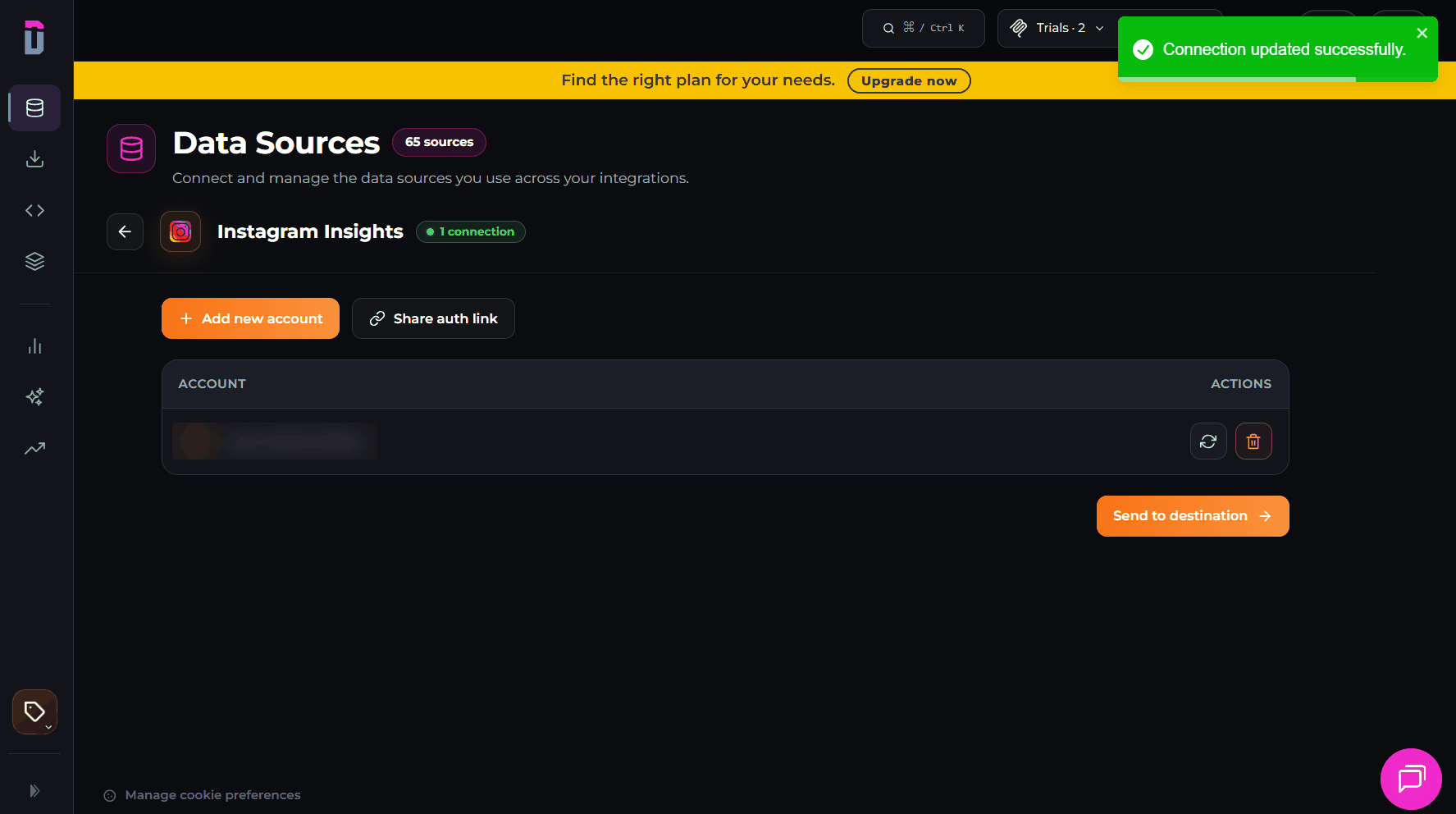
- Log in to Dataslayer and select the Instagram Insights connector.
- Add your account by selecting the required permissions.
Once connected, your Instagram account will appear under Instagram Insights in Dataslayer.
Step 2: Add Dataslayer in ChatGPT
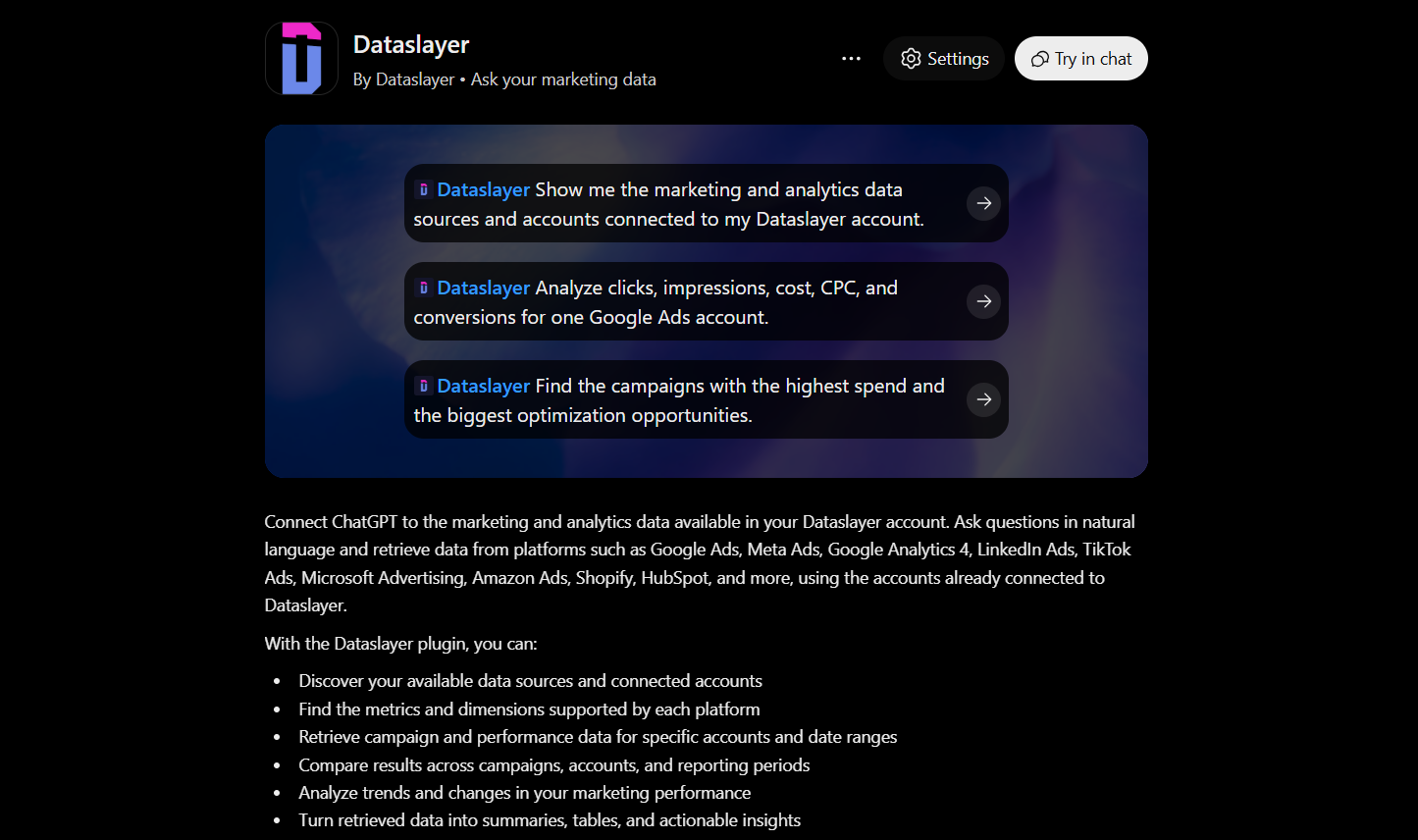
- In ChatGPT, open the Dataslayer plugin link, then click + Install.
- Alternatively, you can find Dataslayer in the ChatGPT plugin directory by name.
- Sign in with the Dataslayer account you used in Step 1 and authorize the connection.
The integration is complete, and now ChatGPT can access data from all your accounts and sources connected in Dataslayer.
Step 3: Ask ChatGPT about your Instagram account
Open a new conversation and enter a simple prompt, like:
"Using the Dataslayer MCP connector, pull Accounts Reached and Media Profile Visits for [your Instagram account] over the last 30 days."
The results show the account name, date range, organic-performance label, and requested metrics.

The Instagram data ChatGPT can work with
ChatGPT can retrieve the Instagram Insights fields Dataslayer exposes, grouped into profile, posts, Reels, carousels, and Stories. You can view all supported Instagram Insights fields here.
Note: Reels and Stories have their own metrics, separate from general post fields. For an Instagram Reels analysis ChatGPT prompt, specify Reels fields to keep the results focused on Reel performance rather than feed posts.
Instagram Insights prompts to try in ChatGPT
Once Instagram is connected, you can ask ChatGPT to do more than simply summarize your metrics. You can compare content formats, identify posts worth repeating, and see what needs to change.
The following Instagram Insights prompts for ChatGPT show you how to use your performance data to make better content decisions.
1. Rank formats by engagement, not total numbers
Prompt:
“Rank my last 30 posts, Reels, and carousels by engagement rate per reach, not raw engagement. Identify which format earns the most engagement relative to the audience it reaches, and recommend which format I should lean into more in my content calendar going forward.”
What you get: A ranking of your content formats based on engagement relative to reach, plus a recommendation on which one to prioritize. This makes it easier to spot formats that perform well with the audience they attract, even when their total reach or engagement is lower.
2. Find posts that get saved but receive fewer likes
Prompt:
“Pull saves and reach for my last 25 posts, then flag anything with a save rate at least double the account average, even if likes and comments are average or below. Recommend which of these flagged posts I should revisit or repost.”
What you get: A list of posts with unusually high save rates, plus a recommendation on which to revisit or repost. These are pieces of content people are bookmarking, even when their likes and comments don't reflect the same level of interest.
3. Identify what is holding back your Reels
Prompt:
“For my last 15 Reels, compare Reel plays to average watch time and group them into 'high plays, low watch time' versus 'low plays, high watch time.' Identify what each group has in common, and recommend what to change in my hooks or pacing based on which group is larger.”
What you get: A comparison showing which Reels attract views and which hold viewers' attention, plus a recommendation on what to adjust. Reels with high plays but low average watch time may be losing viewers quickly. Those with fewer plays but longer watch times may be keeping viewers interested despite reaching a smaller audience.
4. Find the posting times that bring the most reach
Prompt:
“Break down reach by day of week and hour posted for my last 60 days of content, and tell me if my current posting schedule overlaps with when reach is actually highest. Recommend two or three posting times to test next based on the gap between my schedule and the highest-reach windows.”
What you get: A breakdown of the days and hours associated with your highest reach, compared with your current posting schedule, plus specific times to test. You can use the results to adjust your schedule toward windows your audience is already most active in.
5. Spot an engagement drop against your account's usual performance
Prompt:
“Compare this week's engagement rate to my trailing eight-week average. Identify whether the gap is big enough to suggest a meaningful drop or is within normal week-to-week variation, and recommend what to check first if it looks like a real drop.”
What you get: A read on how your current engagement rate stacks up against your recent baseline, plus a starting point if there's a real drop. This helps you identify a potential drop without relying on industry averages that may not reflect your account's audience size or niche.
6. Track audience changes that could affect your content
Prompt:
“Check follower demographics by age and location this quarter against last quarter, and flag any segment that grew or shrank by more than a few percentage points. Recommend whether my content themes, tone, or format should shift to match the audience that's growing.”
What you get: A look at how your audience shifted across the two quarters, plus a recommendation on whether to adjust your content to match. This gives you a clearer picture of who your content is reaching and whether changes in audience composition call for a change in direction.
7. Generate next month's content plan
Prompt:
“Review my posts, Reels, and Stories from the last 30 days. Compare their performance using Media Total Interactions, and use Reel Average Watch Time when evaluating Reels. Identify the three best-performing content formats or themes. Based on these results, create a content plan for next month with specific content ideas, recommended formats, and posting frequency. Explain why each recommendation is worth prioritizing.”
What you get: A content plan with specific ideas, recommended formats, and posting frequency based on your strongest recent content themes and formats.
8. Get a weekly performance summary and action list
Prompt:
“Compare New Followers, Profile Reach, Media Total Interactions, and Reel Total Plays for the last 7 days against the previous 7 days. Flag any metric that changed by more than 15% in either direction. Identify the biggest change, explain what may have driven it, and recommend one action to improve performance this week.”
What you get: A weekly performance summary highlighting significant changes in follower growth, reach, interactions, and Reel plays, with one recommended action based on the biggest shift.
Instagram Insights alongside Meta Ads, TikTok Ads, and Klaviyo
Instagram performance makes more sense when viewed alongside your other marketing channels. Comparing organic content with paid campaigns and email activity can reveal how these channels contribute to reach, traffic, and conversions.
Dataslayer connects Instagram Insights with Meta Ads, TikTok Ads, Klaviyo, and 65+ other platforms, allowing ChatGPT to analyze their data in one conversation.
Here are four useful comparisons you can try:
- Organic-paid reach analysis: Compare organic Reach and Impressions from Instagram Insights with paid Reach, Impressions, and Total Cost from Instagram Ads. See how much visibility comes from organic content and how much you're paying to extend it.
- Bio-link-to-signup analysis: Compare Profile Links Taps with new Subscribed to List signups in Klaviyo over the same period. Identify whether increases in Instagram link activity coincide with email list growth. UTM tracking can help establish which signups came from Instagram.
- Cross-platform reach analysis: Compare Reach, Impressions, and CPM across Meta Ads and TikTok Ads. Identify where you're getting more visibility for your advertising spend and where budget adjustments may improve efficiency.
- Content-to-paid performance analysis: Find Instagram posts with high Media Engagement Rate and compare their creative themes with Meta and TikTok ad performance. Use click-through rate, conversions, and ROAS to identify which content themes also perform well in paid campaigns.
Note: These comparisons reveal patterns rather than exact attribution. Each platform has its own reporting windows, attribution methods, and update schedules. Use consistent date ranges and account for tracking differences when interpreting the results.
You can use these three cross-channel prompts to make the most out of your Instagram Insights analysis:
1. Compare organic reach with Meta Ads spend
Prompt:
“Compare weekly Reach and Impressions from Instagram Insights with weekly Total Cost and Reach from Meta Ads for [Meta account] over the last 6 weeks. Show organic and paid reach side by side. Identify weeks when organic reach grew without a matching rise in ad spend, and recommend whether current ad spend is adding meaningful reach beyond what content alone is already achieving.”
What you get: A side-by-side view of organic and paid reach over time. You can see how much of your total reach is coming from content versus ad spend, and where ad budgets may not be adding much on top of an already strong organic week.
2. Check whether bio-link taps convert to list signups
Prompt:
“Compare Profile Links Taps for [Instagram account] with Subscribed to List (unique) for [Klaviyo account] over the last 90 days. Show the ratio of taps to new signups for each month. Identify months where the gap between taps and signups widens, and recommend what to check on the landing page or signup form first.”
What you get: A monthly comparison of bio-link clicks and the signups Klaviyo actually records. A widening gap can point to a landing page or signup form that's losing visitors before they convert.
3. Decide which platform to boost your top posts on
Prompt:
“Pull my top 5 Instagram posts by Media Reach over the last 45 days, then compare Cost per result for Meta Ads and TikTok Ads for [Meta account] and [TikTok account] over the same period. Identify which platform would likely extend that content's reach most efficiently, and recommend which one to use if I boost those posts.”
What you get: A view of your best-performing organic posts alongside how efficiently each paid platform is currently converting spend into reach. You can use this to decide where to put the budget if you boost that content.
What connecting through Dataslayer gets you
Connecting Instagram Insights to ChatGPT with Dataslayer gives you more than access to your metrics. You can manage multiple accounts, compare data across platforms, and use Instagram reporting alongside the tools your team already works with.
Here’s why users choose Dataslayer MCP for automating the Instagram Insights to ChatGPT integration:
- Manage multiple Instagram accounts from one place. Agencies can connect accounts for different clients, manage team access, and report across accounts without switching between separate logins. The number of accounts you can connect depends on your plan.
- Install the native ChatGPT app in one click. Compared to other available MCP options, you install the Dataslayer app directly from ChatGPT with just one click. No manual MCP configuration required.
- Analyze Instagram alongside other platforms. Dataslayer connects more than 65 data sources through one MCP integration. You can ask ChatGPT about Instagram performance, then compare it with data from other connected platforms in the same conversation.
- Get support when you need it. All plans include 24/5 live chat support. Pro and Business customers also get a dedicated account manager.
- Keep your existing reporting tools. You can also send Instagram data to Google Sheets, Data Studio, Power BI, and BigQuery, depending on your plan and selected destination. This lets you use ChatGPT for analysis without replacing the reporting tools you already rely on.
- Get more from Dataslayer's built-in AI features. The AI Agent, included in every paid plan, lets you analyze connected marketing data directly inside Dataslayer, and AI Alerts can flag unusual changes in your metrics.
There are two ways to use Dataslayer MCP with ChatGPT:
- MCP as your destination: unlimited queries. The best fit if ChatGPT is where you analyze your marketing data.
- Included with any other destination: every plan includes MCP access alongside your core destination, such as Google Sheets or Data Studio, with up to 500 queries per day.
Both options include a 15-day free trial with no credit card required. See Dataslayer’s pricing plans for details.
Other ways to get Instagram Insights into ChatGPT
Dataslayer isn't the only way to connect Instagram Insights to ChatGPT.
If you're comparing how to connect Instagram to ChatGPT, consider how often you need fresh data, whether you plan to analyze Instagram alone, and whether you need to combine it with data from other platforms.
Here are four available Instagram to ChatGPT integration methods to keep in mind:
- Manual exports from Meta Business Suite. Download an Instagram Insights report from Meta Business Suite and upload it to ChatGPT. This works well for one-off analysis and requires no connector setup. However, each new analysis requires another export, and comparing Instagram with other platforms means combining the reports yourself.
- Automate data collection into a spreadsheet. Tools such as Zapier, Make, and n8n can help move Instagram data into a Google Sheet on a schedule, which you can then use with ChatGPT. This avoids repeated manual exports, but requires an automation setup and the data is only as current as the last scheduled update.
- Use another third-party connector. Porter Metrics and Supermetrics offer Instagram reporting alongside data from other platforms. Their available organic Insights fields, pricing, and ChatGPT integration options vary, so check whether your chosen plan supports the data and connection method you need.
- Build a custom integration using the Instagram Graph API. A developer can connect Instagram directly to your preferred workflow and control which data gets retrieved. The trade-off is ongoing maintenance, including Meta app requirements, access tokens, permissions, and API rate limits.
The table below compares these options by setup requirements, ongoing maintenance, and suitability for one-off analysis or recurring reports. Use it to narrow down how to connect Instagram Insights to ChatGPT based on your reporting needs.
For a one-off analysis, downloading a CSV from Meta Business Suite may be enough. If you need recurring reports or want to compare Instagram with other channels, a third-party connector is worth considering.
Dataslayer, Porter Metrics, and Supermetrics are options to compare when looking to connect Instagram Insights to ChatGPT automatically. Check their supported metrics, integration methods, and pricing before choosing.
Instagram Insights limitations to know before you trust the numbers
Instagram Insights has several limitations that affect what ChatGPT for Instagram analytics can retrieve. Understanding them helps you interpret missing data and unexpected numbers without mistaking an API limitation for a connection problem:
- Personal accounts can't connect. Only Instagram Business and Creator accounts expose Insights data through the Graph API. If your account is still personal, you need to convert it before connecting Dataslayer.
- Impressions no longer mean what they used to. In 2025, Meta consolidated Impressions, Plays, and Video Views into a single Views metric, with the change applied retroactively to January 1. Dataslayer still uses some legacy field names, so a field labeled Impressions may not match the figure shown in Instagram today.
- Story data disappears after 24 hours. Once a Story expires, its Insights data is no longer available. Pull Story metrics before that window closes, and expect no data for Stories with fewer than five views.
- Demographic breakdowns need a large enough audience bucket. Instagram won't return an age, gender, or location breakdown unless that specific bucket includes more than 100 people in the period queried, not a flat follower-count minimum. Smaller or newer accounts often get empty demographic fields rather than an error.
- Insights data can take up to 48 hours to update. A query run the morning after publishing may undercount views or reach while Meta processes the data. Allow time for reporting to catch up before comparing performance.
These limitations come from Meta's API, not Dataslayer. They apply to Instagram Insights data integration into ChatGPT regardless of which connector you use.
Instagram Insights in ChatGPT troubleshooting
If you've used Dataslayer to connect Instagram Insights to ChatGPT automatically, a failed query doesn't necessarily mean the integration is broken.
The problem could be an account setting, expired authorization, unavailable data, or a difference in how metrics are reported.
Use this table to identify the likely cause and find the right fix.
Start troubleshooting in Dataslayer. Confirm that your Instagram Insights account is still connected, then check its Facebook Page permissions. If both are in order, review the requested metrics and date range before reconnecting the account.
FAQs
What's the best way to connect Instagram Insights to ChatGPT?
The easiest way is through Dataslayer MCP, which connects Instagram Insights to ChatGPT using a native plugin with one-click installation. Connect your Instagram Business or Creator account in Dataslayer, install the plugin, and authorize access. No coding, manual exports, or custom MCP configuration required.
For occasional analysis, you can also export Instagram reports and upload them to ChatGPT manually.
Is there an official Instagram app for ChatGPT?
No. Meta doesn't offer a dedicated ChatGPT connector for organic Instagram Insights. Dataslayer provides a third-party MCP connection that lets ChatGPT retrieve Insights data from Instagram accounts you authorize through Meta's API.
Why can't I connect my personal Instagram account?
Instagram Insights API access requires a Business or Creator account. This Dataslayer setup uses Facebook Login, so your account must also be linked to a Facebook Page. Meta's separate Instagram Login method, which doesn't require a linked Page, isn't used in this guide.
Does this include Stories data?
Yes, but Story data has a limited retrieval window. Instagram's API makes Story metrics available for approximately 24 hours after publication. Query them while they're available. Once that window closes, ChatGPT can't retrieve the expired data unless it was collected and stored elsewhere beforehand.
Can ChatGPT see follower demographics for any account?
Not always. Meta applies minimum audience-size requirements to demographic insights. If there isn't enough audience data, age, gender, and location breakdowns may be unavailable. This is an API limitation, not necessarily a problem with your Dataslayer connection.
Can I use this to analyze a competitor's Instagram account?
Not through this Instagram Insights connection. Dataslayer retrieves Insights for accounts you've authorized and have permission to access. For competitor analysis, you should use the Instagram Public Data connector.
Can ChatGPT post, reply, or delete anything on my Instagram account?
Not through the Instagram Insights connection, which is built for analysis: it retrieves your metrics but doesn't publish posts, reply to comments, or change your account. Dataslayer MCP already supports campaign management for ad platforms such as Meta Ads, Google Ads, and Klaviyo, and more connectors are being added.
Does this also cover my Instagram ads, or just organic posts?
This guide covers organic Instagram Insights data. To retrieve paid campaign performance, connect Meta Ads separately in Dataslayer. You can then query both organic Instagram performance and paid campaign results in the same ChatGPT conversation.
How much does connecting Instagram Insights to ChatGPT cost?
For unlimited queries, choose MCP as your Dataslayer destination. Every plan, from $35/month, also includes MCP access alongside your core destination, with up to 500 queries per day. Check the current Dataslayer pricing for available options. Dataslayer also offers a 15-day free trial with no credit card required.