



Google Ads reports show campaign performance, but identifying which campaigns, ad groups, or keywords are wasting spend usually means exporting data and analyzing it manually.
A Google Ads ChatGPT integration through Dataslayer MCP lets ChatGPT retrieve your account data and pinpoint wasted spend, conversion issues, or Quality Score problems in a fully automated way. You can also ask ChatGPT to help you optimize current campaigns or propose a plan for new ads based on what’s performing best in your account now.
Beyond Google Ads analysis in ChatGPT, Dataslayer allows you to access GA4, Meta Ads, Microsoft Advertising, and 65+ other platforms in the same conversation, making it easy to line up Google Ads spend against the rest of your advertising and website performance.
This guide walks you through the Dataslayer MCP setup, explains which Google Ads metrics ChatGPT can access, and provides ready-to-use prompts for campaign analysis, keyword optimization, budget allocation, and cross-channel reporting.
Connect Google Ads to ChatGPT with Dataslayer in 3 simple steps
Before you begin: what you'll need
Make sure you have the following prerequisites ready:
- A Dataslayer account. Start a free trial if you haven't signed up yet.
- A Google Ads account. Read-only access is enough for reporting. To edit campaigns from ChatGPT, you’ll need edit access and to authorize campaign management in Dataslayer.
- A ChatGPT account. You'll need to install the native Dataslayer plugin from the ChatGPT directory.
Setting up the Google Ads to ChatGPT connection
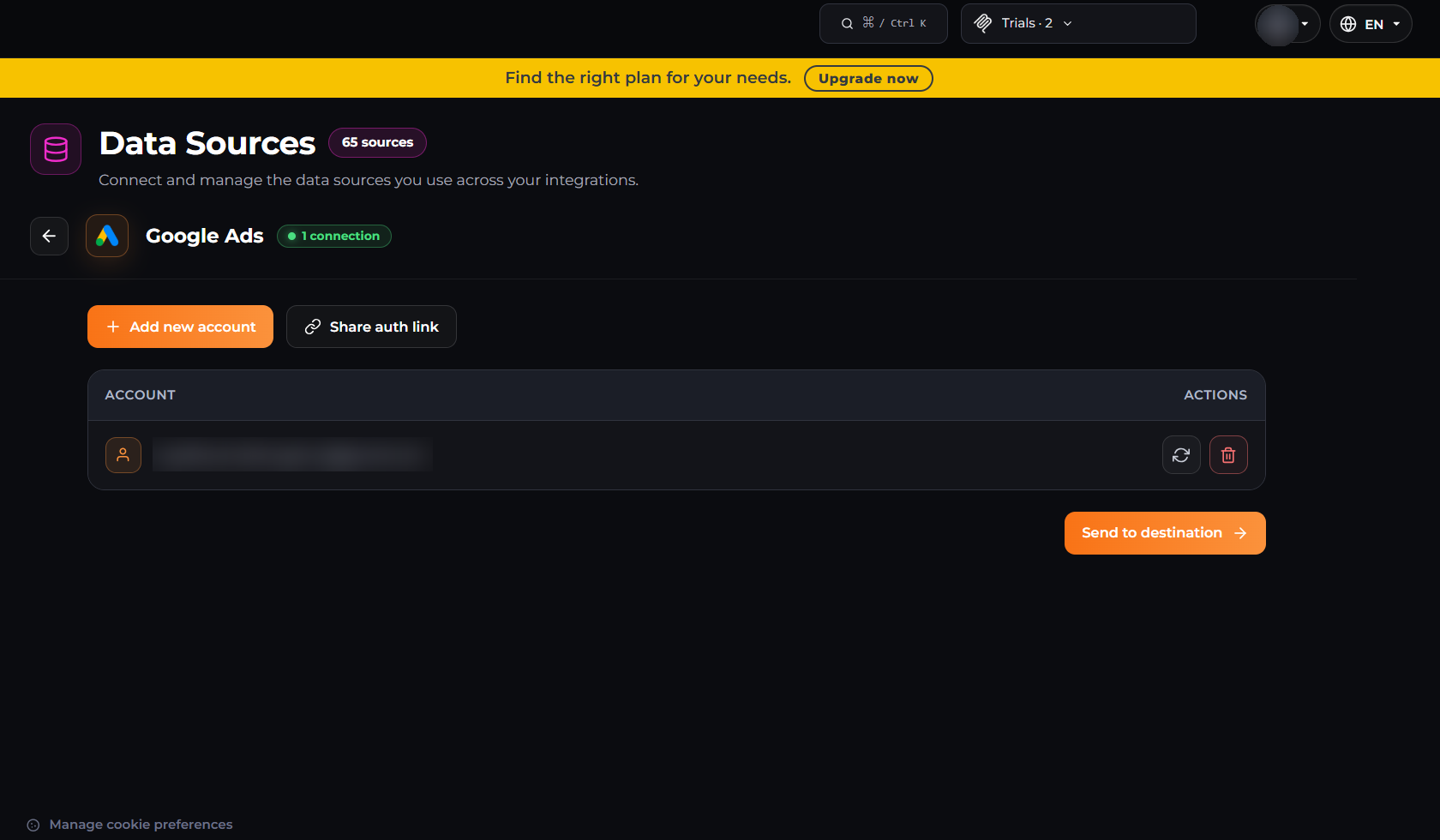
Step 1: Add your Google Ads account in Dataslayer
Log in to Dataslayer, select Google Ads, and add your account.
Step 2: Install the Dataslayer plugin in ChatGPT
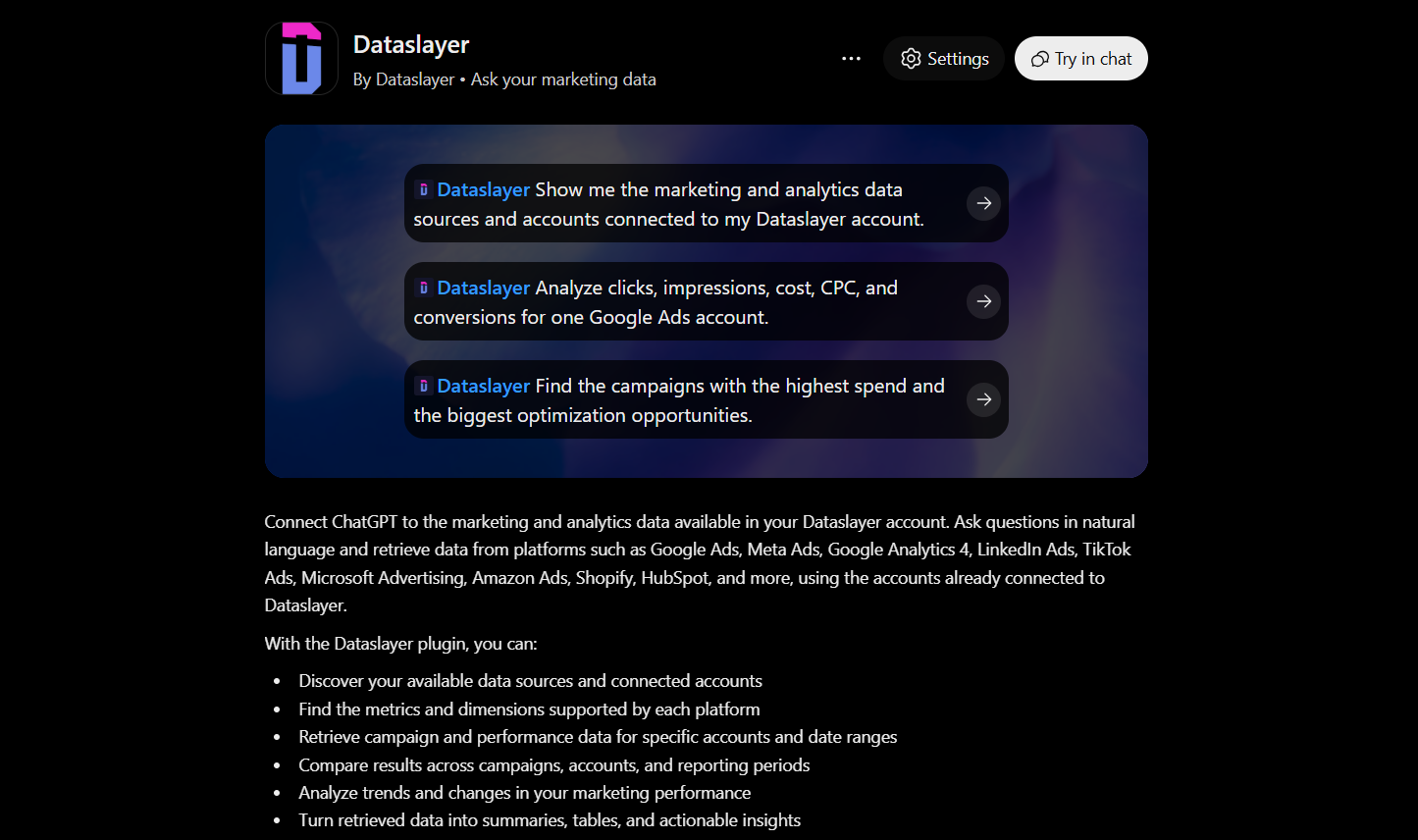
- Open the official Dataslayer plugin in ChatGPT, then click + Install.
- Sign in with the Dataslayer account you used in Step 1 and authorize the connection.
Now ChatGPT can access data from your Google Ads accounts and other data sources connected to Dataslayer.
Step 3: Query your Google Ads data in ChatGPT
That's it! You can now talk to your Google Ads data in ChatGPT using plain-language prompts.
Just open a new conversation and ask something simple, like:
"Using the Dataslayer MCP connector, show total Cost, Impressions, and Clicks for [your Google Ads account] over the last 30 days, broken down by Campaign."
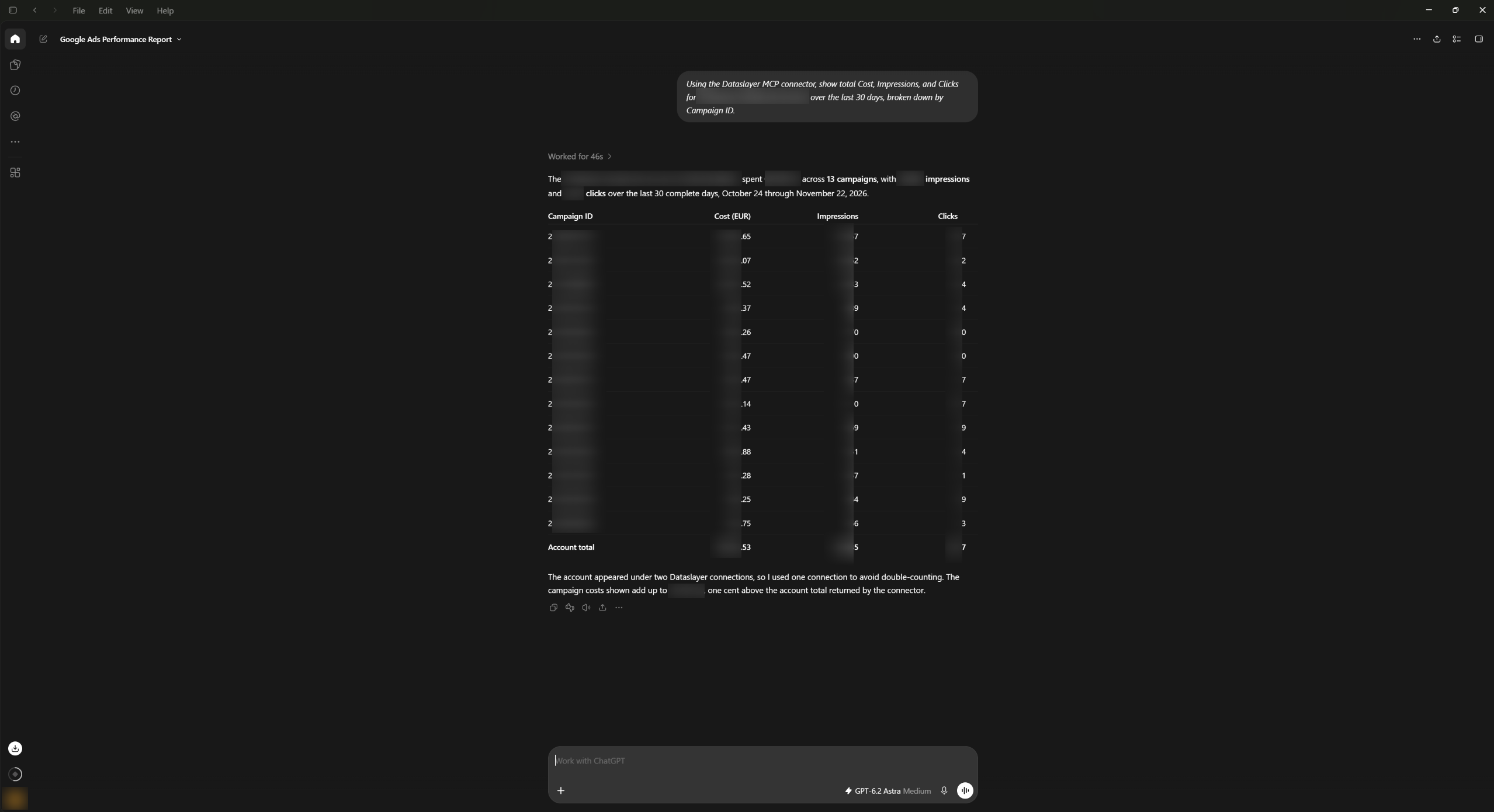
The Google Ads data ChatGPT can pull through Dataslayer
Once your Google Ads account is connected, ChatGPT gets access to over 600 Google Ads metrics and dimensions covering spend, clicks, conversions, Quality Score, auction performance, and much more.
The table below highlights the most commonly used metrics and dimensions in Dataslayer’s Google Ads connector.
For the complete list, see Dataslayer’s Google Ads fields documentation.
ChatGPT Google Ads prompts for campaign, keyword, and budget insights
The following ChatGPT Google Ads prompts can help you compare campaign performance, identify keyword problems, and spot budget inefficiencies. Just replace the account and date placeholders to get analysis and recommendations from your own data.
1. Identify your top- and worst-performing campaigns
Prompt:
“Review all campaigns in [account] over the last 4 weeks. Show Campaign, Cost, Conversions, Cost per conversion, Conversion Value, and Return on ad spend (ROAS). Rank campaigns by ROAS from highest to lowest. Flag campaigns that account for more than 20% of total spend but have a ROAS below 1. Identify the strongest and weakest performers, then recommend how to reallocate the budget to improve overall returns.”
What you get: A campaign ranking that shows where your advertising spend generates returns and where it doesn't. You'll also get recommendations on which campaigns to scale, reduce, or restructure.
2. Track weekly spend and click trends
Prompt:
“Show Date, Cost, Impressions, Clicks, and CPC for [account] across the last 10 weeks, grouped by week. Flag any week where Cost increased by more than 15% without a comparable increase in Clicks. Calculate the percentage change in CPC for each flagged week. Identify the likely causes of rising costs and recommend whether to maintain, reduce, or reallocate spend.”
What you get: A breakdown of weekly spend and click efficiency, highlighting periods when costs rise without a corresponding increase in traffic. You also get recommendations on whether to adjust spending or review competitive pressure.
3. Audit keyword Quality Score issues
Prompt:
“Compare Keyword, Quality Score, Ad relevance, Landing page experience, Cost, and Clicks for [account] over the last 90 days. Identify keywords with a Quality Score below 5 and meaningful spend. Separate them from keywords with insufficient impression data to receive a score. For each underperforming keyword, identify whether ad relevance or landing page experience is the main issue and recommend whether to revise the ad copy, improve the landing page, or reconsider the keyword.”
What you get: A prioritized list of keywords with low Quality scores, the components contributing to those scores, and specific recommendations for improving relevance and landing page experience.
4. Break down performance by device and network
Prompt:
“Break down Cost, Clicks, CTR, and Conversions for [account] by Device and Network over the last 14 days. Calculate Cost per conversion for each combination. Identify which combinations generate conversions at the lowest cost and which spend budget without delivering comparable results. Based on these findings and the account's bidding strategy, recommend adjustments to device bids or targeting to improve conversion efficiency.”
What you get: A breakdown of advertising efficiency across devices and networks. You can identify where conversions cost less and where changes to device bids or targeting may improve performance.
5. Flag budget-limited campaigns
Prompt:
“Pull Campaign, Search Impression Share, Lost search IS due to budget, Lost search IS due to rank, and Cost for [account] over the last 21 days. Identify campaigns losing significant impression share because of budget constraints, not ad rank. Highlight the strongest candidates for additional budget and estimate the potential impact where the available data supports it. Recommend how to prioritize budget increases.”
What you get: A list of campaigns losing search visibility because of limited budgets, separated from those losing visibility due to ad rank. You'll see where additional budget may recover missed opportunities.
6. Run a quick ChatGPT Google Ads audit for negative keyword opportunities
Prompt:
“List Search term, Keyword, Keyword Match Type, Clicks, Cost, and Conversions for [account] over the last 45 days. Identify irrelevant search terms with significant spend and no conversions, excluding terms already covered by negative keywords. Group similar queries, identify the affected campaigns and ad groups, and recommend which terms to exclude using exact or phrase match. Explain why each exclusion is recommended.”
What you get: A list of search terms that may be wasting advertising spend, grouped by theme and matched to the affected campaigns and ad groups. Each recommendation includes a suggested negative keyword match type and the reason for excluding it.
7. Analyze Performance Max campaign performance
Prompt:
“Analyze all Performance Max campaigns in [account] over the last 30 days. Compare Campaign, Cost, Conversions, Conversion Value, Return on ad spend (ROAS), and Cost per conversion. Identify campaigns where spend increased but conversion value or ROAS declined compared with the previous 30 days. Where available, break down performance by Asset Group Name and identify which groups contribute most to conversions and conversion value. Highlight campaigns that may need budget adjustments or further creative investigation, and explain your recommendations based on the available data.”
What you get: A performance overview of your Performance Max campaigns, highlighting rising costs, declining returns, and the asset groups contributing most to results. You'll also get recommendations on where to investigate budget allocation or creative performance.
8. Find new keyword opportunities
Prompt:
“Review the Search term and Keyword data for [account] over the last 90 days. Identify search terms that generated conversions but aren't currently targeted by relevant keywords in the account. Group these opportunities by search intent, and rank them by Conversions, Conversion Value, and Cost per conversion. Suggest new keywords and appropriate match types to test, explaining the reasoning behind each recommendation. Exclude search terms already covered by existing keywords or close variants where identifiable.”
What you get: A list of potential keyword opportunities based on actual search-term and conversion data. You'll discover relevant queries that may deserve dedicated keyword targeting, grouped by search intent and prioritized by their conversion performance.
Comparing Google Ads with GA4, Microsoft Advertising, and Meta Ads in ChatGPT
With Dataslayer MCP, you can go much deeper than basic Google Ads analysis in ChatGPT.
Dataslayer allows you to bring all paid media sources (as well as organic, social media, CRM, e-commerce, and many more) into the same ChatGPT conversation for advanced cross-channel analysis.
For example, Google Ads shows clicks and conversions, while GA4 reveals what visitors do after reaching your website. Microsoft Advertising and Meta Ads provide another view of your paid campaign performance.
You can use this cross-channel dataset to compare:
- Search engine efficiency check: Compare Cost, Clicks, Conversions, and Cost per conversion across Google Ads and Microsoft Advertising. Identify which platform generates more conversions for your advertising spend and where campaign adjustments could improve efficiency.
- Paid channel efficiency check: Look at Cost, Conversion Value, and Return on ad spend (ROAS) across Google Ads and Meta Ads. Identify which channel delivers stronger returns and recommend how to allocate budget based on campaign objectives.
- Website attribution check: Compare Google Ads clicks and conversions with GA4 Sessions and key events attributed to Google Ads traffic. Identify gaps between reported ad activity and website results, then recommend what to check in campaign tagging and conversion tracking.
- Budget allocation check: Bring Cost, Conversions, and Conversion Value from Google Ads, Microsoft Advertising, and Meta Ads into one analysis. Identify where spending generates the strongest returns and recommend how to distribute the next round of advertising budget.
Note: Keep these comparisons directional instead of treating every figure as directly interchangeable. Google Ads, Microsoft Advertising, Meta Ads, and GA4 use different attribution models, conversion windows, reporting schedules, and sometimes currencies and time zones. Align reporting periods and conversion definitions before drawing conclusions from the differences.
Here are a few ready-to-use prompt ideas for effective cross-channel analysis with your Google Ads data in ChatGPT:
1. Compare Google Ads and Microsoft Advertising efficiency
Prompt:
“Compare Cost, Clicks, Conversions, and Cost per conversion for [Google Ads account] and [Microsoft Advertising account] over the last 6 complete weeks. Identify which search engine generates conversions at a lower cost, calculate the difference, and recommend whether to shift additional budget toward the stronger performer.”
What you get: A comparison of advertising costs and conversion efficiency across both search engines, showing which delivers conversions at a lower cost and where additional budget could generate better returns.
2. Benchmark Google Ads against Meta Ads channel efficiency
Prompt:
“Benchmark Cost, Conversions, Cost per conversion, and Return on ad spend (ROAS) for [Google Ads account] and [Meta Ads account] over the last 60 days. Identify which channel generates conversions at a lower cost and which delivers higher returns. Recommend how to reallocate budget between the two.”
What you get: A cross-channel comparison of cost efficiency and return on spend between search and paid social, with a recommendation on how to rebalance the budget split.
3. Check budget allocation across Google Ads, Microsoft Advertising, and Meta Ads
Prompt:
“Combine Cost, Conversions, and Conversion Value for [Google Ads account], [Microsoft Advertising account], and [Meta Ads account] over the last 8 weeks. Calculate Cost per conversion and ROAS, then rank the three channels by performance. Recommend how to reallocate the budget to improve overall returns.”
What you get: A ranking of all three channels by conversion cost and ROAS, showing where your budget delivers the strongest returns and where reallocating spend could improve performance.
What Dataslayer adds to Google Ads reporting in ChatGPT
With Dataslayer, connecting Google Ads to ChatGPT is just the starting point. You also get a central place to manage multiple accounts, analyze cross-channel campaign performance through a single MCP, and send the same data to your existing reporting tools.
Here’s why users choose Dataslayer MCP for Google Ads analysis in ChatGPT:
- Manage every client account from one place: Agencies running multiple Google Ads accounts can connect them all to Dataslayer and give teammates shared access, instead of juggling separate logins per client.
- Feed the same data into the tools you already use: Dataslayer also sends Google Ads data to Google Sheets, Data Studio, Power BI, or BigQuery, so the numbers ChatGPT works from match what's already in your dashboards and warehouse.
- Run analysis inside Dataslayer, not only in ChatGPT: Dataslayer's built-in AI Agent can analyze Google Ads performance directly in the platform, and AI Alerts catch unusual spend or performance shifts and can deliver dashboards to your inbox on a schedule.
- Talk to a person, not just a bot, when something breaks: Dataslayer offers 24/5 live chat on every plan, and Pro and Business customers get a dedicated account manager for setup or troubleshooting help.
There are two ways to use Dataslayer MCP with ChatGPT:
- MCP as your destination: unlimited queries. The best fit if ChatGPT is where you analyze your marketing data.
- Included with any other destination: every plan includes MCP access alongside your core destination, such as Google Sheets or Data Studio, with up to 500 queries per day.
Both options include a 15-day free trial without a credit card. See the Dataslayer pricing plans for full details.
Other ways to connect Google Ads to ChatGPT
You have several options to connect Google Ads data to ChatGPT. They differ in setup requirements and complexity, the level of manual effort, platform coverage, and whether you can modify campaigns or only analyze performance data.
Here are the alternative Google Ads to ChatGPT integration methods you can consider:
- Upload a Google Ads CSV export. For a one-off analysis, download a report from Google Ads and upload it to ChatGPT. This needs no connector or API setup, but you're re-exporting every time the numbers change, and lining Google Ads up against another platform means doing that merge yourself.
- Use a third-party connector. Similar to Dataslayer, third-party connectors such as Porter Metrics, Supermetrics, or Windsor can connect Google Ads to ChatGPT alongside other marketing platforms. Pricing and account limits vary, as shown in the comparison table below.
- Connect Google's official Google Ads API MCP server. Google provides an official MCP server for retrieving and analyzing Google Ads data. To use it in ChatGPT, you need to deploy the server on Google Cloud Run or another hosting service, configure OAuth 2.0, and add its endpoint as a custom connector. Google Ads MCP supports limited actions such as creating assets, uploading videos, and managing labels, with a propose-and-confirm workflow.
- Build a custom integration with the Google Ads API. If you need more control over reporting or campaign management, a developer can build a custom application around the API. This lets you implement the specific data retrieval and campaign-editing functions you need, but your team must manage OAuth, permissions, hosting, API limits, and version updates.
The table below compares these options with Dataslayer by setup requirements, platform coverage, campaign editing capabilities, and pricing.
If you only need Google Ads data, a CSV export or Google's official MCP server may be enough.
For a Google Ads MCP ChatGPT custom connector that supports cross-channel reporting, compare Dataslayer, Porter, and Supermetrics based on platform coverage, interface, and pricing.
Good to know: How to keep Google Ads reporting accurate in ChatGPT
A successful connection between Google Ads and ChatGPT is only the foundation. How you select metrics, date ranges, and campaign segments affects the accuracy of your Google Ads reports.
Consider applying these best practices to keep your Google Ads analysis with ChatGPT consistent and accurate:
- Allow conversions time to register. Recent conversions can take days to be recorded, so compare only completed reporting periods so you're not judging campaigns on partial data.
- Separate campaign types when comparing performance. Search, Display, YouTube, and Shopping campaigns have different cost and conversion patterns. Combining them into one report can hide which campaign types are driving results. Break down performance by Campaign type or Network before comparing similar campaigns.
- Use consistent field names in your prompts. Google Ads Query Language (GAQL) uses technical field names such as metrics.cost_micros, while the Google Ads MCP server for ChatGPT may expose more readable labels such as Cost per conversion. If you're following GAQL ChatGPT examples, don't assume raw GAQL field names will work with every connector, so stick to Dataslayer's documented names to keep each ChatGPT Google Ads audit returning the metrics you expect.
What can skew your Google Ads numbers in ChatGPT?
A handful of Google Ads mechanics can affect how you read ChatGPT's answers:
- Shared budgets blur campaign-level cost. If a campaign draws from a shared budget, Google allocates spend across the pool based on which campaign has the best opportunity that day, so the Cost you see for one campaign reflects that allocation, not a fixed amount you set. Check whether a campaign uses a shared budget before treating its cost in isolation.
- The conversion count setting changes what "conversions" means. Each conversion action is set to count either one conversion per click or every conversion, and Google recommends one for leads and every for sales. Two accounts with identical activity can report very different conversion totals purely because of this setting, so check it before comparing conversion volume across accounts.
- Some conversions are modeled, not observed. Google blends modeled conversions, used for cross-device journeys and other gaps it can't track directly, into the same Conversions column as directly observed ones. ChatGPT reports the combined total, with no way to separate how much of it is modeled.
- Smart Bidding sets bids per auction, not per keyword. With Target CPA, Target ROAS, or Maximize Conversions active, Google sets a bid for each individual auction based on that query's likelihood to convert, so there's no fixed keyword-level bid amount to report the way manual CPC campaigns have. Expect to see outcomes, not the specific bid that produced them.
- Recent conversion data may be incomplete. Google Ads attributes conversions to the date of the ad click, not the date the conversion happened, so recent reports can show full spend before all the resulting conversions arrive, which temporarily inflates CPA. Allow for typical conversion delays before judging performance.
- Some search terms are hidden from reports. Google omits low-volume search queries to protect user privacy, either excluding them from Search Terms report rows or grouping them under categories like "other queries." A negative keyword analysis based only on visible queries won't account for all search activity or spend.
- Quality Score isn't a live auction metric. It's a diagnostic score based on historical impressions for searches matching your keyword. Its component ratings compare your performance with other advertisers whose ads appeared for the same searches over the previous 90 days. Keywords without enough matching search activity show a blank score, not a low one.
- Each Google Ads account has its own fixed currency. Google sets it at creation and it can't be changed later. When analyzing accounts in different currencies, make sure ChatGPT converts Cost and CPA using a specified exchange rate, otherwise the comparison may mix EUR, USD, and GBP without normalizing their values.
- Search terms and keywords aren't interchangeable. A search term is what someone typed into Google; a keyword is what you selected to trigger your ad. Close variant matching allows keywords to trigger ads for searches with similar meanings or intent, even when the wording differs. Treat the Query and Keyword fields separately when identifying irrelevant searches or recommending negative keywords.
Troubleshooting the Google Ads MCP connection in ChatGPT via Dataslayer
When set via Dataslayer, Google Ads connection issues in ChatGPT can stem from expired authorization, account permissions, or query errors.
The table below walks through the most common symptoms, what's behind them, and how to fix each one.
If the problem persists, first check that your Google Ads connection is active in Dataslayer. If it is, refresh Dataslayer's authorization in ChatGPT. Then, try to remove and reconnect the Google Ads connector if the issue continues. Finally, you can always write to our support team for personalized assistance.
FAQs
How to connect a Google Ads account to ChatGPT via Dataslayer MCP?
Google Ads to ChatGPT connection process via Dataslayer MCP takes three simple steps:
- Log in to Dataslayer, select Google Ads, and add your account.
- Then add the Dataslayer plugin from ChatGPT's plugin directory.
- Once it's authorized, type a question in plain language, and ChatGPT queries your Google Ads account directly for the answer.
What's the best way to connect Google Ads to ChatGPT?
The best method depends on what you need. For a quick, no-code setup that lets you analyze Google Ads alongside other marketing platforms, use a third-party MCP connector like Dataslayer.
If you only need Google Ads data and have the technical resources to configure and host your own integration, Google's official Google Ads MCP server is another option. You can also upload a CSV export for a one-time analysis, but the data won't update automatically.
What's the difference between Dataslayer MCP and Google's Google Ads MCP server?
Both use the Model Context Protocol (MCP) to let AI assistants interact with Google Ads data, but they differ in setup and scope.
- Dataslayer MCP is a managed connection to Google Ads and 65+ other marketing and analytics platforms. You connect your accounts through Dataslayer, query data from multiple sources in ChatGPT, and can also create and edit Google Ads campaigns, ad groups, ads, and budgets. It is designed for marketers and agencies who want cross-channel reporting without managing their own MCP server.
- Google's official Google Ads MCP server connects AI assistants directly to the Google Ads API. It focuses on Google Ads and requires technical setup, including authentication and server hosting. It supports data retrieval and a limited set of asset and label management actions.
Choose Dataslayer if you want a fully automated, no-code setup with one managed connection for multiple marketing platforms. Choose Google's server if you need a direct Google Ads API integration and are comfortable managing the infrastructure.
Do I need a Google Ads developer token to use Dataslayer MCP?
No, that's only needed if you build a custom integration from scratch; Google retired the developer-token requirement for its own MCP server back in September 2026, tying access to your Google Cloud project instead. Dataslayer connects through standard OAuth either way, so neither applies on your end.
What are the limitations of Google Ads MCP?
Google Ads MCP makes it easier to retrieve and analyze account data, but it doesn't remove the limitations of the Google Ads API or reporting itself:
- Limited campaign editing: Google's official MCP server supports some asset and label management actions, but it doesn't provide general tools for creating or modifying campaigns, ad groups, ads, budgets, or bids.
- API and field restrictions: The data you can retrieve depends on the Google Ads API resources, metrics, dimensions, and compatibility rules. Not every metric is available for every campaign type.
- Incomplete search-term data: Google may omit low-volume search terms from reports, so an analysis cannot account for every query that triggered an ad.
- Conversion delays: Recent conversion data may be incomplete, which can temporarily make cost per conversion look higher than it will once conversions are recorded.
- Technical setup: Google's server requires configuration of authentication and hosting, so it may be less convenient for non-technical marketing teams.
What happens to my Google Ads data once it reaches ChatGPT?
Dataslayer never passes your Google login to ChatGPT; it fetches the metrics you asked for and hands over just the results, over an encrypted connection, and from there ChatGPT's own data and retention rules take over. You stay in control and can cut the connection anytime. One more thing worth knowing: Dataslayer is a third-party connector, not something Google or OpenAI built, though it's listed as an official ChatGPT plugin.
Does Dataslayer’s Google Ads MCP support Performance Max campaigns?
Yes. You can query Performance Max campaign data through Google Ads MCP and analyze metrics such as Cost, Conversions, Conversion Value, and ROAS. The specific metrics and breakdowns available depend on the fields supported by the Dataslayer’s Google Ads connector and the reporting requirements of each campaign type.
How much does Google Ads MCP for ChatGPT from Dataslayer cost?
For unlimited queries, choose MCP as your Dataslayer destination. Every plan, from $35/month, also includes MCP access alongside your core destination, with up to 500 queries per day. You can start with a 15-day free trial, no credit card required.
Does Google Ads MCP by Dataslayer provide real-time data?
Dataslayer MCP lets ChatGPT request data from your connected Google Ads account when you ask a question, rather than relying on a manually uploaded report. However, this doesn't mean every metric is updated instantly. Data availability depends on Google Ads reporting delays, conversion processing, and the date range you're querying.
Can I connect multiple Google Ads accounts to ChatGPT?
Yes. With Dataslayer, you can connect multiple Google Ads accounts that your Google login is authorized to access. Each account needs to be added in Dataslayer. Once connected, you can select an account in your prompt and analyze its campaign data in ChatGPT.
Can I analyze Google Ads and GA4 data together in ChatGPT?
Yes. Dataslayer MCP lets you access Google Ads, Google Analytics 4, and other connected marketing platforms in the same ChatGPT conversation. For example, you can compare Google Ads clicks and conversions with GA4 sessions and key events to investigate differences between advertising and website performance.
Keep in mind that the platforms may use different attribution models, conversion definitions, and reporting time zones, so their metrics aren't always directly comparable.
Do I need a paid ChatGPT plan to use Google Ads MCP?
For the Dataslayer MCP connection to ChatGPT, you don’t need a paid ChatGPT plan, since Dataslayer is an officially published plugin, accessible to everyone.